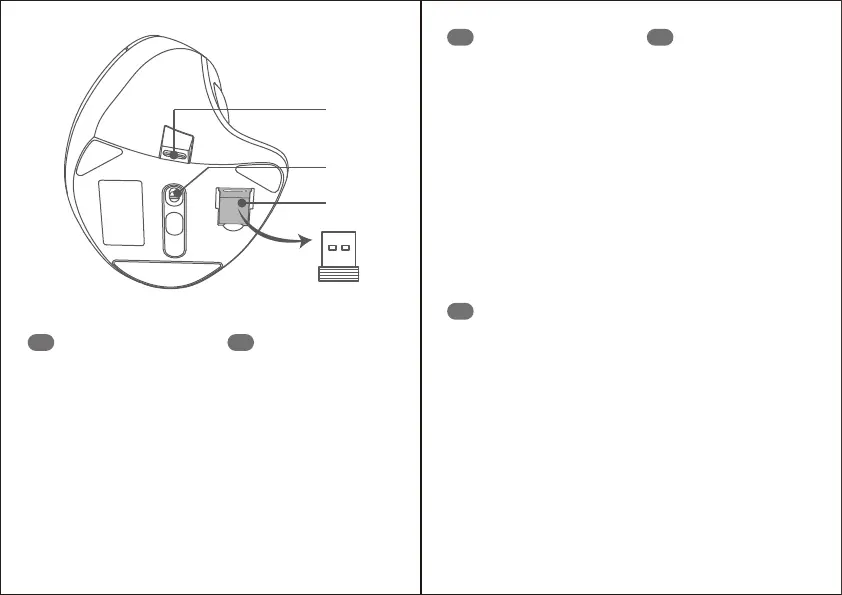
⑧
⑨
⑩
1. Left click button
2. Scroll wheel
3. Right click button
4. LED charging indicator
5. DPI Switch button
6. Forward button
7. Back button
8. Charging port
9. Power switch
10. Receiver
EN
1. Linksklicktaste
2. Scrollrad
3. Rechtsklicktaste
4. LED-Ladeanzeige
5. DPI-Wechseltaste
6. Vorwärtstaste
7. Zurück-Taste
8. Ladeanschluss
9. Netzschalter
10. Empfänger
DE
1. Bouton clic gauche
2. Molette de défilement
3. Bouton clic droit
4. Voyant de charge LED
5. Bouton changement DPI
6. Bouton avancer
7. Bouton reculer
8. Port de chargement
9. Bouton d’alimentation
10. Récepteur
FR
1. Botón de clic izquierdo
2. Rueda de desplazamiento
3. Botón de clic derecho
4. Indicador de carga LED
5. Botón de cambio de DPI
6. Botón de avance
7. Botón de retroceso
8. puerto de carga
9. Interruptor de encendido
10. Receptor
ES
1. Tasto sinistro
2. Rotellina di scorrimento
3. Tasto destro
4. Indicatore di ricarica LED
5. Tasto Interruttore DPI
6. Tasto Avanti
7. Tasto Indietro
8. Porta di ricarica
9. Interruttore di Alimentazione
10. Ricevitore
IT



 To Next Page