System compatible:
Windows7/8/8.1/Mac/Android(Note: for MAC, the side buttons
cannot be used.)
The status of charging can be seen with the following LED
indicators.
Red: The battery is low
Orange: Charging
Off: Charging is complete
Charging method:
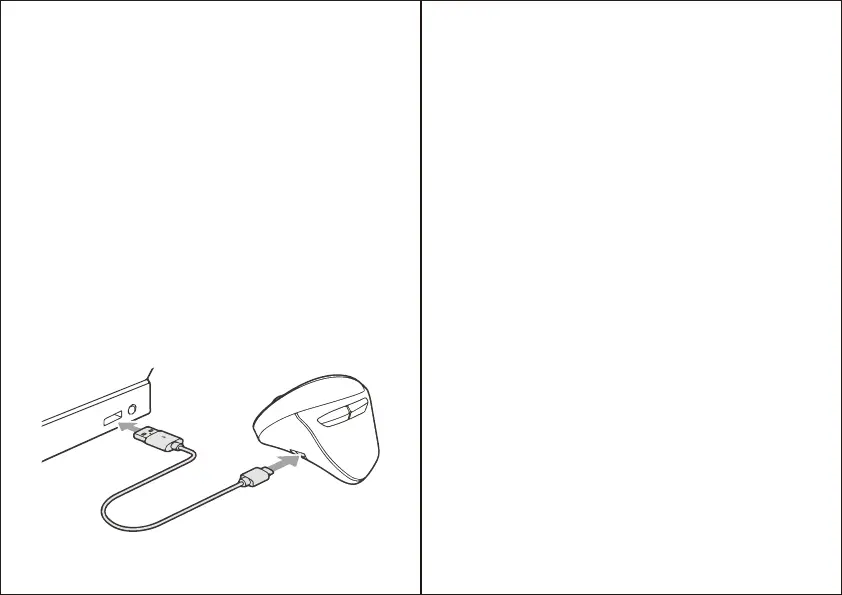
1. Connect the charging cable supplied with the mouse to
charge it. Connect the USB Type-C connector to the charging
port of the mouse and the USB A connector to a USB port
such as a PC as shown below.
2. Charging is complete when the LED turns off. Please unplug
the charging Cable.
(Charging time is about 3 to 4 hours)
Tips:
Even if the power switch is turned on, if the mouse has not been
used for a period of time, the mouse will go to sleep. Click the
mouse to return to working state.
(There may be a slight delay in the initial recovery)
Working current:
DPI:
Receive distance:
Battery capacity:
Charging Cable:
<3mA
800/1200/1600/2000/2400DPI
<10m
300mAH
Type-C
Product Specifications:
EN EN



 To Next Page