Product Specification
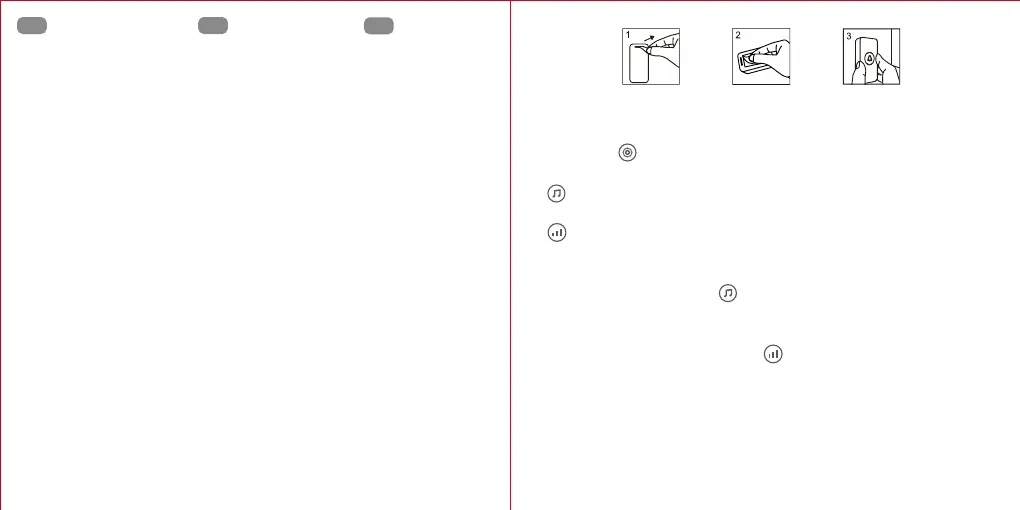
Transmitter installation
①
②
③
Bouton de configuration
Bouton de musique
Réglage du volume
Receiver working voltage:
Power consumption:
Operating Range:
Operating temperature:
RF penetration range:
AC100-240V 50/60Hz
1W
400M+/1300ft+(in the open air)
-10℃~50℃ (14℉-122℉)
4 walls can be penetrated
FR
①
②
③
Pulsante Setup
Pulsante Musica
Regolazione Volume
IT
①
②
③
Botón de configuración
Botón de música
Ajuste de volumen
ES
1. Receiver
Battery:
Working Current:
Operating temperature:
Waterproof Level:
1. Remove the battery isolation strip on the back of the transmitter before use.
2. Use the enclosed double-sided tape to stick the transmitter to the wall or door.
Instructions
1. Press button “ ” to choose from working modes: Flashing only, Ringing only,
Flashing & Ringing
2. “ ” To select, press the music button once for each chime to select your music,
total 38 chimes.
3. “ ” Press the button once each time to adjust the 4 volume levels. (Low - High)
4. Pairing Method
a. Choose your favourite melody.
b. Long press the music button “ ” (at least 3 seconds) on the receiver until a
‘dingdong’ tone is heard.
c. Press the transmitter button once, the receiver will play the chosen melody.
5. Press and hold the Volume Adjustment “ ” for at least 5 seconds until a
‘dingdong, dingdong’ tone is heard. (This will clear the pairing)
6. There is a ‘dingdong’ tone when the receiver is plugged in for the first time. This
indicates the power is on.
7. Indicator light:the light will flash while the chime is playing on the receiver. The
transmitter indicator light will be lit up when pressing the bellpush.
DC 3V (CR2032 x1)
30mA
-10℃~50℃
IP65
2. Transmitter
EN EN


 To Next Page