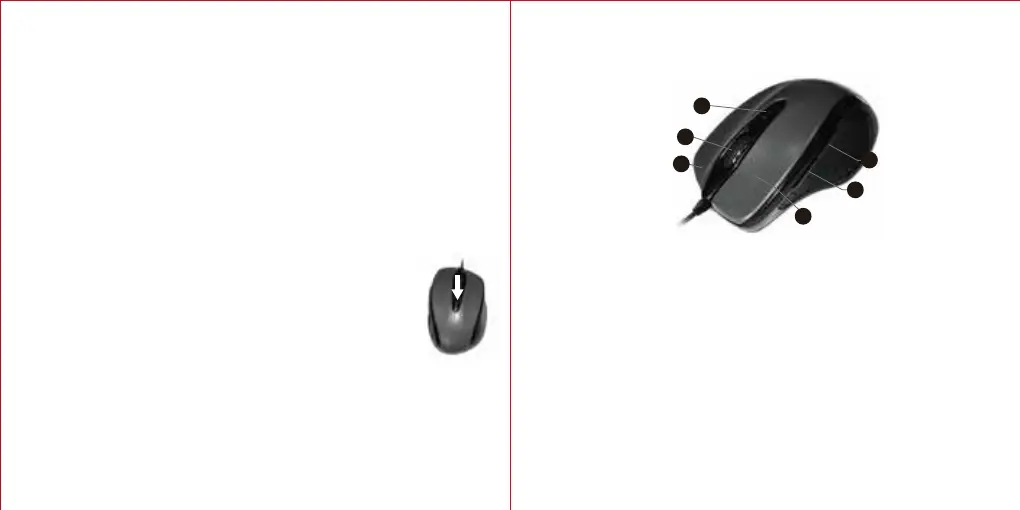
DPI Switch
Package Contents
1 x UM013 Wired Mouse
1 x User Manual
1 x Warranty Card
System Requirements
Hardware
• PC with a Pentium processor or equivalent AMD processors
• USB 2.0
Operating System
• Windows 2000, 2003, XP, Vista, Win7, Win8, Win8.1, Win10
Note: The scroll wheel only works under the operating systems listed above. If
you use the mouse under a different operating system, the mouse may either not
work or lose its enhanced features.
DPI Switch
The mouse supports 1000 DPI, 2000 DPI. To switch to either mode, press the
DPI button.
• The default mode is 1000 DPI.
FAQ
What should I do if the mouse does not work?
1. Make sure the USB connector is firmly inserted into the USB port of your
computer.
2. Click the DPI button on the top of the mouse once to switch from 1000 DPI to
1600 DPI.
EN
4
3
2
1
5
6
Scrollrad
DPI-Umschalttaste
Rechtsklick-Taste
Rückwärts-Taste
Vorwärts-Taste
Linksklick-Taste
Technische Spezifikationen
Tastenanzahl: 6 Tasten
Auflösung: 1000/2000DPI
Empfängerschnittstelle: USB-Version 2.0
Betriebsspannung: 5V
Betriebsstrom: <50 mA
Produktlayout
DE



 To Next Page