POS. 2
POS. 1
POS. 2
Screw self-threading
3,5x20 TPS/CR
POS. 1
A
POS. 3
Screw self-threading
3,5x13 TC/CR
DETTAGLIO A
SCALA 1 : 1
3-4mm
STEP 1
- Check the right position of the holes to fix the cover
POS.1 and the points to fix front stop POS.2
(View DRAWING 1)
20825 BARLASSINA (MI) - via Machiavelli, 16
www.tecnoinoxsrl.it - info@tecnoinoxsrl.it
ASSEMBLY INSTRUCTIONS P-ONE
STEP 2
- Fix on both side of cabinet the front stop in position
POS.2 with screws self-threading 3,5x20 TPS/CR
STEP 3
- Insert the cover using holes in position POS.1
STEP 4
- Screw until a space of 3-4mm n°4 screws self-threading
3,5x13 TC/CR and n°4 washers M4 using holes in POS.3 (View
DRAWING 1)

 Need help?
 General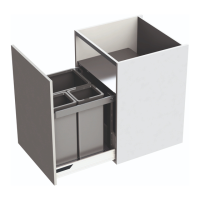

 To Next Page