TECTUS Transponder Technology GmbH, Eurotec-Ring 39, 47445 Moers 7 Germany
MultiPen User Manual V.1.2 ©TECTUS Page 4 / 10
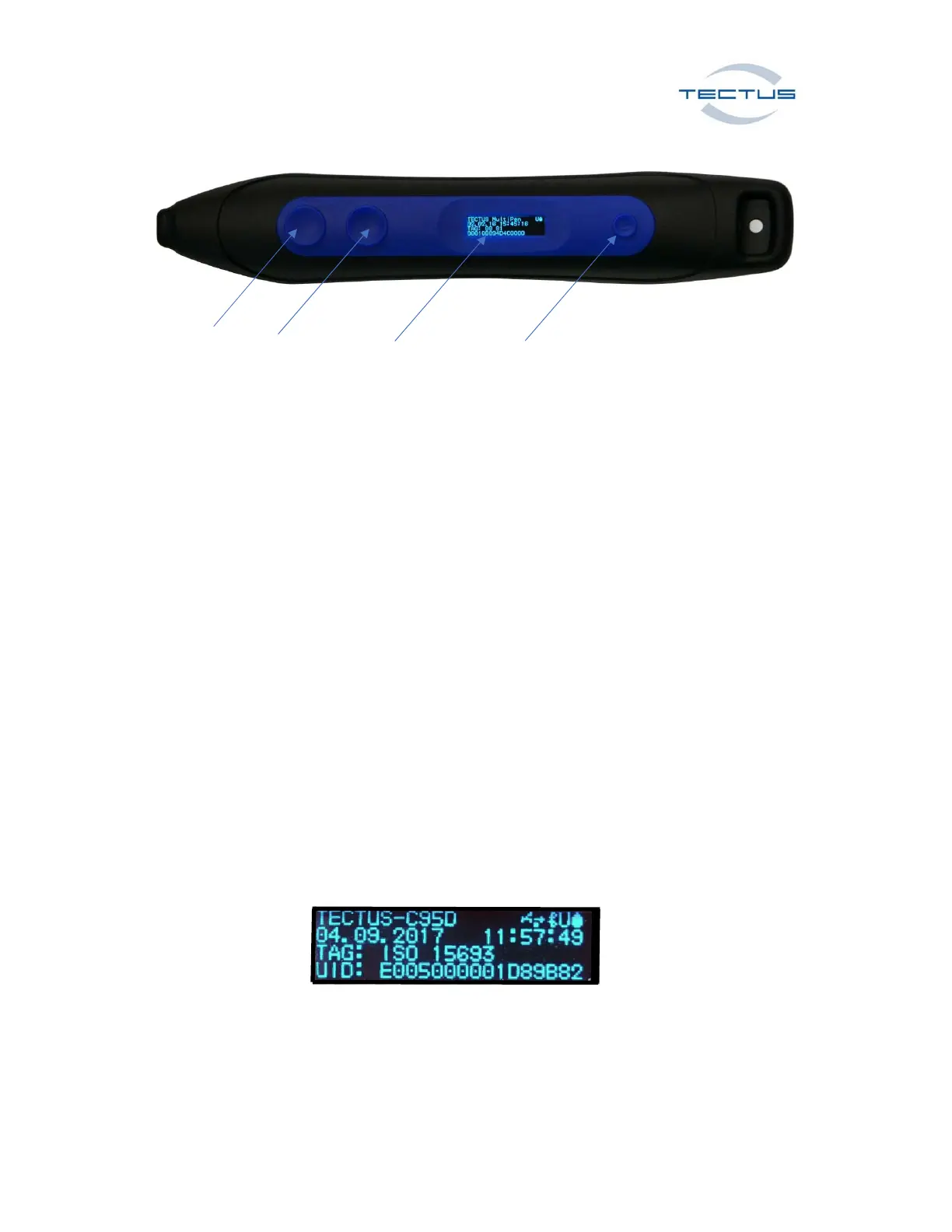
Button 1 Button 2 OLED Display Button 3
Button 1 Transponder Read
Button 2 Bluetooth™ ON / Virtual keyboard ON/OFF by using IOS devices in HID mode
Button 3 ON / OFF
Universal Operating modes (BLUETOOTH™ or USB)
USB CDC connection for PC/Laptop, Smartphone (ANDROID™, WINDOWS™)
USB HID connection for PC/Laptop, Smartphone (ANDROID™, WINDOWS™,)
BLUETOOTH™ HID for PC/Laptop, Smartphone (ANDROID™, WINDOWS™, IOS)
BLUETOOTH™ SPP connection for PC/Laptop, Smartphone (ANDROID™, PC/Laptop, WINDOWS™ )
Default mode for Bluetooth™ is HID.
OLED Display
Bluetooth device name
Date & Time
Tag type
UID
Status for USB ,Bluetooth
memory and battery



 To Next Page