EasyManua.ls Logo

teenage engineering oplab - User Manual

teenage engineering oplab
5 pages
Print Icon
To Next Page IconTo Next Page
Loading...
8/5/2019 teenage engineering – oplab module guide
https://teenage.engineering/guides/op-z/modules/oplab 1/5
oplab
module
connectivity
module for OP-Z
user guide
ガイド
v.1.0
notice
.
read
this
rst
.
never connect the 3.5mm plugs coming from module
connectors to any mic or line-level audio equipment
such as inputs or outputs on sound cards, mixers and
synthesizers. for example:
phantom power coming from a mic-input on a sound
cards could destroy the ports on the oplab module.
the voltage coming from oplab moudule's cv or gate
could damage a line input or line output stage.
FCC ID: Z23012AIC: 9915A-012A
this device complies with part 15 of the fcc rules.
operation is subject to the following two conditions: (1)
this device may not cause harmful interference, and (2)
this device must accept any interference received,
including interference that may cause undesired
operation.this device complies with industry canada
licence-exempt rss standard(s). operation is subject to
the following two conditions: (1) this device may not
cause interference, and (2) this device must accept any
interference, including interference that may cause
undesired operation of the device.
warranty: the oplab module is fully factory tested and
comes with a 12 month (from purchase date) warranty.
this does not include malfunction due to misuse of the
device, such as being dropped, crushed or use in an
application of inappropriate voltages to the device
s
connectors or improperly designed or executed
modifications.store small parts out of the reach of
children and infants. if accidentally swallowed, contact a
doctor immediately. make sure to avoid touching
sensitive components and be aware of static discharge
(esd).
the general guarantee policy does not cover esd
damaged products due to improper handling. the
warranty does not cover shipping charges. make sure
to read the terms & conditions on our website.
what
'
s
in
the
box
check that the following items are
included when you open the box
oplab module. user's guide. midi adapter cable.
Question and Answer IconNeed help?

Do you have a question about the teenage engineering oplab and is the answer not in the manual?

Summary

Notice: Read This First

Interface and Connections

Modes for Out;In

Selects outgoing signals (midi, trig, PO) and incoming signals (midi, trig).

Module Connectors

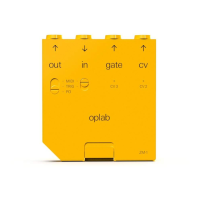
Details the 3X CV/Gate, MIDI In/Out, and TRG/PO ports on the module.

Voltage Ratings

Specifies voltage ranges for CV, Gate, MIDI, and TRG outputs and inputs.

Lock Switch Function

Explains the function of the lock switch for module activation and securing.

Installing the Oplab Module

Using the Oplab Module

CV Output

Connects CV out to control inputs like pitch or auxiliary CV for synths.

Gate Output

Connects gate out to trigger inputs for sequencers or envelopes.

Input Functions

MIDI Input

Controls the OP-Z via standard 3.5mm MIDI input, using a stereo cable.

Trigger Input

Used for single-stepping OP-Z sequencer tracks with a 0-10V pulse.

Output Functions

MIDI Output

Outputs MIDI data from all OP-Z tracks via 3.5mm MIDI out.

Trigger Output

Emits short pulses for triggering drum synths or arpeggiators.

Pocket Operator Output

Enables step outputting trig pulses to sync Pocket Operators.

Connector Overview

teenage engineering oplab Specifications

General IconGeneral
CategoryControl Unit
Manufacturerteenage engineering
ConnectivityUSB, MIDI, CV/Gate
CompatibilityMIDI devices
Power SupplyUSB powered
ModelOP-Lab