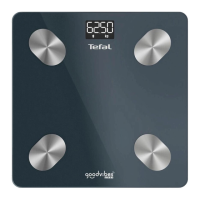
The device is a smart body composition scale, designed to measure various body metrics and provide data analysis through a connected application. It is branded as "Tefal Goodvibes Life+" and has a model number BM962x.
Function Description:
The primary function of this device is to measure body composition, including body fat, muscle mass, and other relevant metrics, using Bioelectrical Impedance Analysis (BIA) technology. It connects via Bluetooth to a smartphone application (Tefal Goodvibes App) to display, track, and analyze these measurements over time. The scale is designed for regular home use to help users monitor their health and fitness progress.
Important Technical Specifications:
- Measurement Units: The scale supports various units for weight (kg, st.lb, st) and height (cm, inch), which can be set within the companion app.
- Weight Capacity: It has a minimum weight capacity of 8 kg and a maximum capacity of 180 kg.
- Power Source: The device is powered by 3 AAA batteries.
- Connectivity: It utilizes Bluetooth technology to connect with the smartphone application.
- Display: The scale features a digital display that shows weight measurements.
- Automatic On/Off: The scale has an automatic on/off function for convenience and battery saving.
- Measurement Frequency: For accurate and consistent results, it is recommended to measure twice a week, 15 minutes after waking up and under the same conditions.
Usage Features:
- App Integration: The scale is designed to be used in conjunction with the "Tefal Goodvibes" application, available for download on iOS (from iOS 8) and Android (from Android™ 5) devices. The app allows users to connect the scale, set up their profile, choose measurement units, and view detailed data analysis.
- Profile Management: Users can register their profile within the app, which helps in tracking individual progress and ensuring accurate data interpretation.
- Measurement Process: To use the scale, users need to launch the app, step onto the scale barefoot, and wait until all data is displayed in the app before stepping off. The scale will automatically turn on when stepped on and transmit data to the connected app.
- Consistent Measurement Conditions: For optimal accuracy, it is advised to measure at the same time of day, preferably twice a week, 15 minutes after waking up, and under consistent conditions. Avoid measuring immediately after strenuous exercise, a shower or sauna, heavy alcohol consumption, or during pregnancy or fever, as these can affect accuracy.
- Barefoot Measurement: Always step onto the scale barefoot to ensure proper contact for Bioelectrical Impedance Analysis. Wearing socks or dirty feet can affect the measurement accuracy.
- Pacemaker Warning: The device explicitly states "NO PACEMAKER" as a warning, indicating that individuals with pacemakers or other medical implants should not use the scale due to the electrical currents involved in BIA.
- Error Indicators: The scale display may show an "EEr" message, indicating an error. The manual also illustrates other error symbols, such as "Lo" for low battery.
Maintenance Features:
- Battery Replacement: The scale uses 3 AAA batteries. When the battery is low, a "Lo" indicator will appear on the display. It is important to replace all three batteries simultaneously with new, non-rechargeable alkaline batteries of the same type. Ensure correct polarity when inserting batteries.
- Battery Disposal: Old batteries should be removed from the device and disposed of in an appropriate manner. Do not mix new and used batteries or different types of batteries.
- Cleaning: The manual does not provide specific cleaning instructions but generally, electronic devices should be kept clean and dry. Avoid using abrasive cleaners or submerging the device in water.
- Storage: Store the device in a dry place, away from extreme temperatures and direct sunlight, to prolong its lifespan.
- Troubleshooting: If the scale does not turn on or displays an error, check the battery installation and ensure the batteries are not depleted. If issues persist, refer to the manual for further troubleshooting or contact customer support.
- Software Updates: As the scale relies on an app, ensure the app is regularly updated to benefit from the latest features and bug fixes.
- Medical Advice: The scale is intended for general health and fitness monitoring and should not be used to diagnose or treat any medical condition. All data is for reference only and cannot be a substitute for advice from a licensed healthcare professional. If you have any medical concerns, consult a professional.

 Need help?






 To Next Page
 General