This document describes the TEFCOLD Refrigerated Multideck, a vertical display chiller available in models MD702, MD1002, MD1402, and MD1902. It serves as a user manual, providing instructions for operation, maintenance, and disposal in multiple languages including English, Danish, Swedish, Finnish, French, German, Spanish, Portuguese, Polish, and Czech.
Function Description:
The TEFCOLD Refrigerated Multideck is designed for the display and cooling of products, typically in a self-service environment. It operates as a hermetically sealed cooling system, ensuring efficient and consistent refrigeration. The unit features an open front design, allowing easy access to products for customers. It is equipped with an internal light for product visibility and a thermostat for temperature control. The cabinet automatically defrosts at pre-set intervals, with an option for manual defrosting if needed.
Important Technical Specifications:
- Refrigerant: The unit uses the energy-efficient and ozone-friendly refrigerants R600a/R290. It is crucial to note that R600a/R290 are flammable gases, requiring good ventilation around the appliance and careful handling during transport and installation to prevent damage to the cooling circuit.
- Electrical Connection: The cabinet is designed for connection to a 220-240 V/50 Hz power supply. It must be connected to an earthed wall socket. Any replacement of the connection cable should be performed by a qualified electrician or refrigeration technician.
- Construction: The construction does not use asbestos or CFCs (chlorofluorocarbons). The compressor oil does not contain PCBs (polychlorinated biphenyls).
- Temperature Control: The thermostat is pre-programmed, and in most cases, no adjustment is necessary. The display shows the current temperature inside the cabinet.
- Error Codes: An 'E1' error code indicates a defective thermostat sensor. In such cases, the cabinet will attempt to maintain the set temperature until repaired.
Usage Features:
- Unpacking and Installation: The cabinet is delivered packed on a wooden pallet. External surfaces are protected by a film that must be removed before installation. It should be placed in a dry and well-ventilated room, away from heat sources and direct sunlight. If the cabinet has been laid down during transport or installation, it is recommended to wait at least 2 hours before starting it.
- Start-up: Before initial use, the cabinet should be cleaned.
- Thermostat Operation:
- Displaying Set Temperature: Press the "up arrow" button briefly to show the set temperature. The display will return to normal reading after 10 seconds.
- Setting New Temperature: Press the "up arrow" button continuously until the set temperature is displayed. Use the "up arrow" to increase the temperature and the "down arrow" to decrease it. Press the "P" button to save the new setting; the display will flash the new value and then return to normal.
- Keypad Lock: The keypad can be locked/unlocked by simultaneously pressing the "P" and "up arrow" buttons for 5 seconds.
- Power On/Off: The cabinet can be turned on or off using the "U" button (when the keypad is unlocked).
- Internal Light: The internal light can be turned on or off using the "P" button (when the keypad is unlocked).
- Defrosting: The cabinet automatically defrosts. For manual defrosting, press the "up arrow" button continuously for more than 5 seconds. This will initiate a manual defrost cycle, after which the unit will return to normal operation. Defrosted water drains into a container in the compressor compartment and evaporates.
Maintenance Features:
- Cleaning:
- Always switch off the cooler at the socket before cleaning.
- Periodically clean the external and internal surfaces with a mild soap solution and wipe dry.
- External surfaces can be maintained using steel oil.
- DO NOT use cleansers containing chlorine or other harsh chemicals, as these can damage stainless steel surfaces and the internal cooling system.
- Clean the condenser and compressor compartment with a vacuum cleaner and a stiff brush.
- DO NOT hose down the compressor compartment with water to avoid short circuits and damage to electrical parts.
- Service: The cooling system is hermetically sealed and requires no supervision, only cleaning. If the cabinet fails to cool, first check for a power cut. If the cause of failure cannot be identified, contact your supplier, providing the model and serial number (found on the rating label inside the cabinet, top right-hand side).
- Disposal: The cabinet must be disposed of in an environmentally correct manner, adhering to existing regulations and any special requirements or conditions.

 Need help?
 General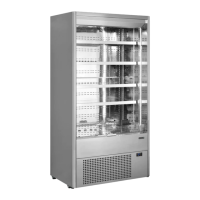

 To Next Page