• To correct a numeric entry while in the NUM mode, hit the
CHANGE/ENTER key twice. This will return number entry to
the beginning of a new number.
• To return the calibrator output to 0° while in the OPR mode, hit
the CLEAR key.
• The unit can be used as a convenient °F to °C or °C to °F cal-
culator.
For example, to convert 77°F to a Celsius reading, go to the CALIB OPR
mode, enter the reading to be converted, and change scale.
eg.°F
CHANGE/ENTER
77
CHANGE/ENTER
°C (Display reads 25°C)
7. CALIBRATOR MODE OPERATION (RTD, Thermistor & Ohms)
Set-Up:
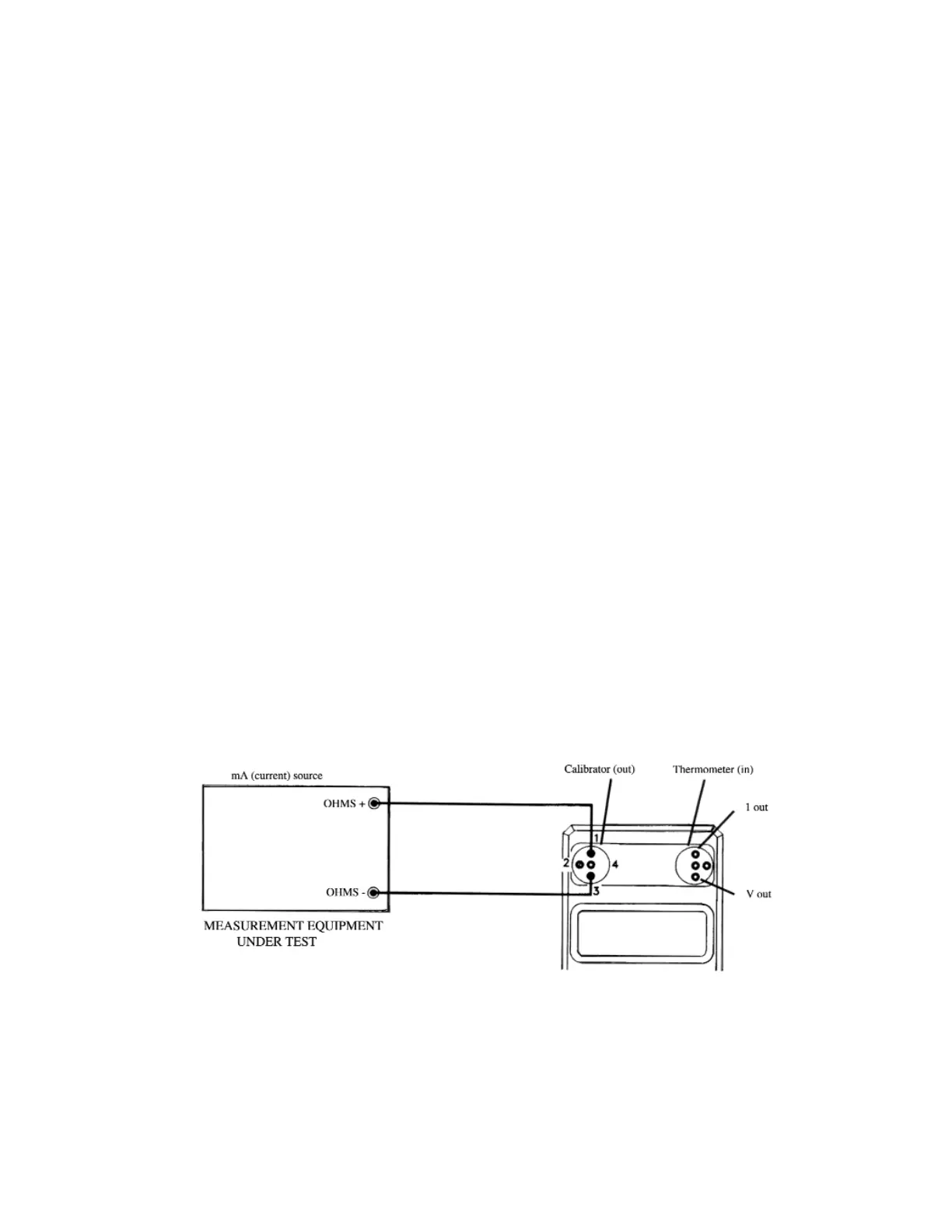
1. Connect measurement equipment under test (eg. RTD thermometer,
ohmmeter, etc.) to the instrument as shown in Figures 8, 9, or 10.
The same performance tradeoffs apply to 2, 3 and 4-wire simulations as
to 2, 3, and 4-wire measurements. Refer to RTD, Thermistor and Ohms
Meter-Mode section above for wiring guidelines.
2. Set instrument to CALIBRATOR mode.
3. Use the sensor-select key to set the instrument to the appropriate func-
tion and range.
Figure 8. 2-Wire Resistance Simulation
18


 To Next Page
 Loading...