EN - 43 -
2.2.18 VITASTORE mode
Vitastore works to protect the avor and texture of food. By maintaining ideal temperature
and humidity levels we create the conditions for longer shelf life. To select Vitastore mode,
the Zone1 compartment should be set up as a cooler, not as a freezer.
To switch the appliance to VitaStore mode, press and hold the [mode] button until “VitaStore
symbol” light comes on. Zone 1 button will be o and user can not change the Zone1
compartment temperature.
If Zone 1 is used as freezer, user should observe below rules before selecting VitaStore
mode.
Important: If Zone1/Zone2 compartment will be converted from freezer to cooler:
• Empty the food from the compartment and leave the door closed for four hours.
Then food can be placed in the compartment.
• Baskets and/or shelves removed from the compartment should be re-tted.
Note: Do not select VitaStore mode if Zone 1 is being used as freezer.
Note: Foods should not be placed in front of the fan.
VitaStore keeps fruits and vegetables fresh and helps vitamin and nutritional values of fruits
and vegetables to protect by maintaining ideal humidity and temperature conditions.
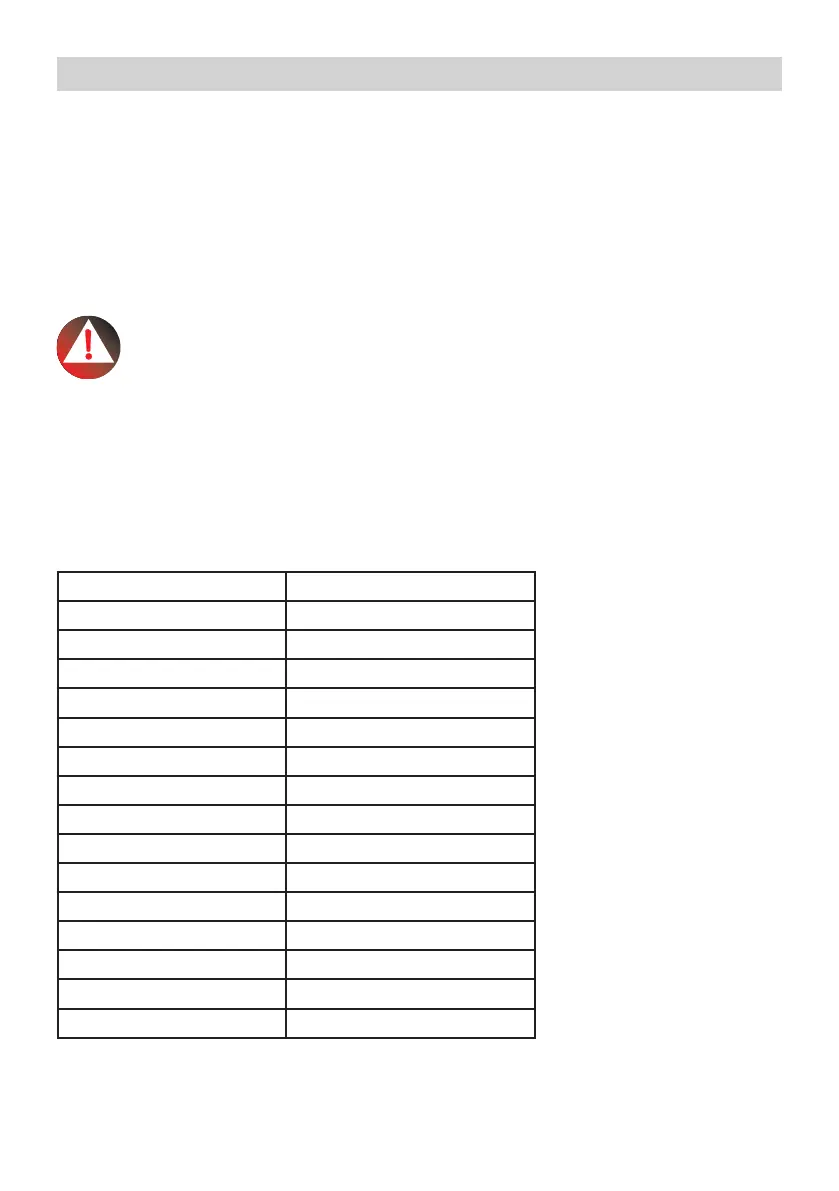
TABLE – Maximum storage conditions of some fruits and vegetables
FRUITS & VEGETABLES STORAGE TIME
Lettuce 10 days
Green leaves 10 days
Tomato 7 days
Cucumber 7 days
Lemon 15 days
Cherry 15 days
Orange 20 days
Strawberry 5 days
Carrot 20 days
Broccoli 10 days
Spinach 10 days
Squash 15 days
Apple 25 days
Grapes 20 days
Artichoke 15 days
USE OF APPLIANCE


 To Next Page