10
18
OPERATION
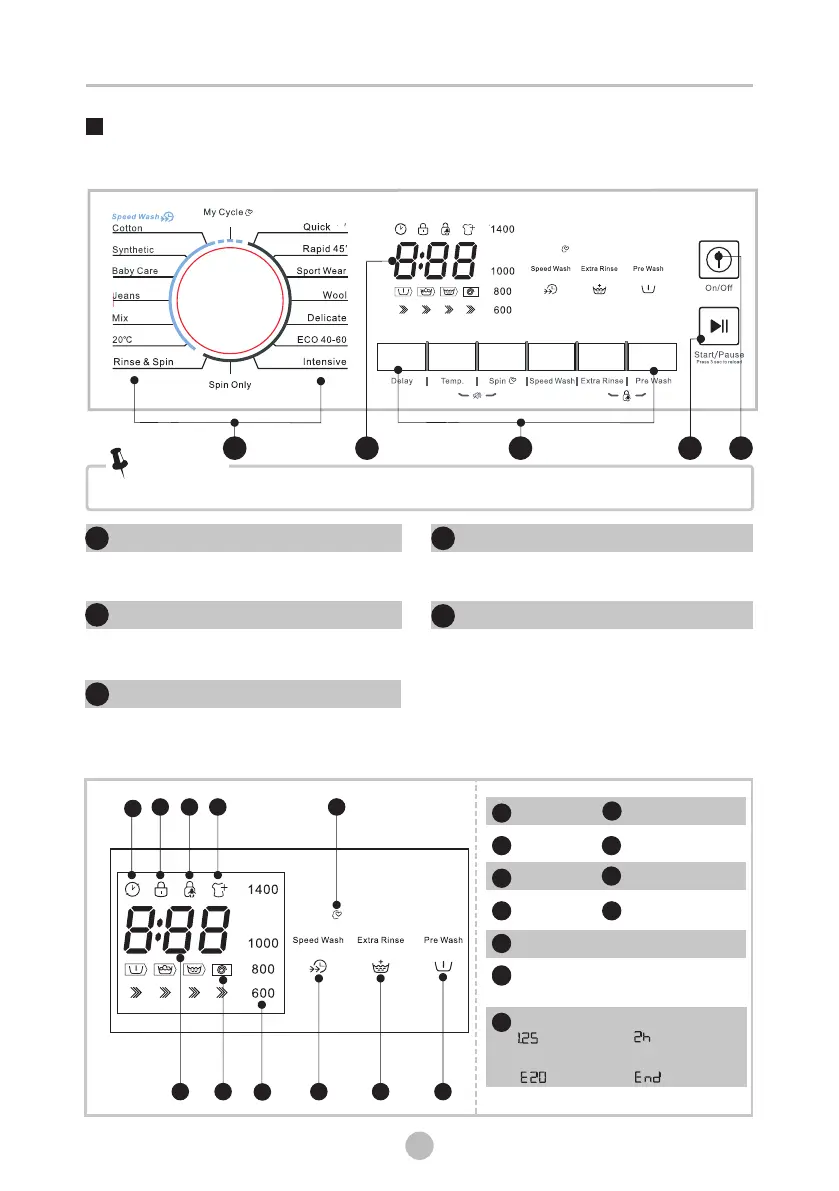
Control Panel
On/Off
Product is switched On/Off.
Start/Pause
Press the button to start or pause the
washing cycle.
Programmes
Available according to the laundry type.
Option
This allows you to select an additional
function and will light when selected.
Note!
• The chart is for reference only, Please refer to real product as standard.
1
1
3
1
2
4
Display
The display shows the settings, estimated time remaining, options, and status messages
for your washer. The display will remain on through the cycle.
5
Model:TKD 1481/TKD 1491
15
1
2
0
0
5
3
1
2
4
1
1
Spin Speed
I
Delay
A
Door Lock
B
Child Lock
C
Reload
D
My Cycle
E
F
Rate Of Progress(Pre wash- Wash
-Rinse-Spin)
J
Wash Time Delay Time
Error End
K
1
2
0
0
D
CB
A
E
I
J
G
H
FK
Pre Wash
F
Extra Rinse
G
Speed Wash
H
Press 3 sec to set My Cycle
Press 3 sec to set My Cycle


 To Next Page