10
27
OPERATION
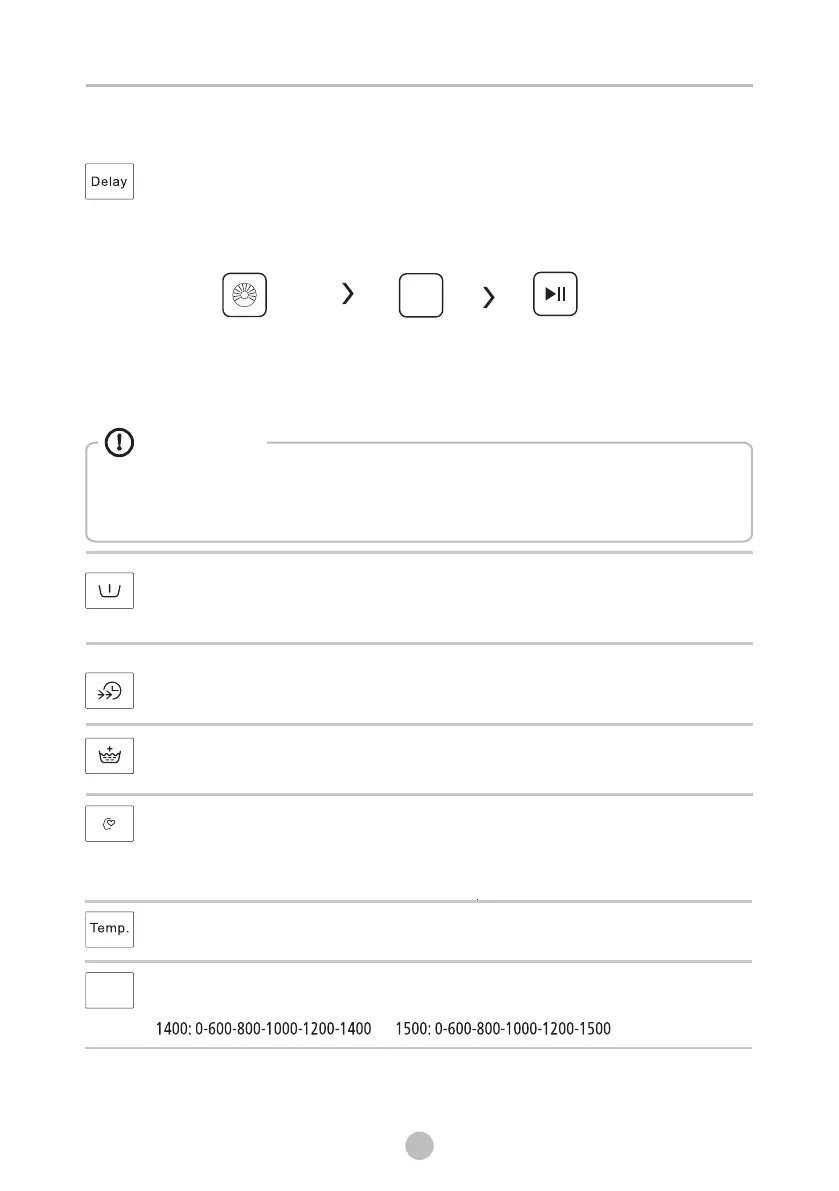
Delay
1. Select a programme; 2.Press the Delay button to choose the time(the delaying time is 0-24 H.);
3.Press [Start/Pause] to commence the delay operation
Set the Delay function:
Choose the Programme
StartSetting time
Delay
Cancel the Delay function:
Press the [Delay] button until the display be 0H.It should be pressed before starting the
programme. If the programme already started, should switch off programme to reset a new one.
Caution!
• If there is any break in the power supply while the machine is operating, a
special memory stores the selected programme and when the power is
restarted, the program will continue.
Pre Wash
The Prewash function can get an extra wash before main wash,it is suitable for washing the
dust rises to surface of the clothes;You need to put detergent into the Case (I) when select it.
Speed Wash
The function can decrease the washing time.
My Cycle
After choosing the programme and setting the options, press [Spin] 3 sec. before
start to wash.The default setting course is Cotton.
To memory the frequently used programme.
Extra Rinse
The laundry will undergo extra rinse once after you select it.
Spin
Press the button to change the speed.
Temp.
Press the button to regulate the temperature(Cold,20℃,30℃,40℃,60℃,90℃)
Spin


 To Next Page