EM00136064 rev. 2.1
6
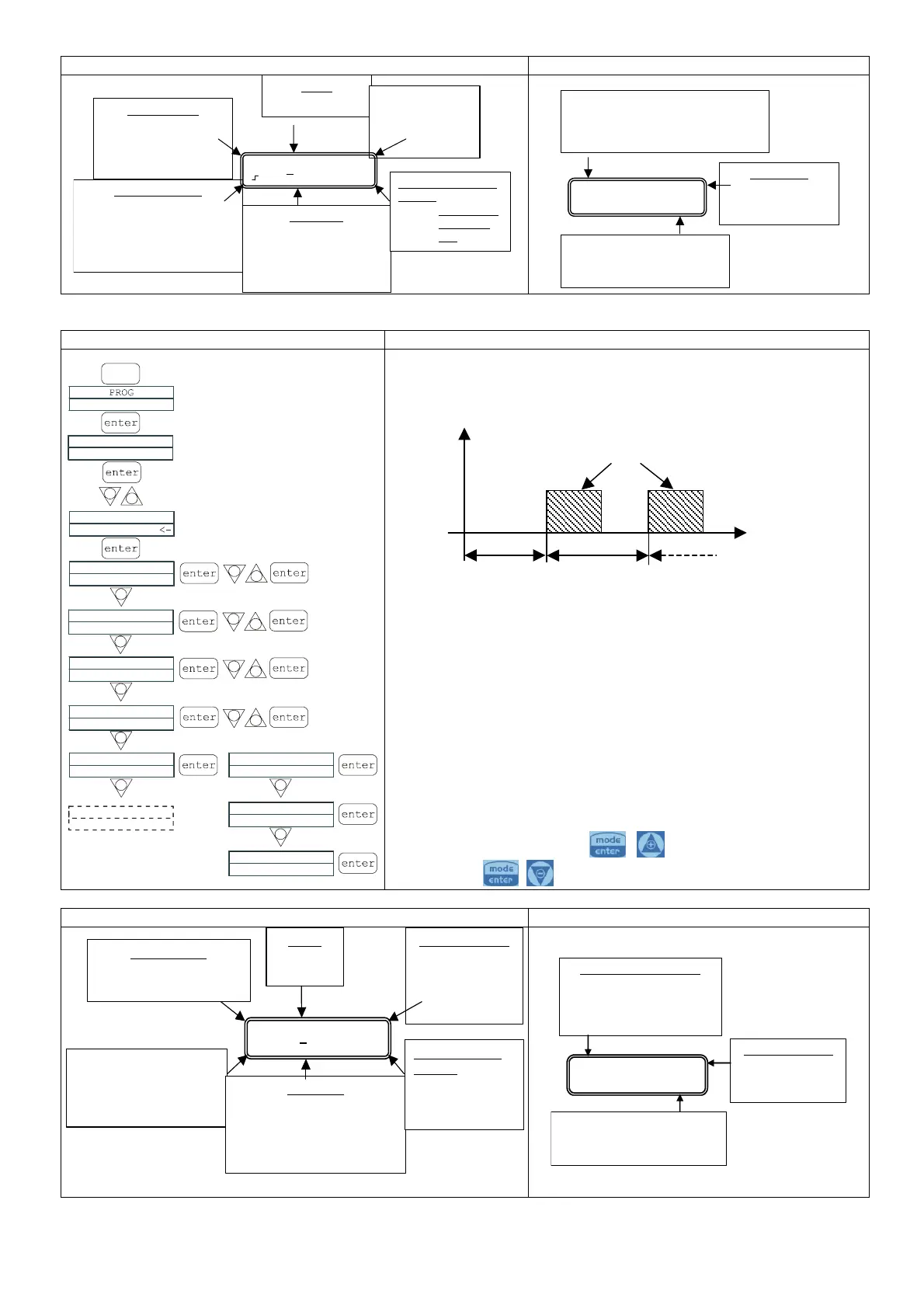
Display during Operation Display during Setting (MODE key)
Timer
FFF
7,0 ml
Stop P 0%
Operating mode
• Timer
Alarms and statuses
• Liv = level alarm
• Flow = flow alarm or
….Release wait
FLOW
sensor status
Programmed value
•
Quantity in ml
Pump status
• Dry = pump starting up
• Stop = pump stop
• Restart = pump restart
Value of the dosing in
rogress
• Percentage of
strokes/min
max
Q.tà 20,0ml
20,0ml P 100%
Operating mode
• The following are shown in sequence:
quantity to dose, delay in d.hh.mm.
and interval in d.hh.m
Dosing value
• Programmed
quantity in m
l
Value of the dosing percentage,
which can be modified by
ressing the + or – keys
Paragraph 3 – Timed Dosage (Frequency signal input “TRIGGER” not activated)
Programming Operation
+
-
-
-
-
+
-
+
-
+
-
Tempo
Quantity 100ml
Delay 0.01.50
Interval 0.01.50
PROG
Time
Time g.hh.mm
Time g.hh.mm
Configuration
Pum functions
Configuration
Pum functions
-
-
Trigger Mode
Pause Input Mode
Disable
Restart Timer
+
-
-
Pause Input Mode
Restart Timer
-
Pause Input Mode
Freeze Time
Pause Input Mode
Pause Dosing
The pump doses a programmed quantity in ml. It is possible to set a
pump delay time (Delay) when the pump is started and an interval
between two successive dosings (Interval), as illustrated in the
diagram:
The Delay and Interval times are in dd.hh.mm (days, hours,
minutes)
The Pause input can be programmed in three different modes:
1. FreezeTime: when the pause is activated, the system cuts
out the current time count and restarts it when the pause is
deactivated.
2. Pause Dosing: with the pause activated, the system
continues to count time the and stops the dosing.
3. Restart Timer: when the pause is activated, the system
stops the dosing and when the pause is deactivated the
count starts again from the beginning.
Durante la fase di funzionamento della pompa, è possibile
modificare la frequenza di dosaggio premendo
contemporaneamente i tasti
per aumentare la frequenza
oppure i tasti
per diminuirla.
Display during Operation
Display at start-up (MODE key)
Timer
FFF
7.0 ml
Liv Stop P 0%
Operating mode
• Timer
• Alarms and Level
statuses = level alarm
•
Flow = flow alarm
FLOW
sensor
status
Programmed value
• Quantity in ml
Pump status
•
Dry = pump starting up
•
Stop = pump stopping
•
Restart = pump restarting
Value of dosing in
progress:
• Percentage of
strokes/min max
Q.tà 20,0ml
Modalità di funzionamento
• Vengono visualizzati in
sequenza:quantità da
dosare, ritardo in g.hh.mm e
intervallo in g.hh.mm
Valore del dosaggio
• Quantità
programmata in
ml
Valore della percentuale di
dosaggio, modificabile premendo
sui tasti + o -
Delay
Interv.
Quantity


 To Next Page
 Loading...