4
19
18
17
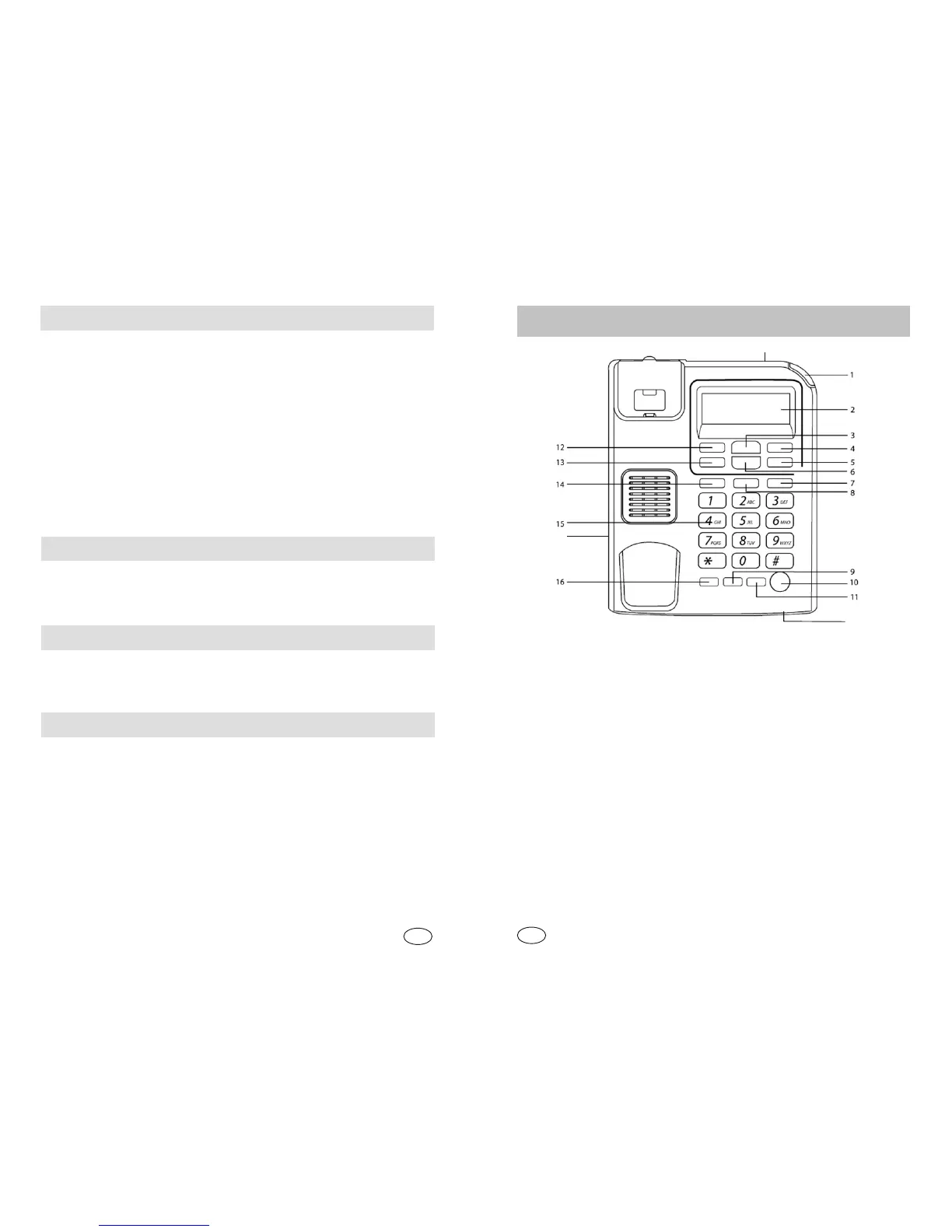
1. Svetelný indikátor zvonenia / Svetelný indikátor prevádzky
2. LCD displej
3. Smerový kláves UP (posúva poradie smerom hore)
4. SET/STORE, vstup do menu, potvrdenie
5. VOL, nastavenie hlasitosti vyzváòania a hlasitého hovoru
6. Smerový kláves DOWN (posúva poradie smerom dole)
7. Jednodotyková pamä M3
8. Jednodotyková pamä M2
9. FLASH/BRT, funkcia FLASH, nastavenie kontrastu displeja
10. Hlasitý hovor
11. RD/BACK, opakovanie posledne volaného èísla, zavola spä
12. OUT, zoznam odchádzajúcich hovorov
13. DEL, vymazanie, návrat spä do menu
14. Jednodotyková pamä M1
15. Èíselná klávesnica
16. RING/Hold, nastavenie tónu zvonenia, odpojenie mikrofónu
17. LINE, konektor na pripojenie linky
18. Konektor na pripojenie vinutej šnúry
19. Mikrofón
Popis prístroja
SK
EN
12
Hold on Music
At the off-hook state, press HOLD key, and you will enter the hold
mode and the hold music is sent out. In the hold mode, the line is held
even if you hang up and the receiver can hear nothing but the music.
To release the hold mode, you have following ways.
--- Picking up the phone again if you hang up, the music stops, and
you will go back to the conversation again.
--- Pressing the HOLD key again, the music stops, and you will go
back to the conversation again.
--- Pressing H.F key if you hang up, the music stops, and you will go
back to the conversation again at the hand-free state.
Adjust volume of ringing
Press the VOL key to H (high), M (middle), L (LOW) or OFF to select
desired ringing volume.
Adjust volume of handsfree
Press the VOL key to H (high) or L (LOW) to select desired handsfree
volume.
Adjust LCD contrast
Press FLASH/BRT to adjust LCD contrast, total 5 levels.


 To Next Page