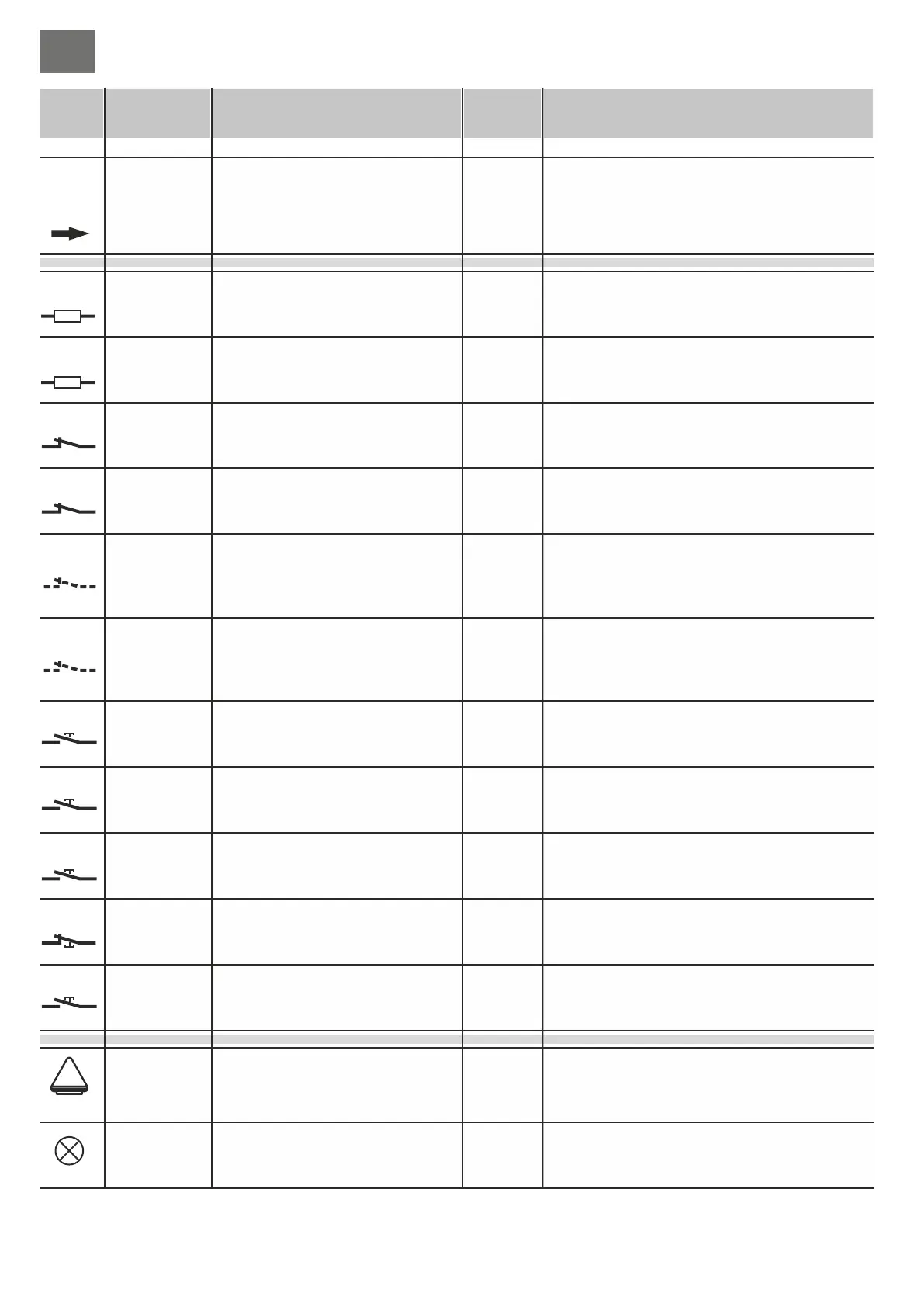
Receiver aerial input
Output for auxiliary device power
supply
Output for Transmitter / Photocell
power supply
Indicator light output
COURTESY LIGHT output
Electric lock output
WARNING LAMP output
Contact for selectable functions
Safety edge input
Cuts in during CLOSING
Safety edge input
Cuts in during OPENING
Photoelectric cell input
Photoelectric cell input
Input for selectable functions
Input for selectable functions
STOP button input
PEDESTRIAN command input
STEP BY STEP command
Command input
CLOSE
Command input
OPEN
power supply input
Encoder sensor input motor M1
Encoder sensor input motor M2
Output motor M1
Output motor M2
38 Calza
39 Cent.
31
32 (0)
33
34 (0)
35
34 (0)
18
19
36
37 (0)
16
17
28 (no)
29 (nc)
30 (c)
3,15 (com)
4
3,15 (com)
5
3,15 (com)
6
3,15 (com)
7
3,15 (com)
8
3,15 (com)
9
3,15 (com)
13
3,15 (com)
12
3,15 (com)
14
3,15 (com)
10
3,15 (com)
11
1 (L)
2 (N)
25 (-)
26 (+)
27 (D)
45 (-)
46 (+)
47 (D)
20 (CON.)
21 (CON.)
22 (AP)
23 (CH)
24 (Com)
40 (CON.)
41 (CON.)
42 (AP)
43 (CH)
44 (Com)
Function / Device Function / DeviceTerm. n. Term. n.
/
/
/
/
/
/
/
/
/
/
/
/
/
/
/
/
/
/
/
/
/
/
/
/
/
/
/
/
/
24ac/0,5A
24ac/0,5A
24ac/0,2A
230V/1A
12dc/1,5A
230V/1A
/4A
8K2/NC
8K2/NC
NC
NC
-
-
NC
NA
NA
NA
NA
230/6A
5-12V
5-12V
230/4A
230/4A
V/I max V/I max
Connection is only necessary if OC2 is inserted
e.g. photocells, external receivers or other 24Vac
devices
Output only active during the manoeuvre and the
reclosing pause period, connect the photoelectric
cell projectors so that the minimum amount of
power is used. If the jumper (part. 9 di fig. A) is set
to ON this output will be continuously active.
Status indication:
automation CLOSED – led off
during OPENING – flashes slowly
during CLOSING – flashes quickly
STOP (block) – remains lit
during the RECLOSING PAUSE – double flashing
with pause
Output active for the entire manoeuvre plus 120”
after complete closing.
Activates, for a couple of seconds at the beginning
of each opening cycle
Output active while the motor is working
See settings for dip 7 (part. 19 fig. A)
Input for closing direction enabled. Connect 8,2K safety
edges or an N.C. contact with 8,2K resistance in series (fig.
E). If unused (binding post free), set dip 1 to ON (part. 23 fig.
A).
Input for opening direction enabled. Connect 8,2K safety
edges or an N.C. contact with 8,2K resistance in series (fig.
E). If unused (binding post free), set dip 2 to ON (part. 23 fig.
A).
Travel direction inversion during closing.
If unused (binding post free), set dip 3 to ON (part. 23
fig. A).
Temporary movement block during the opening stage.
Travel direction inversion during closing.
If unused (binding post free), set dip 4 to ON (part. 23
fig. A).
See dip-switch setting 3 and 4 (part. 19 fig. A).
If unused, set dips 3 and 4 to OFF and then set dip
5 (part. 23 fig. A) to OFF.
See dip-switch setting 3 and 4 (part. 19 fig. A).
If unused, set dips 3 and 4 to OFF and then set dip
6 (part. 23 fig. A) to ON.
Blocks all functions.
If unused, set dip 7 to ON (part. 23 fig. A)
With a 2 motor installation, only M1 opens.
With a 1 motor installation it opens partially for a set
amount of time (see “programming pedestrian
opening”).
See settings for dip 1 and 2 (part. 19 fig. A)
CLOSING only command, during opening it inverts
and closes.
OPENING only command, during closing it inverts
and opens.
Connect to the 230V power supply.
For the motor-ECU connection use a separate cable
(e.g. 3x0,35) with a max. length of 10m
For the motor-ECU connection use a separate cable
(e.g. 3x0,35) with a max. length of 10m
Motor M1 moves first in the opening direction and is
delayed during closing.
An eventual electric lock should be fitted to this gate
leaf.
M2 is the second motor to move and the first one to
close.
Notes Notes
24V
24V FT
M1
M2
BSC
BSA
FT1
FT2
J1
J2
STP
PED
P/P
PC
PA
US1
230V
ENC
1
ENC
2
12V
24V
230V
230V
8K2*
8K2*
GB
GB
43
44


 To Next Page
 Loading...