Operation of Magic Sat Easy
Magic Sat Easy Vers. 003
Operation of Magic Sat Easy
Magic Sat Easy is a completely automatic satellite tracking system and is able to track
satellites which send a QPSK modulated signal, according to the DVB-SI EN 300 468
standard. The main operations that your Magic Sat Easy system is able to carry out are
the following:
• Satellite Seeking
• Antenna parking
All the operations are carried out via the control board.
Turning on the Magic Sat Easy
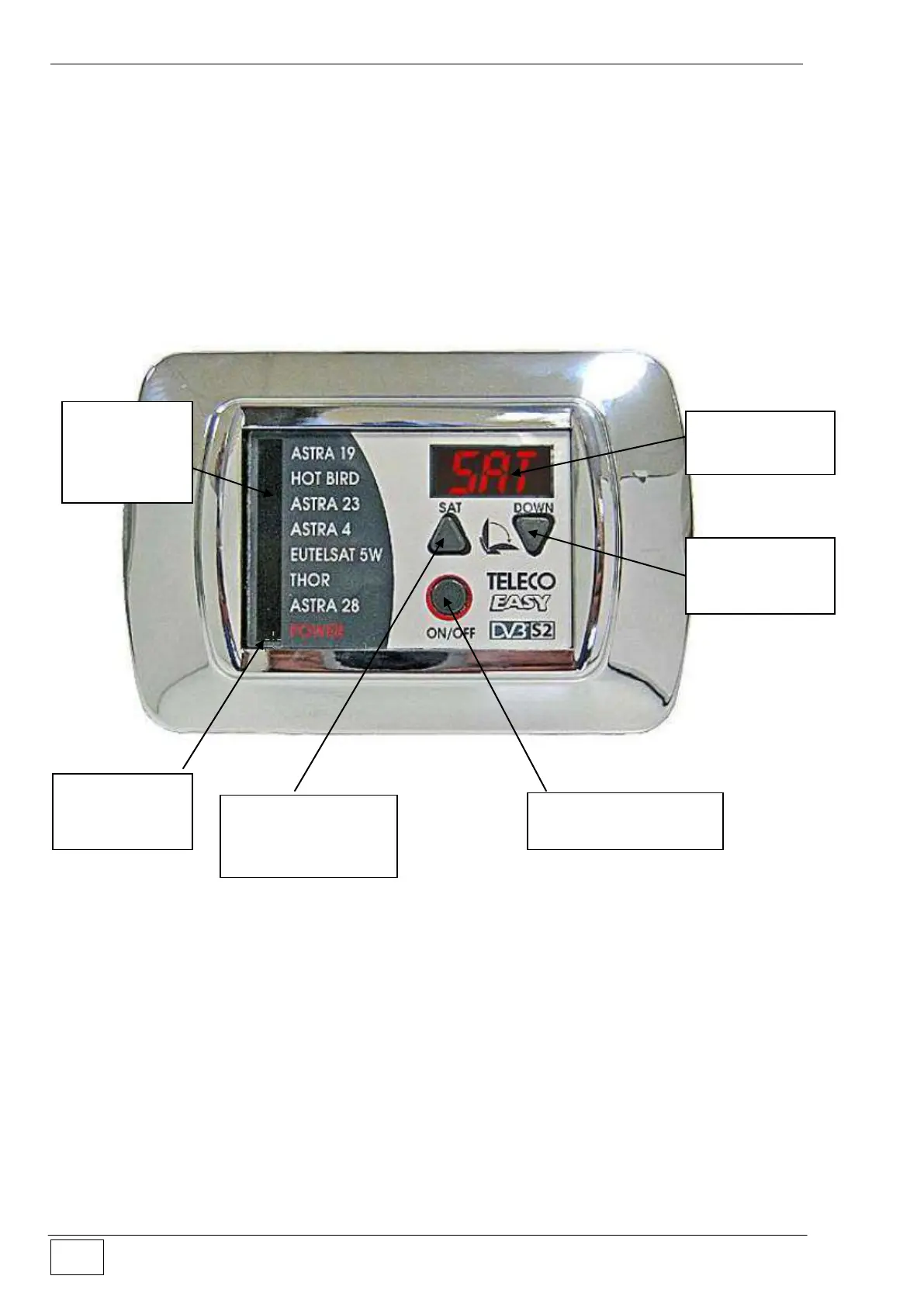
To turn on the Magic Sat Easy system, press the button (3). Upon pressing the button and
for 1 second time, all signal lights will go on to allow you to check the proper operation of
the board. After this step, the message ON will appear on the display and the red power
supply indicator (6) will go on .
Selecting the satellite
When the antenna is in parking condition (if it is not in parking condition, the time you turn
the engine ignition key the Magic Sat Easy will close the antenna), a green signal light (5)
will start blinking beside the name of the satellite; this means that the system is ready to
search for the corresponding satellite. The user can change the satellite by pressing the
button (1) several times until the blinking light is by the name of the selected satellite. If the
Antenna
parking button
(2)
Satellite selection
and search
startup button (1)
Indicator of
selected
satellite (5)
Power supply
indicator (6)



 To Next Page