EasyManua.ls Logo

Telectro 1975 - Trouble Chart; Component Adjustments; Brake Release Bracket; Spindle End Play

Default Icon
12 pages
Print Icon
To Next Page IconTo Next Page
To Previous Page IconTo Previous Page
Loading...
L
erase head
(45).
Erase
head assembly
(45)
is
then
moved
up
or
down
till only
the top haU
of the
tape is
affected.
When
properly
adjusted,
oniy the top half
of
the tape will
be
erased.
Brake
Release
Bracket
Brake release
bracket
(80)
can be adjusted
by
loosening
screw
(81)
and
moving
bracket
forward
or
backward.
When
bracket
(80)
is
moved
to
rear
of
re-
corder,
wind-rewind lever
assembly
(83)
contacts
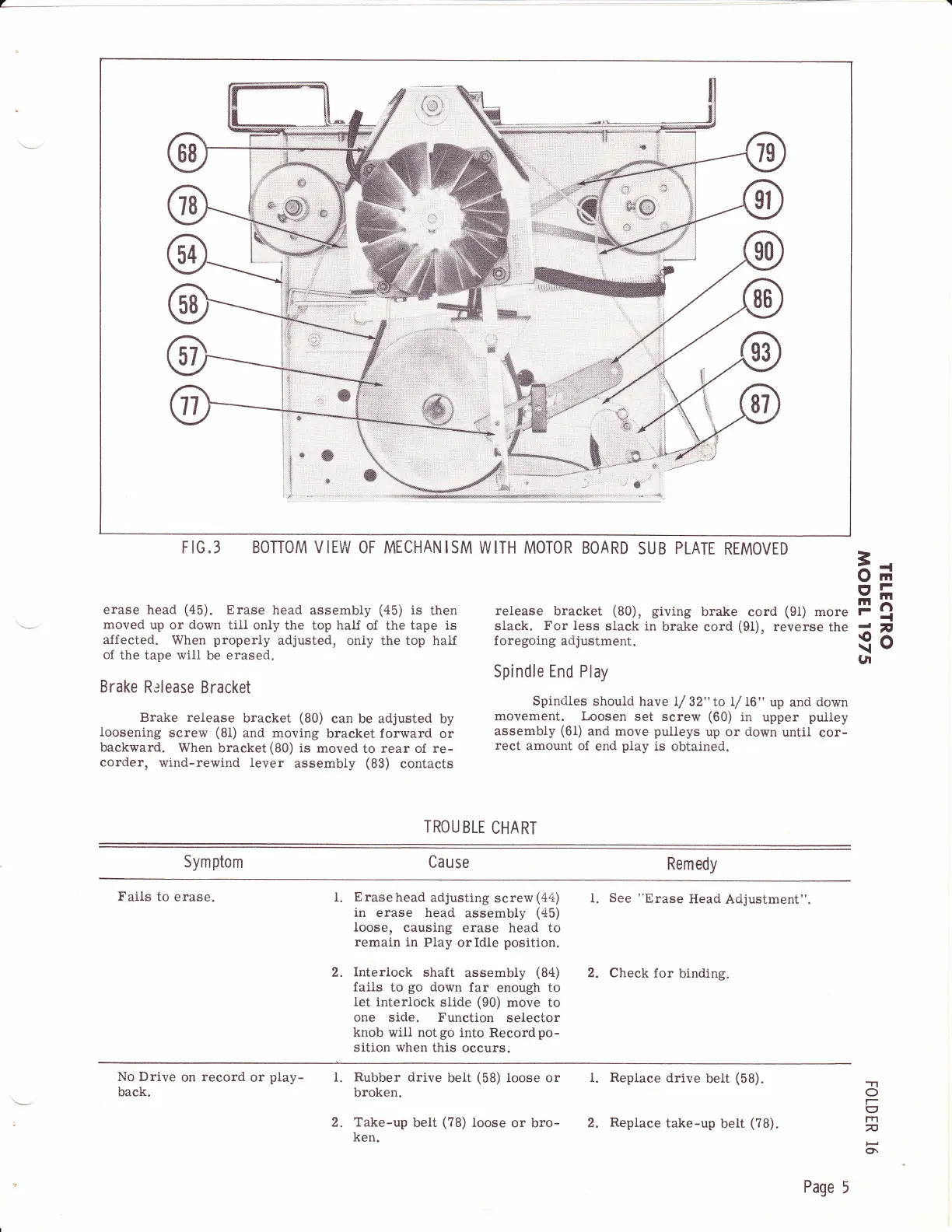
FIG.3 BONOM VIEW OF MECHANISM
WITH MOTOR
BOARD
SUB
PLATE
RTMOVED
release
bracket
(80),
giving
brake cord
(91)
more
slack.
For less
slack in
brake cord
(9t),
reverse
the
foregoing
adjustment.
Spindle
End
Play
Spindles
should
have I/
32"
to
L/ L6"
up
and
down
movement. Loosen
set screw
(60)
in
upper
pulley
assembly
(61)
and move
puileys
up or down
until
cor-
rect
amount of
end
piay
is
obtained.
t*
EI
(a
gt
TROU
BLE
CHART
58
**,
*
Tt#
r11
^J
b*
i{:
j;;
.;
&--
Symptom
Cause
Remedy
Fails
to
erase.
l.
Erase
head
adjusting
screw
(44)
in
erase head
assembly
(45)
loose,
causing
erase head to
remain in
Play
or Idle
position.
Interlock
shaft
assembly
(84)
fails
to
go
down
far
enough
to
let interlock
slide
(90)
move to
one side.
Function
selector
knob will notgo
into Recordpo-
sition when
this occurs.
l.
See
"Erase
Head
Acijustment"
2.
Check for
binding.
2.
No Drive
on
record
or
play-
back.
Rubber drive
beit
(58)
Ioose or
broken.
Take-up
belt
(78)
loose
or
bro-
ken.
i.
Replace
drive
belt
(58).
2.
Replace
take-up
belt
(?B).
I.
'T1
o
I
rn
n
lJ
Ol
2.
Page
5