The JCU-3 is a remote keypad designed for FLIR thermal cameras, offering comprehensive control and integration within a marine electronics system. It can be powered over Ethernet (PoE) or via a dedicated power connector, providing flexibility in installation. The keypad is compatible with FLIR M100 and M200 Series thermal cameras and can interact directly with supported thermal cameras, or as part of a wider system connected to a multifunction display (MFD).
Function Description:
The JCU-3 serves as a central control unit for FLIR thermal cameras, allowing users to navigate menus, adjust camera settings, and control camera movement. It features a Uni-Controller (joystick) for pan/tilt control, a central button for OSD (On-Screen Display) menu access and selection, and dedicated buttons for various functions.
Key controls include:
- User Configurable Buttons (1 and 2): These buttons can be programmed via the camera's web interface to perform specific actions.
- Uni-Controller (3, 4, 5):
- Ring (4): Used for pan/tilt control on M200-Series cameras.
- Outer Ring (3): Rotates clockwise or counter-clockwise for pan/tilt control on M200-Series cameras.
- Central Button (5): Short-press to toggle OSD menu On/Off; long-press to select (OK).
- [HOME] (6): Short-press to return camera to home position; press and hold to set current position as home; 4x press to reset the camera (realign home and stow positions).
- [ZOOM-OUT] (7): Press to zoom thermal camera out.
- [ZOOM-IN] (8): Press to zoom thermal camera in.
- [SCENE] (9): Press to cycle through image scene presets (day, night, docking, high contrast).
- [COLOR] (10): Short-press to cycle through color palettes (WhiteHot, RedHot, Fusion, FireIce); long-press to toggle polarity of selected color palette (e.g., WhiteHot > BlackHot > WhiteHot).
- [NEXT PAYLOAD] (11): Short-press to switch to the next payload on cameras with multiple payloads (e.g., thermal and visible).
- [POWER] (12): Short-press to cycle through keypad backlight brightness settings; long-press to put the camera into standby mode; double-press to switch to the next available camera in the network.
The keypad can be installed in either landscape or portrait orientation, with corresponding keypad mats available. The orientation setting can be changed via the JCU-3 keypad web interface. Pairing the keypad to a thermal camera is done through a web browser interface, allowing for control of multiple cameras by one keypad or one camera by multiple keypads. The keypad can also be reset to factory defaults via the web interface.
Important Technical Specifications:
- PoE Class: Class 1
- Nominal Supply Voltage: PoE: 48 V dc; Alternate power: 12 V / 24 V dc
- Operating Voltage Range: PoE: 44 V to 57 V dc; Alternate power: 9 V to 32 V dc
- Power Consumption: 4 W Max with full keypad illumination
- Operating Temperature: -25 °C to +55 °C (-13 °F to 131 °F)
- Storage Temperature: -30 °C to +70 °C (-22 °F to 158 °F)
- Relative Humidity: Maximum 93%
- Waterproof Rating: IPx6 & IPx7
- Network / PoE Connection: 1 x RayNet 10/100 Mb/s connector
- Alternate Power Connection: 1 x Power connector (SeaTalkng® style connector)
- Conformance: IEEE 802.3, IEEE 802.3af (PoE), EN60945
Usage Features:
- Flexible Mounting: Supports both flush mounting for a sleek, integrated look and surface mounting. Keypad mats are available for both portrait and landscape orientations.
- Network Integration: Connects to the same network as the thermal camera via an Ethernet switch. Can be directly connected to a Raymarine MFD.
- Multi-Camera/Multi-Keypad Control: A single keypad can control multiple thermal cameras, and a single thermal camera can be controlled by multiple keypads.
- Web Browser Configuration: Pairing and orientation settings are managed through a web browser interface, requiring a PC or laptop on the same network.
- Power over Ethernet (PoE) or Dedicated Power: Offers flexibility in power supply, but warns against connecting a dedicated power cable when PoE is active.
- Diagnostics LED: Provides visual feedback on keypad status, aiding in troubleshooting.
- User-Programmable Buttons: Allows customization of certain button functions via the camera's web interface.
Maintenance Features:
- Routine Equipment Checks: Regular inspection of cables for damage, wear, and secure connections is recommended.
- Product Cleaning:
- Switch off power supply before cleaning.
- Use a clean, damp cloth to wipe clean.
- DO NOT use abrasive, acidic, ammonia, solvent, or other chemical-based cleaning products.
- DO NOT use a jet wash.
- No User-Serviceable Components: All maintenance and repair should be referred to authorized FLIR dealers to maintain warranty validity.
- Software Updates: Users are advised to check the FLIR website for the latest software releases.
- Product Documentation: Comprehensive documentation, including installation and operation instructions, is available for download from the FLIR website.
- Warranty Registration: Registering the product online is important to receive full warranty benefits.
- Technical Support: FLIR provides extensive product support via web portal, telephone, and e-mail, with regional contact details provided.
The JCU-3 is designed for leisure marine boats and workboats not covered by IMO and SOLAS Carriage Regulations. Proper installation, including adherence to EMC guidelines, cable routing, and compass safe distance, is crucial for optimal performance and safety.

 Need help?
 General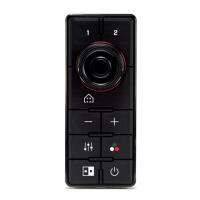

 To Next Page