This document describes the Teledyne Test Tools T3PS16081P / 30051P Programmable Linear DC Power Supplies, providing a comprehensive overview of their functions, specifications, usage, and maintenance.
Function Description
The Teledyne Test Tools T3PS16081P and T3PS30051P are programmable DC power supplies featuring a 2.8-inch TFT-LCD screen for clear display of parameters, real-time measurement, and graphing. These devices are designed for various applications, offering single high-precision programmable output. The T3PS16081P provides a maximum output of 16 V / 8 A with a total power of 128 W, while the T3PS30051P offers a maximum output of 30 V / 5 A with a total power of 150 W. Both models support constant voltage (CV) and constant current (CC) modes, with two types of operation: two-wire mode and remote sense mode. They are compact, easy to use, and powerful, making them ideal for bench power supply applications. The devices also incorporate output short circuit and overload protection.
Important Technical Specifications
- Output:
- T3PS16081P: 16 V / 8 A, total power 128 W
- T3PS30051P: 30 V / 5 A, total power 150 W
- Display: 2.8-inch TFT LCD (240x320 pixels)
- Operating Modes: Constant Voltage (CV), Constant Current (CC)
- Wiring Modes: 2-wire and 4-wire (remote sense)
- Transient Response Time: < 50µs
- Resolution: Maximum resolution of 1mV/ 1mA with 5-bit voltage and 4-bit current display
- Input Voltage Values: Four varieties of input-line voltage values include 100V, 110V, 220V and 230V to satisfy user requirements.
- Noise: Stable, Reliable and Low Noise: ≤ 350 uVrms / 3 mVpp
- Temperature Control: Intelligent temperature-controlled fan for effective noise reduction.
- Interface: Clear graphical interface with waveform display.
- Memory: 5 internal system parameters save / recall, support for data storage space expansion.
- Software: Uses EasyPower PC software, real-time control via USB, LAN, support SCPI command set and LabView driver package to meet remote control and communication requirements.
- Timer Function: Sequences pre-set output values.
- Operating Environment:
- Temperature: 0 °C to 40 °C
- Relative Humidity: ≤ 80% RH at ≤ 30 °C
- Altitude: ≤ 2000 m at ≤ 30 °C
- Pollution degree 2. Use in an operating environment where normally only dry, non-conductive pollution occurs. Temporary conductivity caused by condensation should be expected.
- AC Power Input Voltage & Frequency: 100/120/220/230 V ± 10%, 50/60 Hz
- Fuse Type:
- 100/120 V: T6.3A/250V
- 220/230 V: T3.15A/250V
- Mains Supply Connector: CAT II per IEC/EN 61010-1:2010, instrument intended to be supplied from the building wiring at utilization points (socket outlets and similar).
Usage Features
The power supplies offer a user-friendly interface with an LCD display, adjustment knob, and function keys.
-
Front Panel Controls:
- LCD Display: Shows system parameter settings, system output state, menu options, and messages.
- Adjustment Knob: Rotates to increase or decrease the value of the digit at the cursor when setting parameters.
- Function Keys:
- Fine: Moves the cursor to select the digit to be modified.
- Arrow Keys (Left/Right): Move the cursor to select the parameter to be modified.
- Ver/Lock: Enters the system message interface. Press for 1 second or longer to activate the lock function, preventing accidental changes.
- Timer/Wave: Enters the timer interface or waveform display mode.
- IP/Save: Configures network connection information. Also used to save or recall instrument settings.
- Vsense: Enables/disables the remote sense function.
- On/Off: Enables/disables the channel output.
- Power Button: Turns the instrument on or off.
- Output Terminals: Physical output connections to the external circuit.
- Sense Terminals: Used to sense the voltage at the load, compensating for voltage drop caused by leads between the power supply and the load, increasing the accuracy of the voltage delivered to the load.
- Ground Terminal: Connected to the instrument chassis and ground wire.
-
Rear Panel Connections:
- AC Input: Power socket for AC input.
- AC Power Switch: Selects the appropriate AC line voltage (100V, 120V, 220V, 230V).
- Fuse: Protects the instrument from overcurrent.
- Fan: Provides cooling for the instrument.
- USB Device: Connects the instrument to an external computer for remote control.
- LAN Interface: Connects to a local network using the RJ45 interface for remote control.
-
Operation Procedures:
- Connecting Power: Ensure the correct AC input voltage is selected on the rear panel before connecting the power cord.
- Output Voltage and Current Setting: Use the adjustment knob and function keys to set the desired voltage and current values.
- 2-wire Mode: Connect the load directly to the output terminals.
- Remote Sense Mode (4-wire): Connect the sense terminals to the load to compensate for voltage drops in the output leads, ensuring accurate voltage delivery to the load.
- LAN Configuration: Set up network parameters (IP address, subnet mask, gateway, DHCP) for remote control via LAN.
- Save/Recall: Save up to 5 instrument settings (voltage, current, timer parameters) to internal memory and recall them as needed.
- Timer Function: Program sequences of output values over time. The timer can be started, stopped, and reset.
- Waveform Display: View dynamic variations of voltage and current in a trending graph.
- Lock Key: Prevents accidental changes to settings by locking the front panel keys.
- Firmware Upgrade: Update the device firmware using EasyPower software via USB or LAN.
Maintenance Features
-
General Safety:
- Always use the power cord supplied with the instrument.
- Ground the instrument properly to avoid electric shock.
- Observe all terminal ratings and signs to prevent fire or electric shock.
- Do not operate with suspected failures, in wet/damp conditions, or in an explosive atmosphere.
- Keep the surface of the instrument clean and dry.
- Avoid touching exposed circuits or wires.
- Do not operate without covers.
- Use only the specified fuse.
- Observe proper overvoltage protection and ensure good ventilation to prevent overheating.
-
Troubleshooting:
- Instrument does not start up: Check power connection, power switch, and fuse.
- Constant voltage output is abnormal: Check maximum output power, load requirement, cable connections, and current setting value.
- Constant current output is abnormal: Check maximum output current, load requirement, cable connections, and voltage setting value.
-
Fuse Replacement:
- Disconnect power supply.
- Turn off the instrument and remove the power cord.
- Insert a small straight screwdriver into the slot at the power socket and gently pry out the fuse seat.
- Adjust the power voltage selector manually to select the correct voltage scale.
- Take out the fuse and replace it with the specified fuse (refer to the corresponding relationship between the AC input voltage and fuse specification).
- Re-insert the fuse holder into the power socket.
-
Service and Support: Teledyne Test Tools provides warranties for products free from defects in materials and workmanship. For service or to obtain a copy of the complete warranty statement, contact Teledyne LeCroy sales and service offices. Teledyne Test Tools is not liable for indirect, special, or consequential damages. Contact information for Teledyne LeCroy (US and European Headquarters) is provided in the manual for sales, service, and support.

 Need help?
 General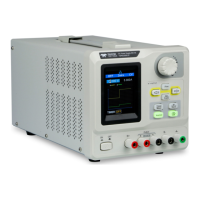

 To Next Page

