EasyManua.ls Logo

Telefunken M 204 E - Oiling and Greasing; Demagnetisation (Degaussing); Operating Instructions; Track Selection and Recording Procedure

Telefunken M 204 E
14 pages
Print Icon
To Next Page IconTo Next Page
To Previous Page IconTo Previous Page
Loading...
Oiling
and
Greasing
The
unit
is
fitted
with
self-lubricating
sintered
bearings
which
give
maintenance-free
operating
times
of
several
thousand
hours.
If
a
bearing
should
happen
to
run
with
much
friction,
it
is
advisable
to
replace
the
component
concerned.
Re-oiling
would
bring
about
the
danger
of
contaminating
the
drive
with
oil
spray.
The
sliders
of
the
actuator
rods
and
the
bearing
brackets
should
be
lubricated
at
the
bearing
points
with
Siemens
uniselector
grease,
and
with
Molykote
Paste
G
Rapid
at
all
places
where
metallic
components
slide
against
each
other
(e.g.
the
press-
button
assembly).
The
prismatic
bearing
for
the
drive
capstan
on
the
head
carrier
plate
is
also
lubricated
with
molykote.
Re-greasing
is
necessary
only
.after
replacing
components,
or
when
a
particular
component
does
not
run
freely.
Molykote
must
always
be
applied
as
an
extremely
thin
film.
Lubricating
grease
or
molykote
must
not
be
used
for
sintered
bearings.
Demagnetisation
(Degaussing)
Tape
drive
components
and
magnetic
heads
may
become
magne-
tised
when
approached
with
magnetic
tools
or
cables
carrying
direct
current.
This
produces
a
permanent
background
noise
on
the
tapes
during
operation.
To
prevent
this
defect,
we
recommend
careful
and
thorough
degaussing
of
all
metallic
components
which
come
into
contact
with
the
tape,
after
every
completed
repair
job
(degaussing
choke
for
220
V
AC,
Order
No.
60.89.108).
All
adjustment
values
and
direction
specifications
refer
to
vertical
operation
of
the
unit.
Operating
Instructions
Track
Selection:
The
function
selector
switch
@
is
blocked
in
the
“Recording”
operating
mode,
so
that
track
selec-
tion
must
be
made
in
the
“Stop”
or
“Playback“
settings.
Stereo:
Turn
switch
@
to
position
“Stereo".
Mono:
Turn
switch
@
to
position
“1“
or
“2".
Parallel:
|
Turn
switch
©
to
position
“P“;
only
for
parallel
playback
of
both
tracks.
Multi-Play:
Turn
switch
@
to
position
“2/1“
or
“1/2",
according
as
to
whether
trans-
cription
is
to
be
made
from
track
2
to
track
1,
or
from
track
1
to
track
2
respectively.
The
drive
level
of
the
new
recording
is
always
to
be
ad-
justed
with
the
control
@
and
the
drive
level
of
the
transcription
recor-
ding
is
always
to
be
adjusted
with
the
control
®.
Recording.
Turn
the
function
selector
switch
@
to
the
desired
setting
and
press
the
recording
button
@.
Then
ad-
just
the
drive
level
for
monaural
recordings
with
the
control
@,
and
for
stereophonic
recordings
with
control
@
for
the
left
channel
and
control
©
for
the
right
channel.
The
meter
pointers
should
deflect
up
to
the
start
of
the red
sectors
on
volume
peaks,
excursians
into
the
red
sectors
being
at
most
very
brief.
After
correct
drive
adjustment,
hold
the
recor-
ding
button
@
depressed
and
press
the
drive
button
@)
additionally
thereto.
The
stop
button
@)
must
be
actuated
prior
to
any
change
of
the
operating
mode.
Manual
Controls
and
Connecting
Jacks
@
Connecting
jack
for
radio
receiver
(mono/stereo
or
VHF
stereo
tuner)
or
separate
Hi-Fi
stereo
amplifier
@
Connecting
jack
for
record
player
(mono/stereo),
also
for
Hi-Fi
record
player
with
built-in
equaliser-preamplifier.
Connecting
jack
for
monaural
earphones
for
“silent“
moni-
toring
during
monaural
recordings.
Connecting
jack
for
stereophonic
earphones
for
“silent“
moni-
toring
during
stereophonic
recordings.
®
Connecting
jack
for
separate
Hi-Fi
loudspeaker
box
(left
channel);
or
jack
for
Hi-Fi
earphones.
©
Connecting
jack
for
separate
Hi-Fi
loudspeaker
box
(right
channel);
or
jack
for
Hi-Fi
earphones.
@
Insertion
slot
for
tape.
Rapid
stop
button,
can
be
latched.
3-digit
counter
mechanism,
counts
forwards
and
backwards,
resettable
to
zero
with
pressbutton.
ELE
)
@
68
©G©@6©000
®@
@@0©8D
©
®©
®
®
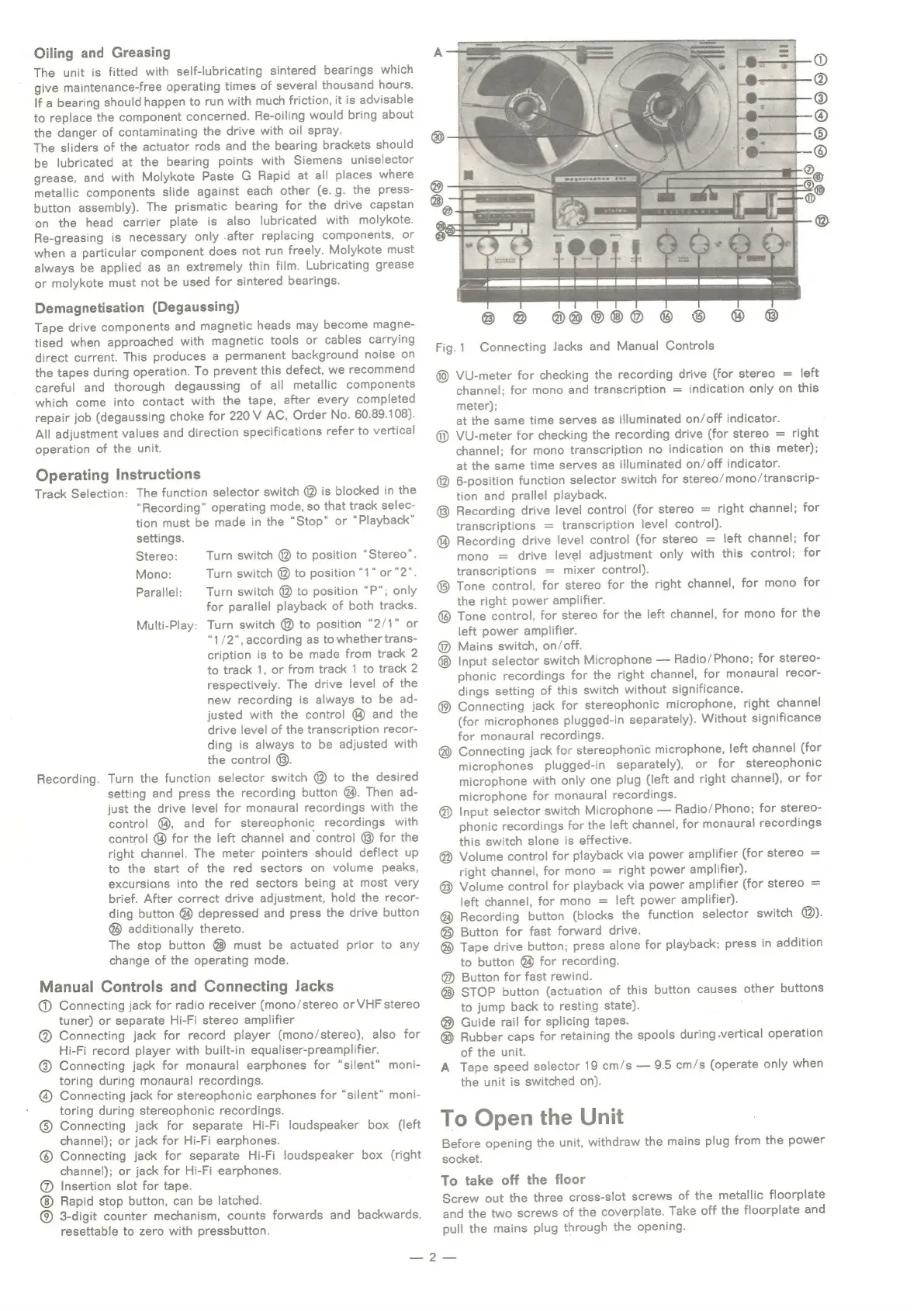
Fig.1
Connecting
Jacks
and
Manual
Controls
left
indication
only
on
this
@
VU-meter
for
checking
the
recording
drive
(for
stereo
=
channel;
for
mono
and
transcription
=
meter);
at
the
same
time
serves
as
illuminated
on/off
indicator.
@
VU-meter
for
checking
the
recording
drive
(for
stereo
=
right
channel;
for
mono
transcription
no
indication
on
this
meter);
at
the
same
time
serves
as
illuminated
on/off
indicator.
@
6-position
function
selector
switch
for
stereo/mono/transcrip-
tion
and
prallel
playback.
Recording
drive
level
control
(for
stereo
=
right
channel;
for
transcriptions
=
transcription
level
control).
@
Recording
drive
level
control
(for
stereo
=
left
channel;
for
mono
=
drive
level
adjustment
only
with
this
control;
for
transcriptions
=
mixer
control).
®
Tone
control,
for
stereo
for
the
right
channel,
for
mono
for
the
right
power
amplifier.
®
Tone
control,
for
stereo
for
the
left
channel,
for
mono
for
the
left
power
amplifier.
@
Mains
switch,
on/off.
Input
selector
switch
Microphone
Radio/Phono;
for
stereo-
phonic
recordings
for
the
right
channel,
for
monaural
recor-
dings
setting
of
this
switch
without
significance.
®
Connecting
jack
for
stereophonic
microphone,
right
channel
(for
microphones
plugged-in
separately).
Without
significance
for
monaural
recordings.
@
Connecting
jack
for
stereophonic
microphone,
left
channel
(for
microphones
plugged-in
separately),
or
for
stereophonic
microphone
with
only
one
plug
(left
and
right
channel),
or
for
microphone
for
monaural
recordings.
@
Input
selector
switch
Microphone
Radio/Phono;
for
stereo-
phonic
recordings
for
the
left
channel,
for
monaural
recordings
this
switch
alone
is
effective.
@
Volume
control
for
playback
via
power
amplifier
(for
stereo
=
right
channel,
for
mono
=
right
power
amplifier).
®
Volume
control
for
playback
via
power
amplifier
(for
stereo
=
left
channel,
for
mono
=
left
power
amplifier).
@
Recording
button
(blocks
the
function
selector
switch
@).
®
Button
for
fast
forward
drive.
@
Tape
drive
button;
press
alone
for
playback;
press
in
addition
to
button
@
for
recording.
@
Button
for
fast
rewind.
STOP
button
(actuation
of
this
button
causes
other
buttons
to
jump
back
to
resting
state).
:
Guide
rail
for
splicing
tapes.
@
Rubber
caps
for
retaining
the
spools
during
vertical
operation
of
the
unit.
A
Tape
speed
selector
19
cm/s
9.5
cm/s
(operate
only
when
the
unit
is
switched
on).
To
Open
the
Unit
Before
opening
the
unit,
withdraw
the
mains
plug
from
the
power
socket.
To
take
off
the
floor
Screw
out
the
three
cross-slot
screws
of
the
metallic
floorplate
and
the
two
screws
of
the
coverplate.
Take
off
the
floorplate
and
pull
the
mains
plug
through
the
opening.
ee