English - 19 -
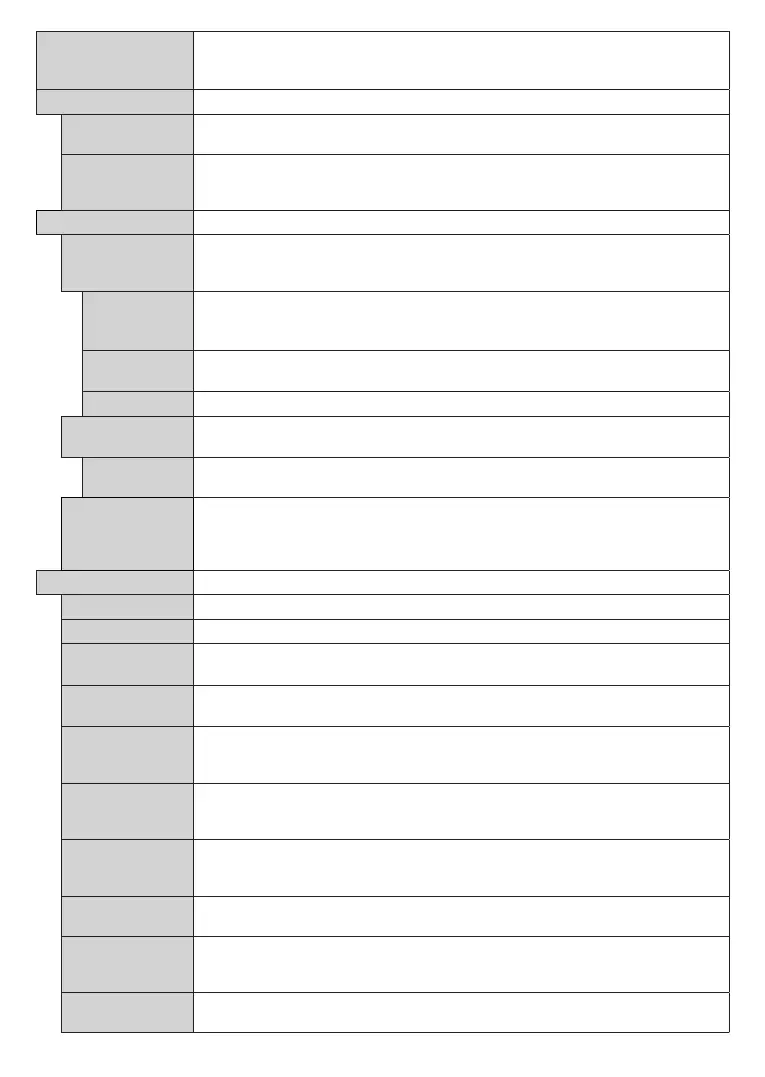
Netflix
If this feature is supported by your TV, you can view your ESN(*) number and deactivate
Netflix.
(*) ESN number is an unique ID number for Netflix, created especially to identify your TV.
Device Settings
CEC
With this setting you can enable and disable CEC functionality completely. Press Left or
Right button to enable or disable the feature.
CEC Auto Power
On
This function allows the connected HDMI-CEC compatible device to turn on the TV
and switch to its input source automatically. Press Left or Right button to enable or
disable the feature.
Alexa Built-in
Starts the setup process for this feature manually. If the setup is priorly completed Alexa
Language, Alexa On Standby, Alexa Alarm Volume and Sign Out options will be
available. Refer to
section for more information.
Alexa On
Standby
Enables or disables Alexa On Standby feature. If enabled Alexa will be available while
the TV is in standby mode.
Note: This feature may affect your TV’s power consumption.
Alexa Alarm
Volume
Sets the volume level for Alexa alarms.
Sign Out
You can use this option to sign out. If you sign out Alexa Built-in feature will be disabled..
Works With
Alexa
Starts the setup process for this feature manually. If the setup is priorly completed Sign
Out option will be available. Refer to Alexa Ready section for more information.
Sign Out
You can use this option to sign out. If you sign out
Works With Alexa feature will be
disabled.
Google
Assistant
S
tarts the setup process to enable your TV to work with Google Assistant devices.
Highlight Start and press OK. If the setup is priorly completed Sign Out option will be
available. If you sign out Google Assistant feature will be disabled. Refer to Google
Assistant section for more information.
Displays other setting options of the TV.
Changes timeout duration for menu screens.
If set as Off the standby LED will not light up when the TV is in standby mode.
Software
Ensures that your TV has the latest firmware. Press OK to see the menu options.
Application
Displays current software version.
Auto Power
Down
Sets the desired time for the TV to automatically go into standby mode when not being
operated. This option can be set from 1 to 8 hours in steps of 1 hour. You can also disable
this option by setting as Off.
Subtitle Mode
This option is used to select which subtitle mode will be on the screen (DVB subtitle /
Teletext subtitle) if both is available. Default value is DVB subtitle. This feature is available
only for the country option of Norway.
Biss is a satellite signal scrambling system that is used for some broadcasts. If you need
to enter Biss key on a broadcast, you can use this setting. Highlight Biss Key and press
OK to enter keys on the desired broadcast.
Store Mode
Select this mode for store display purposes. Whilst Store Mode is enabled, some items
in the TV menu may not be available.
Audio Video
Sharing
This feature allows you to share files stored on your smartphone or tablet pc. If you have
a compatible smartphone or tablet pc and the appropriate software is installed, you can
share/play photos on your TV. See instructions of your sharing software for more information.
Power Up Mode
This setting configures the power up mode preference. Last State and Standby options
are available.










 To Next Page