English - 46 -
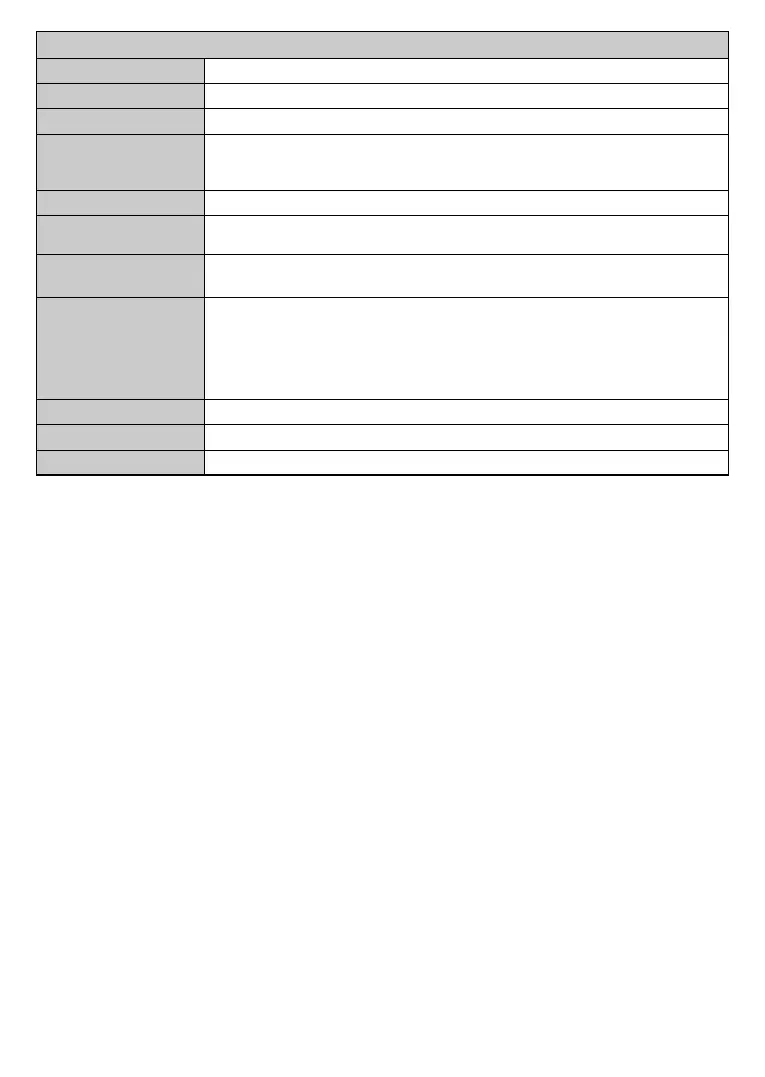
System - Sound Menu Contents
Volume Adjusts the volume level.
Equalizer Selects the equalizer mode. Custom settings can be made only when in User mode.
Balance Adjusts whether the sound comes from the left or right speaker.
Headphone
Sets headphone volume.
Please ensure before using headphones that the headphone volume is set to a low level, to
prevent damage to your hearing.
Sound Mode You can select a sound mode (If the viewed channel supports).
Audio Link
Press OK to open the Audio Link menu screen. Using this screen you can discover and
connect the sound devices to your TV wirelessly.
AVL (Automatic Volume
Limiting)
Headphone/Lineout
select this option as Lineout. If you have connected headphones to the TV, set this option
as Headphone.
Please ensure before using headphones that this menu item is set to Headphone. If it is
set to Lineout, the output from the headphone socket will be set to maximum which could
damage your hearing.
Dynamic Bass Enables or disables the Dynamic Bass.
Surround sound Surround sound mode can be changed as On or .
Digital Out Sets digital out audio type.





 To Next Page