English - 47 -
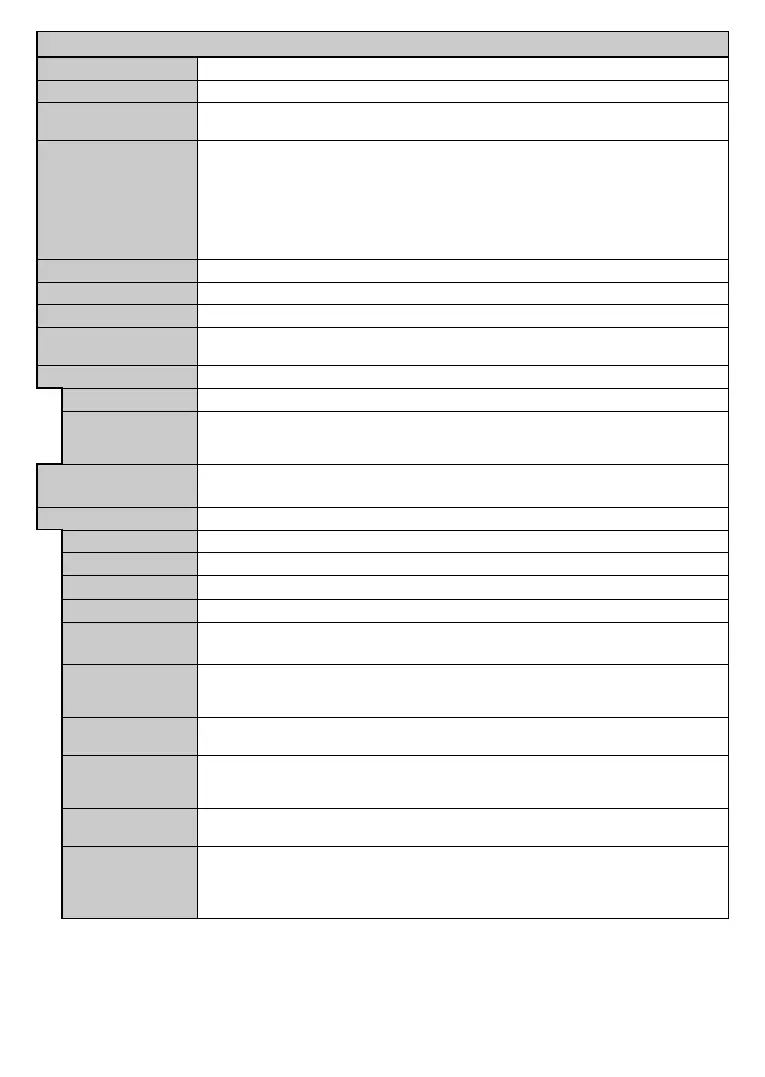
System - Settings Menu Contents
Conditional Access Controls conditional access modules when available.
Language
Privacy Settings (*)
Manage your privacy privileges for smart TV related applications. Press OK to enter the menu
and set according to your preferences.
Parental
Enter correct password to change parental settings. You can easily adjust Menu Lock,
Maturity Lock, Child Lock or Guidance in this menu. You can also set a new PIN or
change the Default CICAM PIN using the related options.
Note: Some menu options may not be available depending on the country selection in the
First Time Installation
First Time Installation use
Timers
Date/Time Sets date and time.
Sources Enables or disables selected source options.
Network/Internet
Displays network/internet settings.
Accessibility Displays accessibility options of the TV.
Hard of Hearing Enables any special feature sent from the broadcaster.
Audio Description
A narration track will be played for the blind or visually impaired audience. Press OK to
see all available Audio Description menu options. This feature is available only if the
broadcaster supports it.
Displays other setting options of the TV.
Menu Timeout Changes timeout duration for menu screens.
HBBTV You can enable or disable this feature by setting it as On or .
Software Upgrade OK to see the menu options.
Application Version Displays current software version.
Subtitle Mode
This option is used to select which subtitle mode will be on the screen (DVB subtitle / Teletext
subtitle) if both is available. Default value is DVB subtitle. This feature is available only for the
country option of Norway.
Auto TV OFF
Sets the desired time for the TV to automatically go into standby mode when not being
operated.
Biss is a satellite signal scrambling system that is used for some broadcasts. If you need to enter Biss
key on a broadcast, you can use this setting. Highlight Biss Key and press OK to enter keys on the
desired broadcast.
Store Mode
Select this mode for store display purposes. Whilst Store Mode is enabled, some items in
the TV menu may not be available.
Audio Video
Sharing
Audio Video Sharing
you have a compatible smartphone or tablet pc and the appropriate software is installed, you can
share/play photos on your TV. See instructions of your sharing software for more information. Audio
Video Sharing mode will not be available with internet portal feature.






 To Next Page