User Manual CX3
59300625 Rev.001
1.2.2018 3(4)
Interfaces
9918012
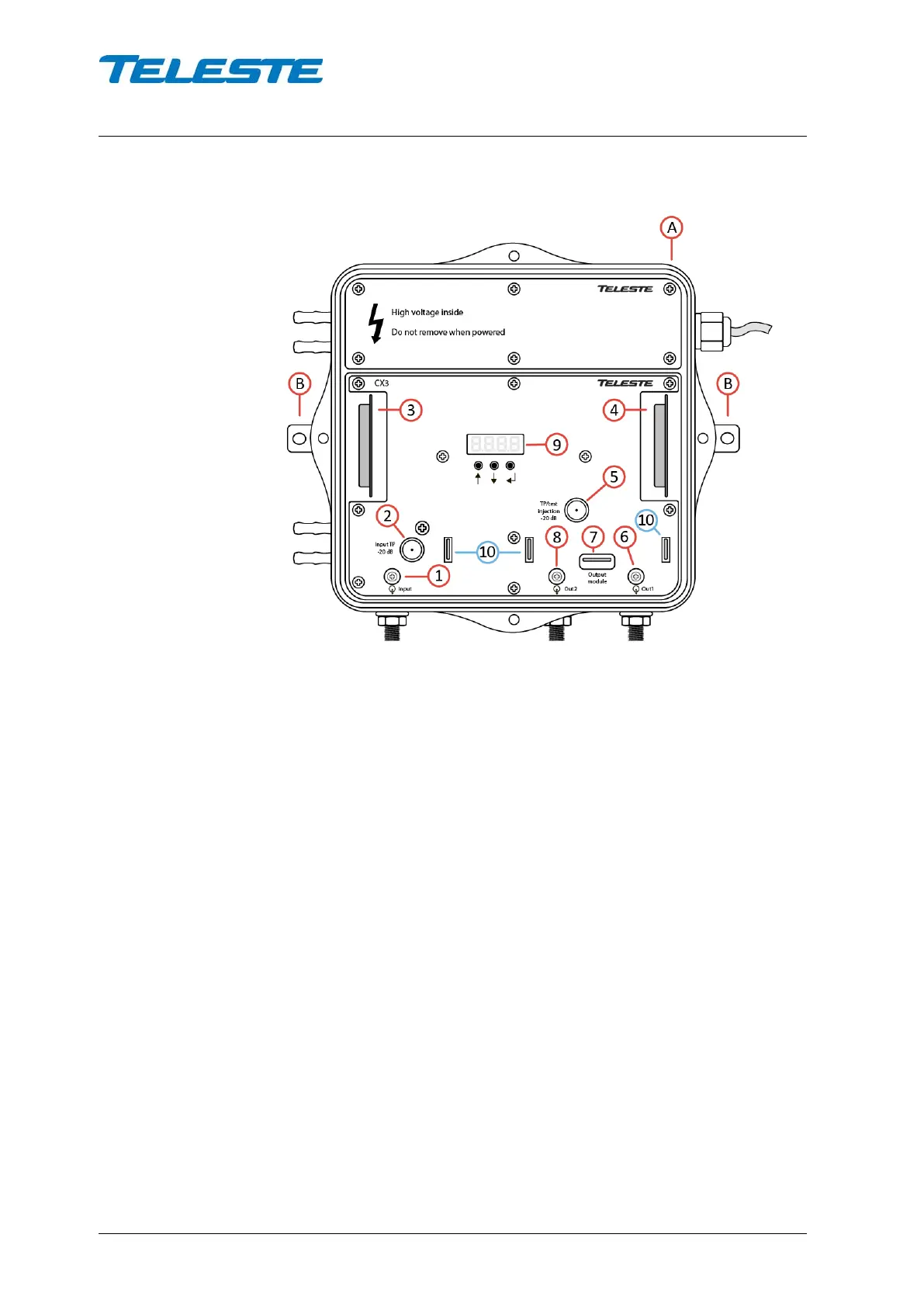
Figure 1 CX3 housing details
1) Input port
2) Input test point -20 dB
3) Input diplex filter module
4) Output diplex filter module
5) Output test/injection point -20 dB
6) Output port 1
7) Output module
8) Output port 2
9) Local user interface
10) Fuses (remote powered model only)
Local user interface
The CX3 amplifier has a local user interface consisting of a 4*7-segment display
and 3 buttons. This local UI is used for basic configuration. During the power-up
"Teleste" text scrolls through the display. Pressing “Enter” button wakes up the
display and activates the first menu item. If there is no button activity during ~3
minutes, the display will go dark.
The “Up” / “Down” buttons browse through the menu items, The “Enter” button
selects the item for modification / reading, “Up” / “Down” changes the value of a
parameter and “Enter” returns to the menu.


 To Next Page