76
Installation
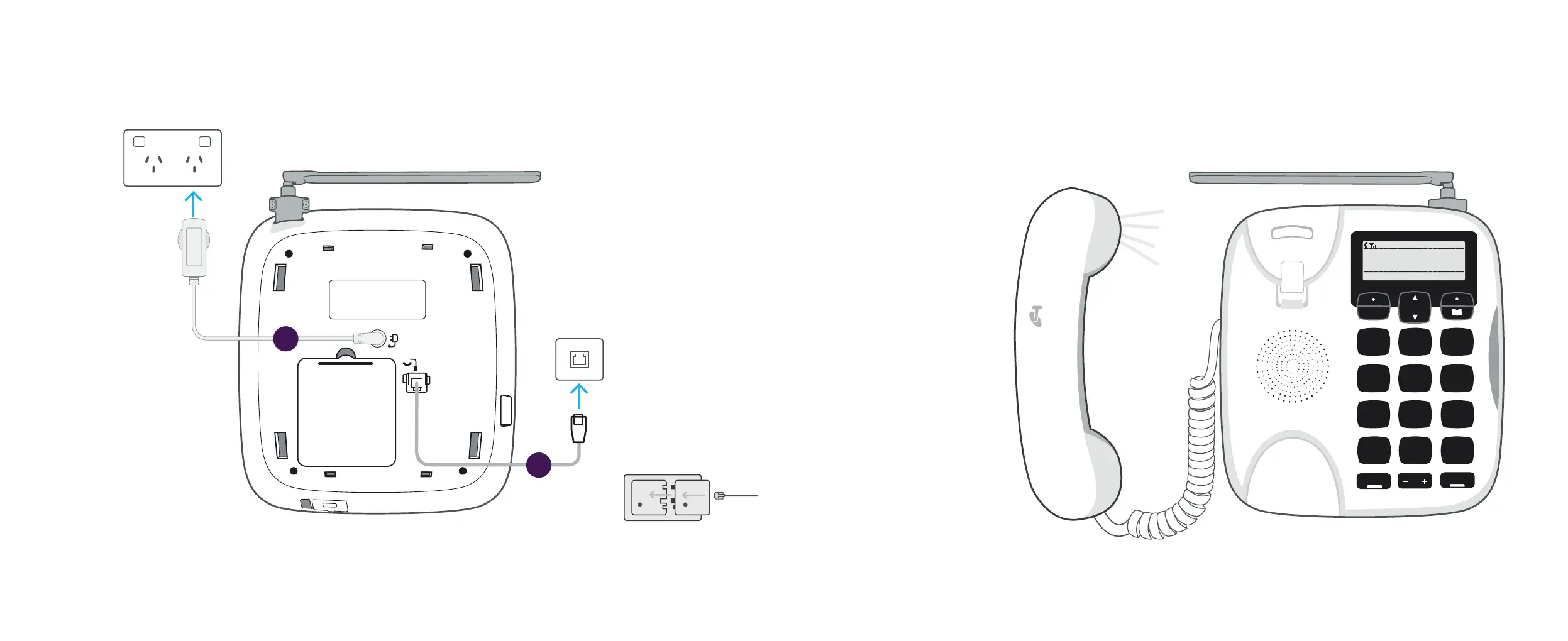
Got an older-style telephone wall socket?
You may need to purchase an adapter rst.
These can be found at most hardware or
electronics stores.
1
2
1. Plug in the
power adapter
Ensure the power point
stays on so that the
phone’s back-up battery
remains charged. Your
fully charged phone
battery will remain
operational for up to
8 hours in the event
of a power outage.
2. Connect to a
telephone socket
Using the grey phone
cable supplied, connect
the phone to your
telephone socket.
3. Check for dial tone
• Pick up your handset
and check that you
have a dial tone.
• If a dial tone is heard,
you will be able to make
and receive calls now.
In the event of a phone
line or power outage, you
should still hear a tone.
Your Telstra Priority Assist
Phone will automatically
switch over to the battery
and/or emergency mobile
back-up mode to ensure
you can make calls as usual.
1
4
5
6
7
8
9
M*
0 #
2 3
Mute
PQRS
GHI
JKL
ABC
R
Back
Calls
List
DEF
MNO
TUV
WXYZ
VOL
Handsfree
O1-O1
Menu
12:O1
The next section will show
you how to set up your phone.



 To Next Page