EasyManua.ls Logo

Teltonika FM1120 - User Manual

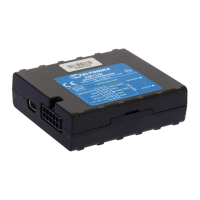
Teltonika FM1120
88 pages
Print Icon
To Next Page IconTo Next Page
Loading...
FM1120 User Manual
V4.4
*This version is suitable for device with universal FM11YX firmware
base v.01.17.xx

Table of Contents

Other manuals for Teltonika FM1120

Question and Answer IconNeed help?

Do you have a question about the Teltonika FM1120 and is the answer not in the manual?

Summary

1 Introduction

1.1 Safety Precautions

General safety warnings and attention points.

1.2 Safety Instructions

Detailed instructions for safe operation and installation.

2 Basic Description

1.3 Legal Notice

Copyright, disclaimer, and manufacturer rights.

1.4 About Document

Document scope, acronyms, and terms.

2.1 Package Contents

List of items included in the device package.

2.2 Basic Characteristics

Overview of device's GSM/GPRS and GNSS features.

2.3 Technical Features

FM1120 Specifications Table

Detailed technical specifications of the FM1120.

2.4 Internal Battery Information

2.5 Electrical Characteristics

Detailed electrical properties, ranges, and units.

2.6 Absolute Maximum Ratings

Analog Input Error Margin Note

Note on analog input error variations.

3 Connection, Pinout, Accessories

3.1 SIM Card Insertion Guide

Step-by-step guide to SIM card installation.

3.2 Installing FM1120 Drivers

Driver Installation Wizard Steps

Visual guides for driver installation process.

3.3-3.5 LEDs and Socket Pinout

3.5 Socket 2 x5 Pinout Diagram

Diagram of the 2x5 connector pinout.

3.6 USB and COM Port Identification

3.7 Accessories

1-Wire Device Connection Schemes

Information on 1-Wire devices and connection schemes.

Sensor Connection Diagrams

Relay Connections and Pinouts

4 Firmware Update

4.1 Updating Firmware via USB

Steps to update firmware using a USB cable.

5 Operational Basics

5.1 Operational Principles

How the device acquires and sends data records.

5.2 Sleep Modes

5.2.1 Sleep Mode

Description and conditions for device sleep mode.

5.2.2 Deep Sleep Mode

Description and conditions for deep sleep mode.

5.3-5.4 Features Overview

5.4.1 Scenarios Overview

Introduction to the device's available scenarios.

Scenario Details

Scenario Details (Jamming, Authorized Driving, Immobilizer)

Specific details on Jamming, Authorized Driving, and Immobilizer scenarios.

5.4.2 Trip and 5.4.3 Geofencing

Configuration for Trip and Geofencing features.

5.5 Configuration

5.6 Configurator Software

Using the FM1120 Configurator program.

Recommended vs. Advanced Configuration Modes

5.7-5.8 System Settings

System Parameter Configurations

Detailed system parameter settings.

Stop Detection and Static Navigation Settings

5.9-5.11 Records and GSM Settings

5.10 GSM Settings: GPRS Part

Configuration of GPRS parameters.

5.11 GSM Settings: SMS Part

5.12 Data Acquisition Mode Settings

Operator List Configuration

Configuring the operator list for modes.

Data Acquisition Mode Logic Flow

Mode Parameter Configurations

GPRS Week Time Configuration

Data Acquisition Methods Explained

5.13 Features Settings

5.13.1 Scenarios Settings

Configuration of device scenarios and digital outputs.

5.13.2 Trip Settings

Trip Start;Stop SMS Event Configuration

Configuring SMS events for trip start/stop.

5.13.3 Geofencing Settings

Geofence Border Configuration

Setting the frame border thickness for geofencing.

Geofence and AutoGeofencing Configuration

5.13.4 SMS Events

SMS Events for Geofencing and AutoGeofencing

Configuring SMS alerts for geofence events.

SMS Event Predefined Numbers and Activation

5.13.4.1 SMS Events Configuration

Scenario SMS Event Configuration

Configuring SMS events for scenarios.

Scenario SMS Event Configuration

Trip SMS Event Configuration

Configuring SMS events for trip events.

Geofence SMS Event Configuration

AutoGeofence SMS Event Configuration

I;O SMS Event Configuration

Configuring SMS events for I/O properties.

5.14 I;O Settings

General I;O Settings Configuration

Configuring I/O elements and parameters.

5.14.1-5.14.2 Monitoring and Event Generating

I;O Monitoring and Event Generation Settings

Configuring I/O monitoring and event generation.

Digital Input Event Generation Example

5.14.3 Hysteresis Configuration

6 SMS Command List

6.1 SMS Command List Overview

Comprehensive list of available SMS commands.

SMS Commands: getstatus to getgps

SMS Commands: ggps to getinfo

SMS Commands: getio to setparam

SMS Commands: getparam variations, readops, flush

SMS Commands: sn, banlist, crashlog, LV-CAN commands

7 Debug Mode

Terminal Window for Logging

Using the terminal for logging data.

8 Parameter List

8.1 Parameter Value Types

Explanation of different parameter value types.

8.2.5-8.2.10 System Parameters

8.3 Records Parameters

8.3.1-8.3.3 Records Parameters (Sorting, Timeouts)

Parameters related to record management and timeouts.

8.4 GSM Parameters

8.4.1-8.4.6 GSM Parameters (GPRS Activation, APN, Domain, Port)

Key GSM and GPRS configuration parameters.

8.4.7-8.4.12 GSM Parameters

8.4.7-8.4.12 GSM Parameters (Protocol, SMS Login;Password, Phone Numbers)

Additional GSM parameters including SMS security.

8.4.13-8.4.14 SMS Event Numbers and Operator List

8.5 Data Acquisition Mode Parameters

8.5.1 Home Network Vehicle on STOP Parameters

Acquisition parameters for Home Network, vehicle stopped.

8.5.2 Home Network Vehicle MOVING Parameters

8.5.3-8.5.4 Roaming Network Parameters

8.5.3 Roaming Network Vehicle on STOP Parameters

Acquisition parameters for Roaming Network, vehicle stopped.

8.5.4 Roaming Network Vehicle MOVING Parameters

8.5.5-8.5.6 Unknown Network Parameters

8.5.5 Unknown Network Vehicle on STOP Parameters

Acquisition parameters for Unknown Network, vehicle stopped.

8.5.6 Unknown Network Vehicle MOVING Parameters

8.6 Features Parameters

8.6.1 Digital Output Scenarios

Scenarios for Digital Output No.1 usage.

8.6.2-8.6.8 Feature Settings

8.6.2-8.6.8 Feature Settings (Braking, Speed, Trip, Ignition)

Various feature settings like forces, speed, trip, and ignition.

8.6.9 Trip Distance Counting and 8.6.10 Geofencing

Geofence Zone Coordinates and Shape

8.6.11 AutoGeofencing Configuration

8.7 I;O Parameters

8.7.5-8.7.6 I;O Parameters

8.8 SMS Event Configuration

8.8.1 I;O#1 SMS Event Configuration

Configuring SMS events for I/O#1.

9 LV-CAN200 Adapter Integration

9.1 Purpose of LV-CAN200 Adapter

Understanding the function of the LV-CAN200 adapter.

9.2 LV-CAN200 Program Number Selection

9.2.1 SMS Command Configuration

Configuring the program number via SMS.

9.2.2 Manual Program Number Selection

Manually setting the program number.

9.3 Connecting FM1120 with LV-CAN200 Adapter

LV-CAN200 Adapter Connection Cable Pinout

Diagram of the adapter's cable pinout.

9.4 FM11 Configuration with LV-CAN200

SCAN Function for CAN Data

Using the SCAN function to acquire CAN data.

Offline CAN Data Configuration

Configuring CAN data without the adapter connected.

Parameters ID and Configurator Example

Configurator Example for CAN Data

Screenshot example of CAN data configuration.

Acquired Parameters IO ID Tables

LV-CAN200 IO SMS Configuration and Allowed Values

CAN Program Number Request and LV-CAN Info via SMS

Requesting CAN program number and info via SMS.

10 Mounting Recommendations

Wire Connection Guidelines

Best practices for connecting device wires.

Power Source and Ignition Wire Connection

Guidelines for connecting power and ignition wires.

Module Installation and Placement

Summary

1 Introduction

1.1 Safety Precautions

General safety warnings and attention points.

1.2 Safety Instructions

Detailed instructions for safe operation and installation.

2 Basic Description

1.3 Legal Notice

Copyright, disclaimer, and manufacturer rights.

1.4 About Document

Document scope, acronyms, and terms.

2.1 Package Contents

List of items included in the device package.

2.2 Basic Characteristics

Overview of device's GSM/GPRS and GNSS features.

2.3 Technical Features

FM1120 Specifications Table

Detailed technical specifications of the FM1120.

2.4 Internal Battery Information

2.5 Electrical Characteristics

Detailed electrical properties, ranges, and units.

2.6 Absolute Maximum Ratings

Analog Input Error Margin Note

Note on analog input error variations.

3 Connection, Pinout, Accessories

3.1 SIM Card Insertion Guide

Step-by-step guide to SIM card installation.

3.2 Installing FM1120 Drivers

Driver Installation Wizard Steps

Visual guides for driver installation process.

3.3-3.5 LEDs and Socket Pinout

3.5 Socket 2 x5 Pinout Diagram

Diagram of the 2x5 connector pinout.

3.6 USB and COM Port Identification

3.7 Accessories

1-Wire Device Connection Schemes

Information on 1-Wire devices and connection schemes.

Sensor Connection Diagrams

Relay Connections and Pinouts

4 Firmware Update

4.1 Updating Firmware via USB

Steps to update firmware using a USB cable.

5 Operational Basics

5.1 Operational Principles

How the device acquires and sends data records.

5.2 Sleep Modes

5.2.1 Sleep Mode

Description and conditions for device sleep mode.

5.2.2 Deep Sleep Mode

Description and conditions for deep sleep mode.

5.3-5.4 Features Overview

5.4.1 Scenarios Overview

Introduction to the device's available scenarios.

Scenario Details

Scenario Details (Jamming, Authorized Driving, Immobilizer)

Specific details on Jamming, Authorized Driving, and Immobilizer scenarios.

5.4.2 Trip and 5.4.3 Geofencing

Configuration for Trip and Geofencing features.

5.5 Configuration

5.6 Configurator Software

Using the FM1120 Configurator program.

Recommended vs. Advanced Configuration Modes

5.7-5.8 System Settings

System Parameter Configurations

Detailed system parameter settings.

Stop Detection and Static Navigation Settings

5.9-5.11 Records and GSM Settings

5.10 GSM Settings: GPRS Part

Configuration of GPRS parameters.

5.11 GSM Settings: SMS Part

5.12 Data Acquisition Mode Settings

Operator List Configuration

Configuring the operator list for modes.

Data Acquisition Mode Logic Flow

Mode Parameter Configurations

GPRS Week Time Configuration

Data Acquisition Methods Explained

5.13 Features Settings

5.13.1 Scenarios Settings

Configuration of device scenarios and digital outputs.

5.13.2 Trip Settings

Trip Start;Stop SMS Event Configuration

Configuring SMS events for trip start/stop.

5.13.3 Geofencing Settings

Geofence Border Configuration

Setting the frame border thickness for geofencing.

Geofence and AutoGeofencing Configuration

5.13.4 SMS Events

SMS Events for Geofencing and AutoGeofencing

Configuring SMS alerts for geofence events.

SMS Event Predefined Numbers and Activation

5.13.4.1 SMS Events Configuration

Scenario SMS Event Configuration

Configuring SMS events for scenarios.

Scenario SMS Event Configuration

Trip SMS Event Configuration

Configuring SMS events for trip events.

Geofence SMS Event Configuration

AutoGeofence SMS Event Configuration

I;O SMS Event Configuration

Configuring SMS events for I/O properties.

5.14 I;O Settings

General I;O Settings Configuration

Configuring I/O elements and parameters.

5.14.1-5.14.2 Monitoring and Event Generating

I;O Monitoring and Event Generation Settings

Configuring I/O monitoring and event generation.

Digital Input Event Generation Example

5.14.3 Hysteresis Configuration

6 SMS Command List

6.1 SMS Command List Overview

Comprehensive list of available SMS commands.

SMS Commands: getstatus to getgps

SMS Commands: ggps to getinfo

SMS Commands: getio to setparam

SMS Commands: getparam variations, readops, flush

SMS Commands: sn, banlist, crashlog, LV-CAN commands

7 Debug Mode

Terminal Window for Logging

Using the terminal for logging data.

8 Parameter List

8.1 Parameter Value Types

Explanation of different parameter value types.

8.2.5-8.2.10 System Parameters

8.3 Records Parameters

8.3.1-8.3.3 Records Parameters (Sorting, Timeouts)

Parameters related to record management and timeouts.

8.4 GSM Parameters

8.4.1-8.4.6 GSM Parameters (GPRS Activation, APN, Domain, Port)

Key GSM and GPRS configuration parameters.

8.4.7-8.4.12 GSM Parameters

8.4.7-8.4.12 GSM Parameters (Protocol, SMS Login;Password, Phone Numbers)

Additional GSM parameters including SMS security.

8.4.13-8.4.14 SMS Event Numbers and Operator List

8.5 Data Acquisition Mode Parameters

8.5.1 Home Network Vehicle on STOP Parameters

Acquisition parameters for Home Network, vehicle stopped.

8.5.2 Home Network Vehicle MOVING Parameters

8.5.3-8.5.4 Roaming Network Parameters

8.5.3 Roaming Network Vehicle on STOP Parameters

Acquisition parameters for Roaming Network, vehicle stopped.

8.5.4 Roaming Network Vehicle MOVING Parameters

8.5.5-8.5.6 Unknown Network Parameters

8.5.5 Unknown Network Vehicle on STOP Parameters

Acquisition parameters for Unknown Network, vehicle stopped.

8.5.6 Unknown Network Vehicle MOVING Parameters

8.6 Features Parameters

8.6.1 Digital Output Scenarios

Scenarios for Digital Output No.1 usage.

8.6.2-8.6.8 Feature Settings

8.6.2-8.6.8 Feature Settings (Braking, Speed, Trip, Ignition)

Various feature settings like forces, speed, trip, and ignition.

8.6.9 Trip Distance Counting and 8.6.10 Geofencing

Geofence Zone Coordinates and Shape

8.6.11 AutoGeofencing Configuration

8.7 I;O Parameters

8.7.5-8.7.6 I;O Parameters

8.8 SMS Event Configuration

8.8.1 I;O#1 SMS Event Configuration

Configuring SMS events for I/O#1.

9 LV-CAN200 Adapter Integration

9.1 Purpose of LV-CAN200 Adapter

Understanding the function of the LV-CAN200 adapter.

9.2 LV-CAN200 Program Number Selection

9.2.1 SMS Command Configuration

Configuring the program number via SMS.

9.2.2 Manual Program Number Selection

Manually setting the program number.

9.3 Connecting FM1120 with LV-CAN200 Adapter

LV-CAN200 Adapter Connection Cable Pinout

Diagram of the adapter's cable pinout.

9.4 FM11 Configuration with LV-CAN200

SCAN Function for CAN Data

Using the SCAN function to acquire CAN data.

Offline CAN Data Configuration

Configuring CAN data without the adapter connected.

Parameters ID and Configurator Example

Configurator Example for CAN Data

Screenshot example of CAN data configuration.

Acquired Parameters IO ID Tables

LV-CAN200 IO SMS Configuration and Allowed Values

CAN Program Number Request and LV-CAN Info via SMS

Requesting CAN program number and info via SMS.

10 Mounting Recommendations

Wire Connection Guidelines

Best practices for connecting device wires.

Power Source and Ignition Wire Connection

Guidelines for connecting power and ignition wires.

Module Installation and Placement

Teltonika FM1120 Specifications

General IconGeneral
Digital Inputs2
Digital Outputs1
GSMQuad-band 850/900/1800/1900 MHz
GPRSClass 12
GPSYes
Tracking sensitivity-161 dBm
Acquisition sensitivity-148 dBm
Hot start<1s
Cold start<35s
Analog Inputs1
InterfaceRS232
GNSSGPS
GNSS Channels50
BluetoothNo
Wi-FiNo
IP RatingIP54
AccelerometerYes
CAN BusNo
Serial InterfaceRS232
Power Supply10V - 30V DC
CommunicationGSM/GPRS
Operating Temperature+55°C
SIM CardSIM
Warm start25 s
Cellular ConnectivityGSM
Battery BackupYes
SMSSMS (text, data)
Position Accuracy<2.5m