EasyManua.ls Logo

Teltonika Maxview MXL050 Roam - User Manual

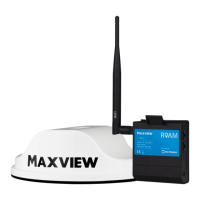
Teltonika Maxview MXL050 Roam
36 pages
Print Icon
To Next Page IconTo Next Page
Loading...
Installation & User Instructions - Version 2*
MXL050
UK contact:
Helpline: +44 (0)1553 811000
Email: support@maxview.co.uk
Web: www.maxview.co.uk
Maxview reserve the right to change specifications without prior notice
9111431 Iss 1
Roam
We have partnered up with one of the largest
suppliers of Wi-Fi products worldwide.
Maxview Roam Powered by
*Please visit our website to check
for latest versions of these instructions
Question and Answer IconNeed help?

Do you have a question about the Teltonika Maxview MXL050 Roam and is the answer not in the manual?

Summary

Product Installation Guide

Positioning Your Roam

Guidance on placing the router and antenna for optimal performance and space.

Important Antenna Installation Information

Key considerations for secure and permanent antenna mounting on roof surfaces.

Fitting the Antenna

Step-by-step guide for drilling and securing the antenna through the roof.

Router Installation

Instructions for mounting the router bracket and connecting cables and power.

Basic Connectivity and Setup

Router Overview and Components

Identifies and explains the router's ports, LEDs, and the credential sticker.

Connecting Your Device via Wi-Fi (Device Settings)

Connecting devices via Wi-Fi using device settings.

Connecting Your Device via Wi-Fi (QR Code)

Connecting devices via Wi-Fi using the QR code method.

Factory Reset Procedure

Steps to restore the router to its default factory settings using the reset button.

Advanced Router Configuration

Accessing the Web User Interface

Instructions on how to access and log into the router's web-based configuration.

Logging Out of the Web UI

Procedure for safely logging out of the router's web interface after use.

Changing Router Language

Steps to select and set the preferred language for the router's interface.

Managing Internet Source Priority

Setting Primary Internet Source (3 G;4 G or Wi-Fi)

Guide to configure the router to prioritize Wi-Fi over 3G/4G when available.

Router Functions and Features

Managing Wi-Fi Connections

How to view, manage, and remove saved Wi-Fi network connections.

Changing Wi-Fi Network Name and Password

Steps to customize the router's Wi-Fi hotspot name (SSID) and password.

Entering SIM Card PIN

Procedure for inputting the SIM card PIN if it's activated for security.

Managing Mobile Data Usage

How to set data limits and receive SMS warnings for monitoring usage.

Using the Teltonika Mobile App

Overview of the mobile app for managing router functions like usage and settings.

Updating Router Firmware

Updating Router Firmware

Instructions for updating the router's firmware to the latest version for new features.

Support and Important Details

General Safety Warnings

Important safety precautions to follow during installation and operation.

Terms and Conditions

Legal disclaimers and conditions regarding product use, warranty, and SIM cards.

Maintenance and Cleaning

Recommendations for keeping the antenna clean for optimal signal strength.

One Year Limited Guarantee

Details of the warranty coverage, exclusions, and return procedures.

Troubleshooting and FAQs

Solutions to common issues and answers to frequently asked questions about the router.

Product Specifications

Technical details of the antenna and router, including dimensions and capabilities.

Certification and Environmental Information

Information on product compliance with EEC directives and environmental disposal.

Summary

Product Installation Guide

Positioning Your Roam

Guidance on placing the router and antenna for optimal performance and space.

Important Antenna Installation Information

Key considerations for secure and permanent antenna mounting on roof surfaces.

Fitting the Antenna

Step-by-step guide for drilling and securing the antenna through the roof.

Router Installation

Instructions for mounting the router bracket and connecting cables and power.

Basic Connectivity and Setup

Router Overview and Components

Identifies and explains the router's ports, LEDs, and the credential sticker.

Connecting Your Device via Wi-Fi (Device Settings)

Connecting devices via Wi-Fi using device settings.

Connecting Your Device via Wi-Fi (QR Code)

Connecting devices via Wi-Fi using the QR code method.

Factory Reset Procedure

Steps to restore the router to its default factory settings using the reset button.

Advanced Router Configuration

Accessing the Web User Interface

Instructions on how to access and log into the router's web-based configuration.

Logging Out of the Web UI

Procedure for safely logging out of the router's web interface after use.

Changing Router Language

Steps to select and set the preferred language for the router's interface.

Managing Internet Source Priority

Setting Primary Internet Source (3 G;4 G or Wi-Fi)

Guide to configure the router to prioritize Wi-Fi over 3G/4G when available.

Router Functions and Features

Managing Wi-Fi Connections

How to view, manage, and remove saved Wi-Fi network connections.

Changing Wi-Fi Network Name and Password

Steps to customize the router's Wi-Fi hotspot name (SSID) and password.

Entering SIM Card PIN

Procedure for inputting the SIM card PIN if it's activated for security.

Managing Mobile Data Usage

How to set data limits and receive SMS warnings for monitoring usage.

Using the Teltonika Mobile App

Overview of the mobile app for managing router functions like usage and settings.

Updating Router Firmware

Updating Router Firmware

Instructions for updating the router's firmware to the latest version for new features.

Support and Important Details

General Safety Warnings

Important safety precautions to follow during installation and operation.

Terms and Conditions

Legal disclaimers and conditions regarding product use, warranty, and SIM cards.

Maintenance and Cleaning

Recommendations for keeping the antenna clean for optimal signal strength.

One Year Limited Guarantee

Details of the warranty coverage, exclusions, and return procedures.

Troubleshooting and FAQs

Solutions to common issues and answers to frequently asked questions about the router.

Product Specifications

Technical details of the antenna and router, including dimensions and capabilities.

Certification and Environmental Information

Information on product compliance with EEC directives and environmental disposal.

Teltonika Maxview MXL050 Roam Specifications

Antenna Specifications IconAntenna Specifications
frequency range698MHz to 2700MHz
peak gain at 698-960MHz2.5dBi
peak gain at 1710-2700MHz5.0dBi
Power IconPower
router power supply12V, 1A
router power consumption0.4A
antenna power typePassive
Connectivity IconConnectivity
router compatible speedsUp to 150Mps
router ethernet ports2 x RJ45
router connection devicesUp to 50
Weight and Dimensions IconWeight and Dimensions
antenna dimensionsø: 196mm x H: 65mm
antenna weight500g
router dimensionsH: 83 x W: 74 x D: 25mm
router weight125g