EasyManua.ls Logo

TemperZone HAN-L5 - User Manual

TemperZone HAN-L5
2 pages
Print Icon
To Next Page IconTo Next Page
Loading...
WEEK HOUR MIN
CLOCK PROG RST/RCL
ON AUTO OFF
AM
Mo Tu We Th Fr Sa Su
ON
ON
OFF
7 DAY AUTO ON/OFF TIMER
HAN-L5
RUN
TIMER
AUTO HIGH MED LOW
FAN COOL AUTO HEAT
FAN SPEED INDICATORS
MODE SWITCH
SYSTEM ON LIGHT
LED DISPLAY
COUNT DOWN TIMER ON
TEMPERATURE UP
BATTERIES
SET COUNT DOWN TIMER
TEMPERATURE DOWN
FAN SPEED SELECT
TIMER
12HR
SPEED
FAN
OVERRIDE
SELECTABLE RE-START AFTER POWER FAILURE
The HAN-L5 controller can be field set by the building occupier for the following function.
a) Auto re-start after power failure.
b) No re-start after power failure.
Setting of the control for one of the above options is as follows.
a) Auto re-start after power failure.
Note: Batteries must be installed for this function to operate.
1) Press time clock override button and move display bar under time display to “ON”
position or to “AUTO” position following “ON” position.
In this setup mode should a power failure occur, the control will automatically re-start
the air conditioner. This will take place even if the control is switched off when the
power failure occurs.
b) No re-start after power failure.
Note: Without batteries installed this setting is not required.
With batteries installed set the control in the following sequence.
1) Press timer override button and move display bar to “OFF” position. In this position the
control will not restart after a power failure.
2) If auto start/stop programs are set.
Press override button and move bar to “OFF” then to “AUTO” position.
After this sequence the control will not restart after a power failure unless the time is
within a program “ON” time.
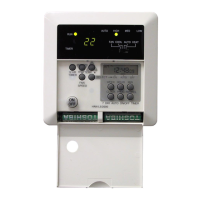
DIAGRAM OF HAN-L5 WITH FRONT DOOR OPEN
AIR CONDITIONER OPERATING
INSTRUCTIONS
HAN-L5 MICROPROCESSOR CONTROLLER
Congratulations on your purchase of a quality air conditioning system. Your
air conditioning system is equipped with the latest HAN-L5 microprocessor
system controller. The HAN-L5 is a sophisticated controller incorporating
advanced trend optimising software to maintain a high level of comfort
control. To cater for the various climatic conditions you can select fan only
for air circulation, heat or cool operation or if you prefer set the control to
auto for fully automatic temperature control. As the controller is pre-
programmed for your comfort, operation of the control is conveniently easy.
The HAN-L5 also features 2 easy to use timer functions. A count down
timer providing delay stop or delay start feature and can be set for 1 to 12
hours. A 7 day time clock is also incorporated which allows auto start/stop
settings. A total of 6 ON/OFF setting times can be selected. The 7 day time
clock has battery back up to prevent loss of settings should the main power
supply be turned off.
Full operational instructions are provided in the following.

Question and Answer IconNeed help?

Do you have a question about the TemperZone HAN-L5 and is the answer not in the manual?

Summary

Selectable Re-Start After Power Failure

Auto re-start after power failure

Configure the controller to automatically restart the air conditioner after a power failure.

No re-start after power failure

Configure the controller to prevent automatic restart after a power failure.

HAN-L5 OPERATING INSTRUCTIONS

Switch On

Procedure to turn on the air conditioning unit and confirm operation.

Switch Off (Standby Mode)

Procedure to turn off the unit to standby mode, retaining settings.

System Memory

Explanation of how the controller retains settings after power interruption.

System Mode Switch (Slide Switch) FAN;COOL;AUTO;HEAT

How to select operating modes: Fan, Cool, Auto, or Heat.

Fan Speed Adjustment

How to adjust the fan speed settings for optimal airflow.

Temperature Adjustment

How to set the desired temperature for comfort control.

Count Down Timer-On Setting

Setting a delayed start for the air conditioner unit.

Timer-On Cancellation

How to cancel a set timer-on function.

Timer-On Override

How to override a timer-on setting.

Count Down Timer-Off Setting

Setting a delayed stop for the air conditioner unit.

Auto Restart After Power Failure

Behavior of the unit after a power failure during 7-day timer control.

7 DAY AUTO TIME CLOCK

Clock Setting

Procedure to set the current time and day on the digital clock.

Timer Setting

How to program daily ON/OFF times for the unit.

Batteries

Information regarding battery replacement and backup for settings.

Summary

Selectable Re-Start After Power Failure

Auto re-start after power failure

Configure the controller to automatically restart the air conditioner after a power failure.

No re-start after power failure

Configure the controller to prevent automatic restart after a power failure.

HAN-L5 OPERATING INSTRUCTIONS

Switch On

Procedure to turn on the air conditioning unit and confirm operation.

Switch Off (Standby Mode)

Procedure to turn off the unit to standby mode, retaining settings.

System Memory

Explanation of how the controller retains settings after power interruption.

System Mode Switch (Slide Switch) FAN;COOL;AUTO;HEAT

How to select operating modes: Fan, Cool, Auto, or Heat.

Fan Speed Adjustment

How to adjust the fan speed settings for optimal airflow.

Temperature Adjustment

How to set the desired temperature for comfort control.

Count Down Timer-On Setting

Setting a delayed start for the air conditioner unit.

Timer-On Cancellation

How to cancel a set timer-on function.

Timer-On Override

How to override a timer-on setting.

Count Down Timer-Off Setting

Setting a delayed stop for the air conditioner unit.

Auto Restart After Power Failure

Behavior of the unit after a power failure during 7-day timer control.

7 DAY AUTO TIME CLOCK

Clock Setting

Procedure to set the current time and day on the digital clock.

Timer Setting

How to program daily ON/OFF times for the unit.

Batteries

Information regarding battery replacement and backup for settings.

TemperZone HAN-L5 Specifications

General IconGeneral
BrandTemperZone
ModelHAN-L5
CategoryControl Panel
LanguageEnglish