6
7
8
9
•
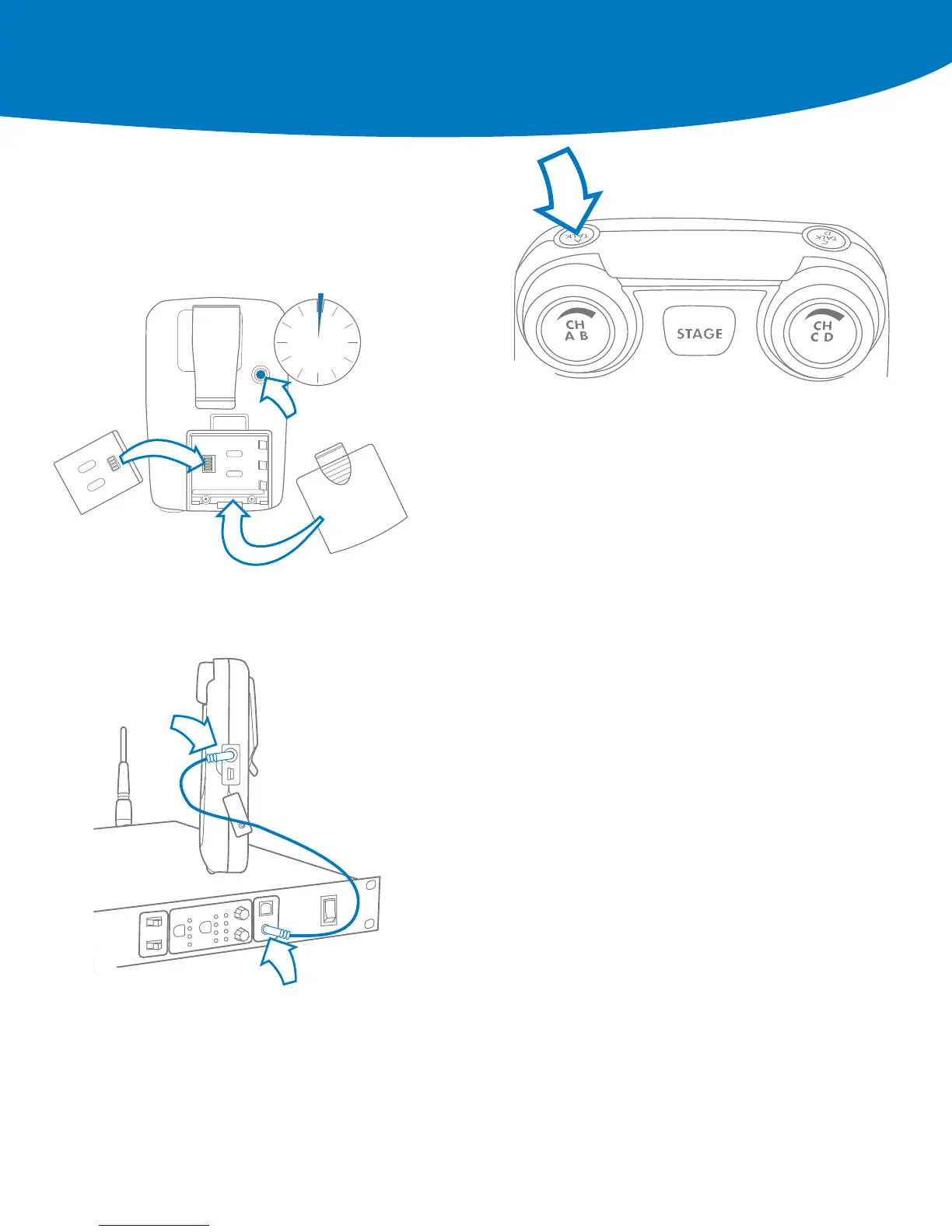
Remove the battery door by pressing down and back
•
Install the battery (or 3 AA batteries) & replace the battery door
•
Press and hold the ON/OFF button for two seconds
•
The BeltStation will vibrate as it powers up
•
Power the Belt OFF by pressing and holding the ON/OFF button
for two seconds
•
Plug a headset into each Belt
•
To set mic gain, Press ENTER. Scroll down to set controls
•
Select mic gain and Press ENTER to save
•
Set the mic gain for the headset that you are using
------ Speak loudly into the microphone and adjust the mic gain setting so that
the blue talk LED just starts to flash red. Press ENTER to save
•
Select the desired communication channel by pressing the A/B or C/D
channel selector
•
Set the headset listen volume by turning the A/B or C/D rotary control
•
Press the TALK button to talk to others on the selected channel (the blue
flashing LED will light continuously when talk is enabled on that channel)*
•
Confirm the desired talk channel and talk status by observing the Belt
LCD screen
•
Select the correct intercom type on the front of the Base
------ Intercom type select switch A&B controls both intercom channels
A and B. C&D controls both intercom channels C and D
------ CLEAR-COM is used for Clear-Com and Clear-Com compatible
2-Wire systems
------ RTS is used for RTS and RTS compatible systems
--- BAL is used for Telex AudioCom & AudioCom compatible systems
•
Connect 3-PIN XLR cables to the back of the Base for the appropriate channel
•
Press the first SEL button to select an intercom channel A through D
•
Press the second SEL button to select 2-Wire
•
Use the IN and OUT rotary controls to set the in (from 2-Wire to Base)
and out (from Base to 2-Wire) levels
•
Perform Auto-Null from the BaseStation* (See Manual for Details)
•
The intercom type select switches do not apply to 4-Wire operation*
•
Connect RJ-45 cables to the back of the Base for the appropriate channel
•
Press the first SEL button to select an intercom channel A through D
•
Press the second SEL button to select 4-Wire
•
Use the IN and OUT rotary controls to set the in (from 4-Wire to Base)
and out (from Base to 4-Wire) levels.
*Refer to the Tempest Owner’s Manual for detailed system information.
Power ON the BeltStation
Pair BeltStations to the
BaseStations
Start Communicating
Connecting to External
2-wire Intercom Systems
Connecting to External
4-wire Intercom systems
5
•
Confirm the Base is powered ON
•
Confirm the Belt is powered OFF
•
Connect the 3.5mm data pairing cable from the Base to the Belt
•
Power ON the Belt while watching the Belt LCD screen
•
The Belt will vibrate and “Pairing Complete” will appear momentarily on the
Belt LCD
•
The belt will return to the operational screen and Log into the Base
•
The belt will appear in the first available slot on the Base LCD screen
•
Repeat for each Belt
Note: BeltStations are named to their default setting name. They may be renamed.
Quick Start Guide


 To Next Page
 Loading...