• tempmate.com V1.0
Operation Instructions
Status Action LED confirmation
Start Logger Push button for 5 sec GREEN LED flashes 10 times
Set Mark double-click button RED LED + GREEN LED flashes 5 times simultaneously
Mark limit full double-click button RED LED + GREEN LED flashes 5 times alternating
Stop Logger Push button for 5 sec RED LED flashes 10 times
Start / Stop
Status Action LED confirmation
Not Started
push button once
RED LED + GREEN LED flashes 1 time
Recording – OK
push button once
GREEN LED flashes 1 time
Recording – Alarm
push button once
RED LED flashes 1 time
Stopped – OK
push button once
GREEN LED flashes 2 times
Stopped – Alarm
push button once
RED LED flashes 2 times
Low Battery
push button once
RED LED flashes 3 times
Scheduled Start
push button once
RED LED + GREEN LED flashes 2 times alternately
Status Request by pushing Button once
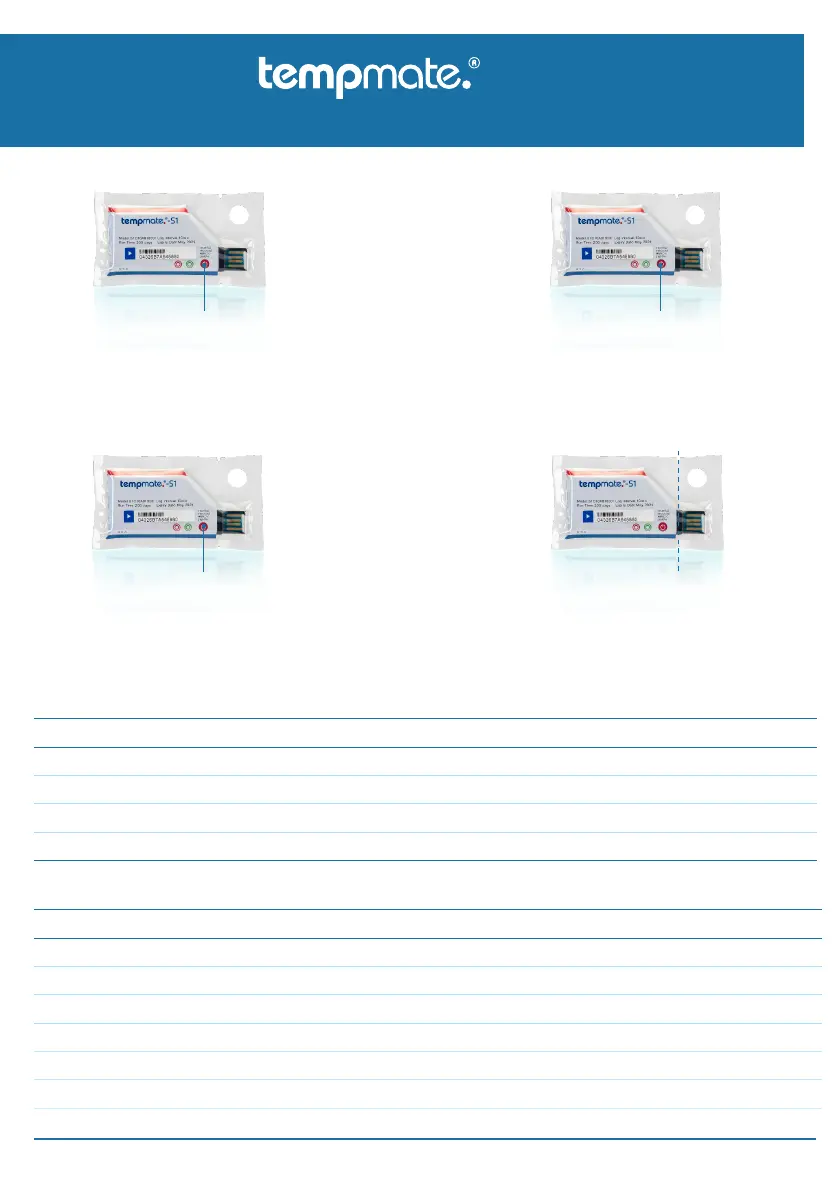
01 Press and hold for at least 5 seconds to start recording.
If the GREEN LED flashes 10 times, the start was
successful.
Note: If the GREEN LED does not flash 10 times to
indicate a correct start or RED LED flashes 3 times, DO
NOT use this logger.
02 Press button once at any time to check current
status of the logger. Double-click button to
set a mark in the report. See details of these
optional features in tables below.
03 Keep button pressed for minimum 5 seconds to
stop recording. Then RED LED flashes
10 times, which indicates a successful stopping.
Note: For safety issues the logger is not stoppable in the
first 30min. after the start.
04 After stopping record, tear o the transparent
plastic cover and connect the logger to a USB
port of the computer. The PDF ans CSV report
will be generated automatically and can be
found in the device‘s „tempmate“ folder.
Press button
Press button
Tear o
Status Request or Set Mark (optional)
Single-Use USB Data Logger
-S1
Manual –


 To Next Page
 Loading...