3
4
Power Up
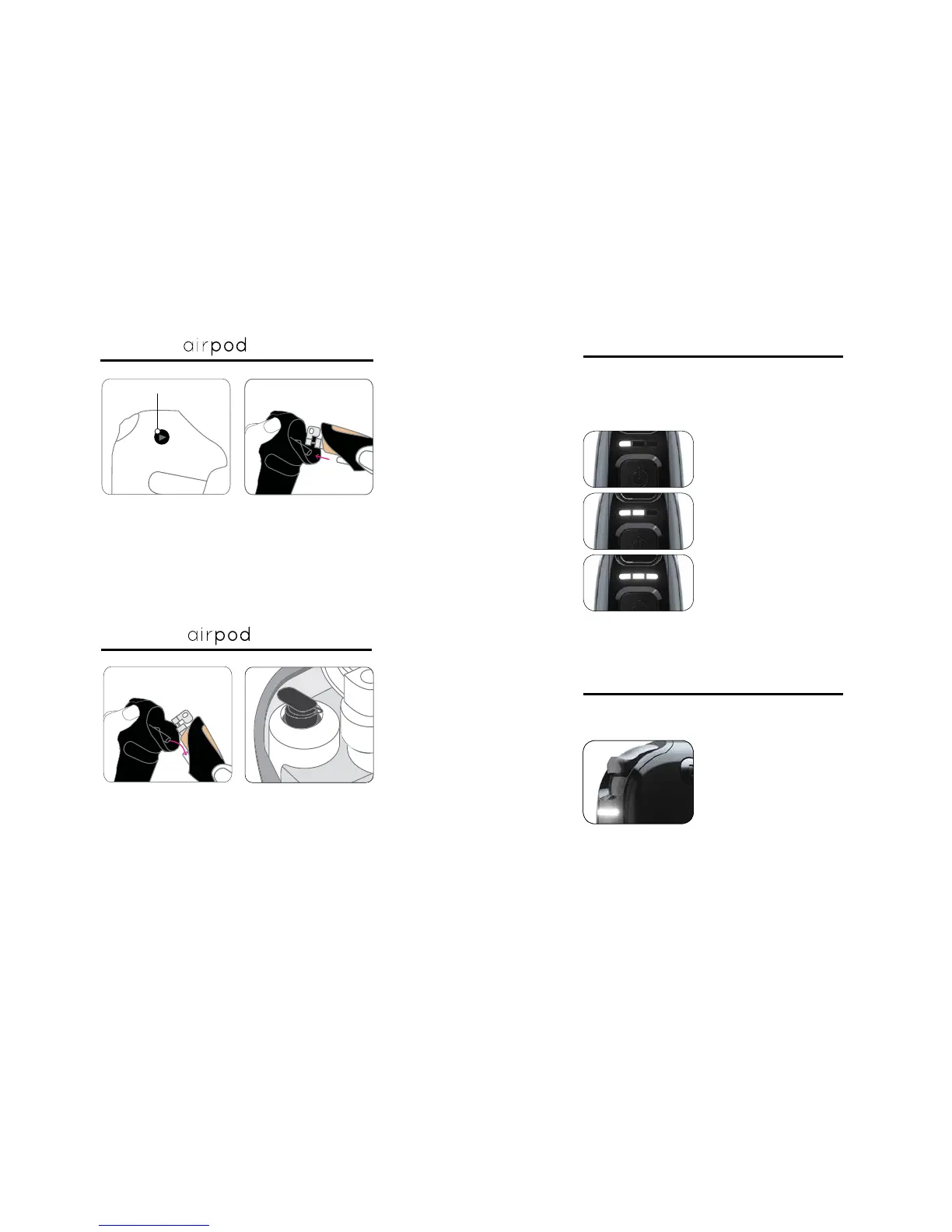
Charge before first use. Hold down on the power
button for two seconds to turn the TEMPTU Air
on and off. Tap lighty on the button to switch speeds.
Speed 1: Light Air
Speed 2: Medium Air
Speed 3: Full Air
Detail work (e.g. spot correction)
Foundation, blush and bronzer
Highlighter and larger areas
(décolletage, arms)
SoftTouch Control
For makeup to spray, use
pointer finger to hold down
the SoftTouch Control.
Practice on your hand to get
a feel
for the application.
Less is More.
Always press down lightly when applying to the face.
Only press down all the way on the SoftTouch Control
All 3 lights will start blinking when the Air needs to be
charged, which takes 1-2 hours to complete.
The SoftTouch Control regulates the amount of makeup
released from the Airpod.
Attaching
TM
Press down on the release button and slide the Airpod,
window side up, into the TEMPTU Air until it clicks into
place.
Press down on the release button and pull downward
on the Airpod to remove it from the Air.
Be sure to close the black plug on the
Airpod when not in use.
Detaching
Release Button
TM



 To Next Page