TV
AV
LIST
-
+
OK
INFO
RADIO
SWAP
EXIT
MENU
P+
P-
0-9
PVR
Remote control
PVR
PQRS TUV WXYZ
GHI JKL MNO
ABC DEF
MENU
EXITLIST
TEXT
P+
OK
P-
-+
SWAPAV
PAUSE RADIOTV
INFO
231
4
78
0
9
56
P+
OK
P-
-
+
TEL: +49(0)7237/4855-0
www.ten-haaft.com
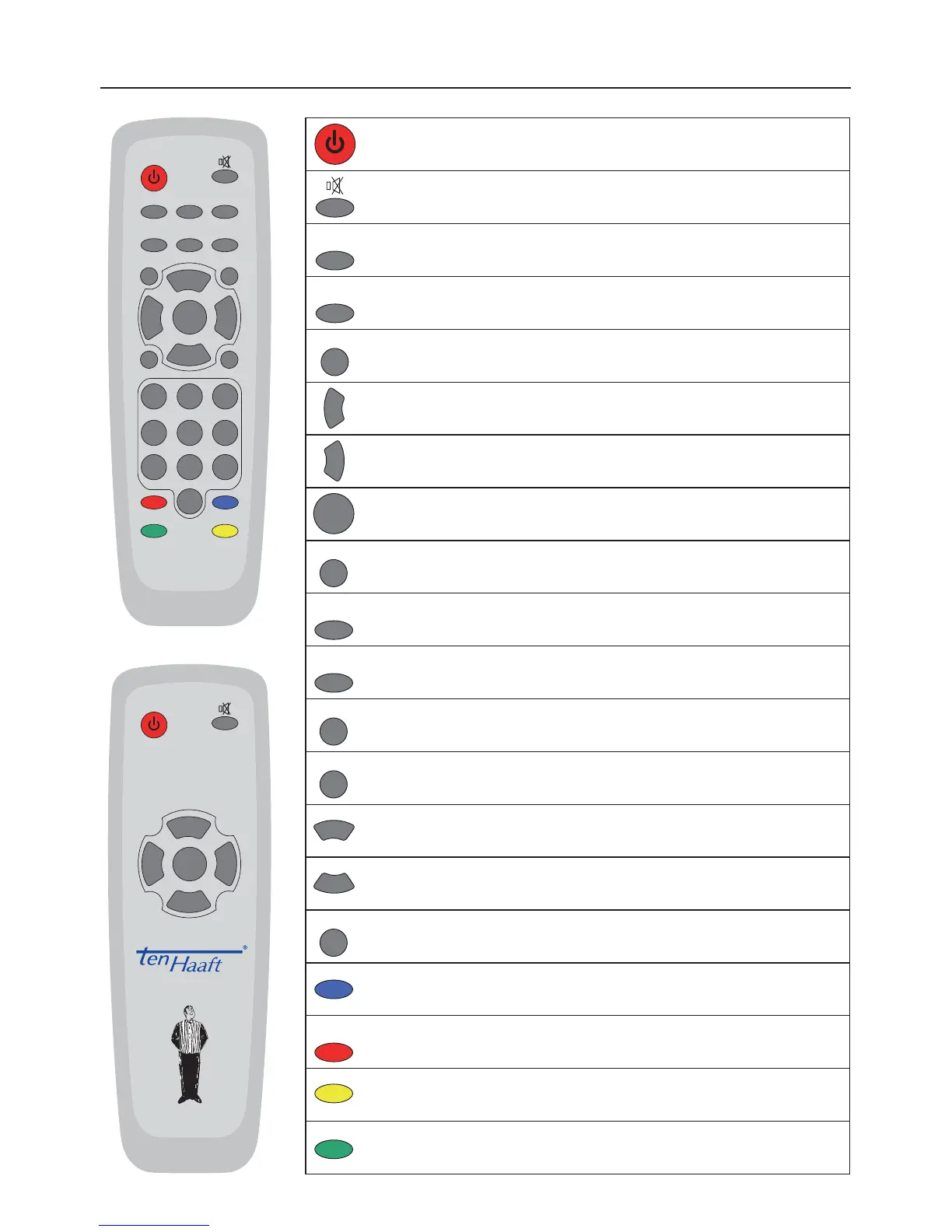
Switches the system on or off. (Power)
Mute function of speakers.
SLEEP function - press 3 sec to activate
Activation of TV mode
Activates the loop-trough of the satellite and video signal
Display of program list
Volume down. Changing of values in menus
Volume up. Changing of values in menus
Select or confi rms functions
Display of current program information (EPG)
Activation of radio mode
Return to previously selected channel
Closes on-screen menus
Display of on-screen menus
Program up. upward in menus
Program down. downward in menus
Number keys for direct channel selection
Direct selection, video/audio settings
Opens the control menu of the personal Video Recorder (optional)
Starting DVB-T program search (optional)
Caro Digital MA: Starting Menu Intelligent satellite recognition system.
OYSTER Internet: Starting satellite search
3


 To Next Page