Please note that the output connection on model 715 only
provides MIC, GND, and signal. If you have connected a
microphone to the input that includes UP/DOWN frequency
controls or other features, they will not be operable when
model 715 is connected to your transceivers’ mic jack.
Connect the supplied DC transformer to the 12-20 VDC
jack on the rear panel of the unit. Plug the opposite end into a
110 VAC source. We recommend the use of this “wall wart”
to power the unit as opposed to your transceiver and accessory
DC source as every installation is unique and this can help
prevent possible problems with ground loops introducing
distortion into your transmitted audio.
USE
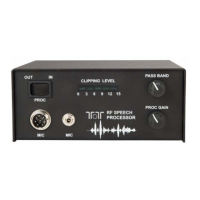
When all connections have been made, set the IN/OUT
button on the front to OUT. When set to OUT, mic audio is
bypassed directly through the unit, unprocessed, to the input of
the transceiver.
When using the processor, it is convenient to have both the
unprocessed and the processed signal level equal at the
transceiver microphone input. This will allow you to turn on
and turn off the processor without readjusting the gain on your
transceiver. The processor will allow you to adjust equal
outputs on microphones, or amplified microphones, with an
output from approximately 1mv to 14mv. If your microphone
has a greater output than 14mv, then it will not be possible to
adjust the processed output to equal the unprocessed
microphone output as described in steps 1 through 3 below. If
you are not able to adjust the processor output to drive the
transmitter into ALC, back off from the microphone and
increase the microphone gain in the transceiver.
1) With the IN/OUT button set to OUT, speak into your
microphone and adjust the mic gain control on your transceiver
to the typical operation level.
2) Press the IN/OUT button to IN. Speak into the
microphone and adjust the PROC GAIN control on the front
until some clipping is observed on the LED bargraph. 1, 2 or 3
bars lit is enough for this initial setting.
3) Adjust the rear panel PROC LEVEL control while
speaking into the microphone until the mic gain or ALC level
set on your transceiver is approximately equivalent to the one
set in step 1.
4) Adjust the front panel PROC GAIN and PASSBAND
controls for best results.
‘Best results’ can generally be accomplished by having
another station on the air listen to your transmitted SSB audio
while the processor is in use. Keep in mind that the goal of the
processor is to increase average SSB output power for a louder,
more readable signal on the receiving end rather than vastly
improved audio fidelity.
Some transceivers like the Orion and Orion II provide a
monitor for actual transmitted audio signal; this can also be
useful for adjustments for best results using model 715.
PROC GAIN controls the clipping level of high amplitude,
low energy voice peaks. Depth of clipping is indicated on the
5 LED bargraph scale, measured in dB.
The PASSBAND control on model 715 is unique. This
control permits a precise setting of the beat frequency oscillator
Part # 74425
Revision 1
January 2009


 To Next Page
 Loading...