- 6 -
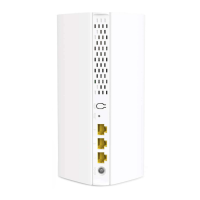
Used to start the WPS negotiation process, or to reset the router.
- WPS: Press the button of the router for 1 to 3 seconds. Within 2
minutes, enable the WPS function of the other WPS-supported
device to establish a WPS connection.
- Reset: When the router is working normally, hold the button down for
about 8 seconds, and then release it when the LED indicators blinks
fast. The router is reset.
Gigabit LAN/IPTV port.
It is a LAN port by default. When the IPTV function is enabled, it can only
serve as an IPTV port to be connected to a set-top box.
Gigabit WAN port.
- (Default) Under the Router mode, it is used to connect to a modem or an
Ethernet jack.
- Under the WISP or universal repeater mode, DO NOT connect any
device to this port.
- Under the AP mode, it functions as a LAN port.
Gigabit LAN port.
Used to be connected to computers, switches, or game machines.
Power jack.
Button/
port/jack
Description
WPS/RST
IPTV/3
1、2
WAN
POWER
IPTV/3 WAN
WPS/RST
POWER
2 1


 To Next Page
 Loading...