This document describes the TENMIYA Portable Boombox Speaker, model A66, a versatile audio device designed for various uses.
Function Description
The A66 is a portable audio device that can be easily connected with audio or video devices for daily needs. It supports multiple input modes including Bluetooth, Aux in, USB, TF card, and FM radio. The speaker also features recording capabilities, an equalizer (EQ), and remote control functionality. It is compatible with personal computers, MP3 players, MP4 players, smartphones, and other smart devices. A key feature is its ability to intelligently select MP3/FM stations using remote number keys and to remember the last played song number after being turned off.
Important Technical Specifications
- Output Power: 20W + 5W * 2 (Total 30W)
- Frequency Response: 100Hz-20KHz
- Signal-to-Noise Ratio (S/N): ≥85dB
- Output Impedance: 4Ω
- Input Voltage: DC 5V-1A
- Battery Capacity: 3.7V, 4000mAh (Built-in two rechargeable lithium batteries)
- Speaker Driver Size: 4" + 2.5" * 2
- Product Size: 355mm * 160mm * 210mm
- Bluetooth Version: 4.2 (Uses the latest decoding chip for quick connection)
- Power Supply: Double power supply (5V -1A charging)
Usage Features
The A66 speaker offers a wide range of features for an enhanced user experience:
Modes:
The "Mode" button allows switching between Bluetooth, FM radio, and input devices such as U-disk, Micro SD, and AUX. Long pressing the "Mode" button switches the speaker's LED lights on/off.
Bluetooth Mode:
- Power On/Off: Turn the volume knob to the right to power on and to the left to power off.
- Connection: Open Bluetooth settings on your mobile device, search for "A66," and connect. A "Ding-dong" sound indicates successful pairing. If pairing fails, turn the knob to "OFF" and restart. If the device is turned off while Bluetooth on the smartphone remains open, it will automatically reconnect upon restart.
FM Radio Mode:
- Activation: Turn on the speaker and press the "Mode" button or the FM button on the remote control to enter FM radio mode.
- Automatic Search: Long press the "Play/Pause" button (►II) to automatically search and save available FM stations.
- Switching Stations: Click "Previous" (◄◄) or "Next" (►►I) buttons, or use the number keys on the remote control to select specific stations. Each number key saves the corresponding FM radio station.
- Manual Search: Use the number keys on the remote to enter a specific station number (e.g., "905" for 90.5 radio station).
AUX Mode:
- Activation: Turn on the speaker and press the "Mode" button to select AUX mode.
- Connection: Use a 3.5mm audio cable to connect an MP3 player or computer to the speaker to play music.
SD Mode:
- Activation: Turn on the speaker and insert a TF card. The speaker will automatically switch to SD mode and play music from the card.
- Breakpoint Playback: If the TF card is re-inserted after being pulled out, the speaker will resume playing from the previous breakpoint.
U-DISK Mode:
- Activation: Turn on the speaker and insert a U-disk. The speaker will automatically switch to U-disk mode and play music from the U-disk.
- Breakpoint Playback: If the U-disk is re-inserted after being pulled out, the speaker will resume playing from the previous breakpoint.
Recording Mode:
- Activation: In TF/USB mode, click the "REC" button to enter recording mode. A microphone must be used for recording.
- Recording Process: Speak into the microphone. Short press "REC" again to end the recording, and the recording will play automatically. The recording is saved to the TF card or USB flash memory.
- Deleting Recording: Long press "REC" to quickly delete the recording.
Microphone and EQ:
- MIC/EQ Button (9): In Bluetooth mode, long press to switch between EQ modes (Off/Normal/Pop/Jazz/Rock/Class).
- Microphone Volume Adjustment: When the microphone is in use, short press the "MIC/EQ" button once, then turn the volume knob (13) to adjust the microphone volume.
- ECHO Volume Adjustment: Press the "MIC/EQ" button again, then turn the volume knob (13) to adjust the ECHO volume.
- Karaoke Priority (Remote Button 13): Press this button to activate Mic priority mode (Mic LED will light up), which lowers music volume when the microphone is used. Press again to close Mic priority.
Remote Control Functions:
The remote control provides comprehensive control over the speaker's functions, including:
- Stand-by, Stop, Mute
- Mode shift, Recycle
- EQ mode selection (Normal/Bass/Pop/Jazz, etc.)
- Previous/Next Song/Radio Channel
- Pause/Play
- Volume Decrease/Increase
- Number Keys (0-9) for quick selection of song numbers or radio channels
- Karaoke priority
- Record/playback
- AUX line mode, FM mode, USB/TF shift, WIRELESS mode
- FM trimming decrease/increase
Maintenance Features
Charging:
- Process: Insert the micro USB charge cable into the loudspeaker port and connect it to a DC5V charger, then plug the charger into an AC220V power source. Charge the speaker like a smartphone.
- LED Indicator: The charging LED light is red while charging and turns off when fully charged.
- Long-term Storage: If the product is not used for a long time, charge it at least once every three months to prevent damage to the lithium battery.
- Store the loudspeaker away from humid areas, high temperatures, oil, and other liquids.
- Do not expose the product to direct sunlight or rain.
- Set a suitable volume to avoid hearing impairment.
- Do not disassemble, repair, or open the product.
- When charging, keep the device out of reach of children to prevent electric shock or suffocation.
Troubleshooting:
- Bluetooth pairing failed:
- Cause 1: Speaker not in Bluetooth mode. Solution: Press "Mode" to select Bluetooth mode.
- Cause 2: Speaker Bluetooth automatically connected to other devices. Solution: Long press "Play/Pause" (►II) to disconnect Bluetooth, then turn on phone Bluetooth and connect to A66.
- Speaker sound too small:
- Cause 1: Speaker volume too low. Solution: Increase speaker volume.
- Cause 2: Phone volume too low. Solution: Increase phone volume.
- Music playing staccato:
- Cause 1: Effective distance between speaker and mobile phone exceeds 33 feet. Solution: Shorten the distance.
- Cause 2: Obstacles between speaker and mobile phone. Solution: Shorten the distance.
- General Solution: Reconnect to Bluetooth.
- Speaker doesn't work:
- Cause 1: Speaker may have run out of power. Solution: Turn on speaker after fully charged.
- Cause 2: Bluetooth is not connected. Solution: Reconnect Bluetooth.
- Cause 3: Speaker or mobile phone volume not turned on. Solution: Increase speaker and phone volume.

 Need help?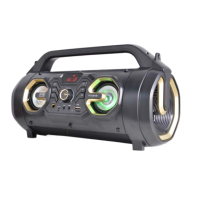

 To Next Page
 General