EasyManua.ls Logo

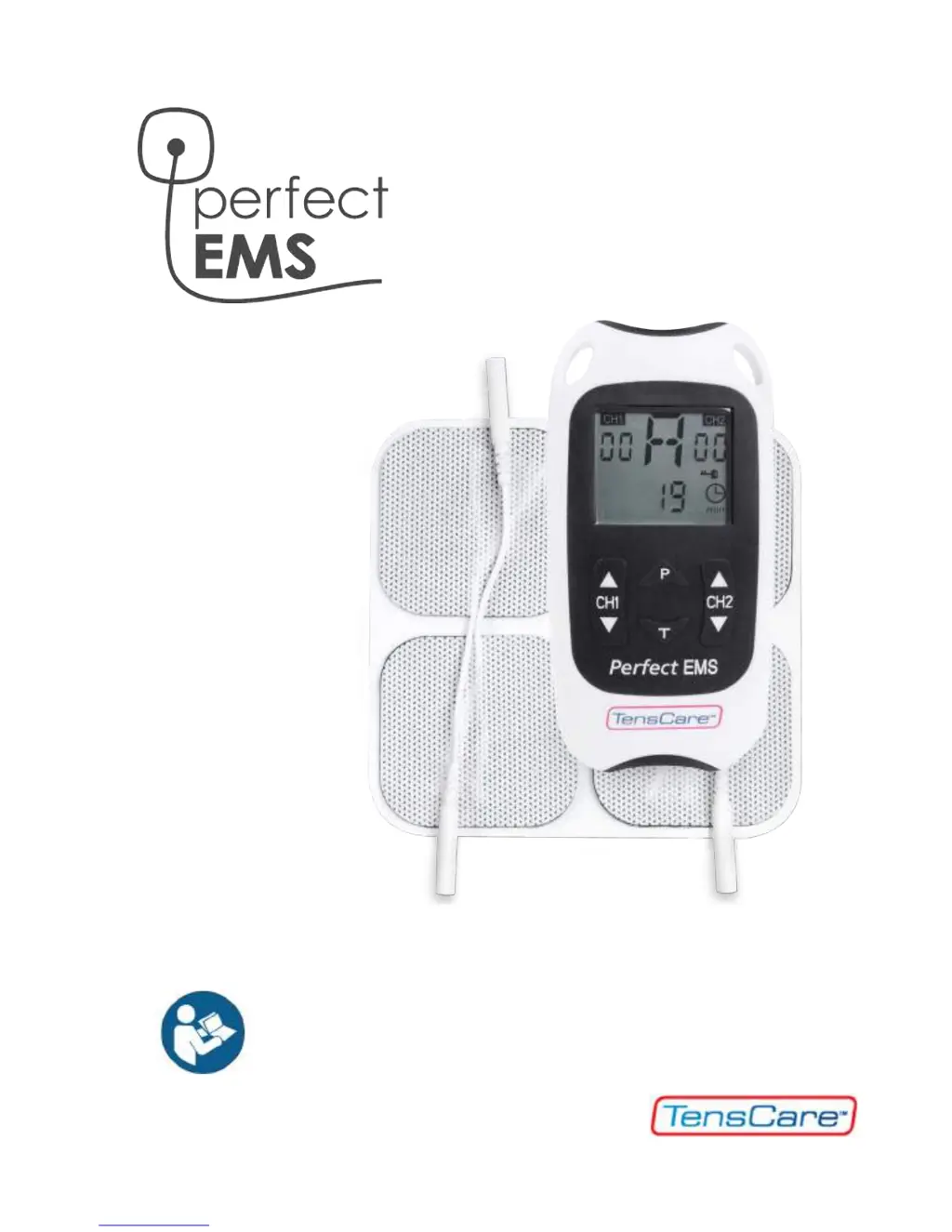
TensCare Perfect EMS - User Manual

TensCare Perfect EMS
56 pages
Print Icon
To Next Page IconTo Next Page
Loading...
INSTRUCTIONS FOR USE
READ CAREFULLY BEFORE USE

Questions and Answers

  • C
    Calvin KimAug 15, 2025
    What to do if the output will not increase above zero on TensCare Health Care Products?
    • R
      robertcooleyAug 15, 2025
      If the output of your TensCare Health Care Product won't increase above zero, it might be due to an open circuit. This can happen if the electrodes aren't correctly connected to your body or are faulty, or if the lead wires are damaged. Make sure the electrodes are firmly attached to your body. Try using the second lead wire. If needed, purchase replacement electrodes or leads.
  • S
    samuelmaldonadoAug 17, 2025
    Why am I not feeling any sensation from my TensCare Perfect EMS Health Care Products?
    • E
      Erik WebbAug 18, 2025
      If you're not feeling any sensation from your TensCare Health Care Product, ensure both electrode pads (per lead wire) are applied to create a complete circuit. Also, check that the leads are properly connected to both the device and the electrode pads. If that doesn't work, steadily increase the strength setting; most users typically feel something below a setting of 20.
  • K
    Kaitlyn BuckleyAug 21, 2025
    What to do if I feel a sudden change in sensation using TensCare Health Care Products?
    • A
      Ashley CochranAug 21, 2025
      If you experience a sudden change in sensation when using your TensCare Health Care Product, it could be because the signal feels stronger after disconnecting and reconnecting. To avoid this, always return the strength setting to zero before disconnecting the lead or electrode pads.
  • S
    solsenAug 25, 2025
    How to fix low battery display on TensCare Health Care Products?
    • L
      Lindsay RomeroAug 26, 2025
      If your TensCare Health Care Product displays a low battery warning, the batteries are likely low. Replace them to resolve this issue.
  • K
    Kyle MyersAug 27, 2025
    What to do if my TensCare Perfect EMS has no display?
    • W
      William Owens Jr.Aug 28, 2025
      If your TensCare Health Care Product has no display, it could be due to flat batteries. Replace the batteries. Also, check if the batteries are inserted correctly. If the springs in the battery compartment are damaged, contact your supplier.
  • W
    William ThompsonAug 31, 2025
    What to do if TensCare Medical Equipment output will not increase above zero?
    • A
      Alec BlanchardAug 31, 2025
      If the output on your TensCare Medical Equipment won't increase, it might be due to an open circuit. Make sure the device is correctly attached to your body. Try using the second lead wire. If the issue persists, you may need to purchase a replacement lead.
  • S
    smithgarySep 4, 2025
    Why is there no sensation with my TensCare Medical Equipment?
    • T
      Tiffany EvansSep 4, 2025
      If you're not feeling any sensation with your TensCare Medical Equipment, the intensity might be too low. Increase the strength setting. Most users typically feel something below 20 mA.
  • M
    Meredith LawrenceSep 7, 2025
    How to fix no display on TensCare Medical Equipment?
    • W
      William LeSep 7, 2025
      If your TensCare Medical Equipment has no display, here are a few things to check: 1. Replace the batteries, as they might be flat. 2. Ensure the batteries are inserted correctly, paying attention to the + and - signs, and remove any plastic wrap. 3. If the springs in the battery compartment are damaged, contact the supplier.
  • J
    Jeffrey DavisSep 10, 2025
    What to do if TensCare Medical Equipment shows a low battery display?
    • F
      Frederick StewartSep 12, 2025
      If your TensCare Medical Equipment is displaying a low battery warning, the simple solution is to replace the batteries.

Summary

1. Introduction

2. How TENS Works

Pain Gate Mechanism

Explains how TENS stimulates sensory nerves to block pain signals at the spine.

Endorphin Release Mechanism

Describes TENS stimulating motor nerves to release endorphins for natural pain relief.

3. How EMS Works

EMS Applications and Benefits

Details EMS uses in rehabilitation, sports training, and its advantages for muscle recovery and performance.

EMS Mechanism Explained

Explains how EMS uses electrical impulses to stimulate muscle groups, detailing fibre types and frequency effects.

4. Side Effects

6. Battery Installation

7. Belt Clip Usage

8. Device Programmes

9. Programme Settings

Pulse Waveform and Frequency

Explains pulse waveform types and the impact of pulse frequency (Hz) on muscle response.

Pulse Frequency and Muscle Response

Details pulse frequency (Hz) and how different frequencies affect slow and fast-response muscle fibres.

Pulse Width and Strength Settings

Explains pulse width (µS) for penetration and pulse strength for sensation and muscle contraction.

Work, Rest, and Ramp Times

Defines work, rest, and ramp times, including work/rest ratios for EMS programmes.

Manual TENS and EMS Programme Setup

Guides on adjusting parameters for manual TENS (S-T) and EMS (G-H) programmes.

10. Controls and Display

Device Controls Overview

Identifies and describes the functions of all buttons and the screen display on the Perfect EMS unit.

Strength and Programme Adjustment

Explains how to adjust channel strength and select programmes using the unit's controls.

Timer, Lock, and Safety Features

Details setting the treatment timer, using the keypad lock, and the open circuit cutout safety feature.

Memory Functions

11. Using Manual Programmes

12. Connecting Lead Wires

13. Electrode Pad Placement

TENS Pad Placement Guide

Offers advice and examples for optimal electrode pad placement for TENS therapy to target pain effectively.

EMS Pad Placement Examples

Illustrates electrode pad positions for EMS on various body parts like eyes, stomach, hips, buttocks, arms, chest, shoulders, thighs, and calves.

EMS Electrode Placement Chart - Front

EMS Electrode Placement Chart - Back

14. General Pad Advice

15. Troubleshooting

16. Cleaning and Care

17. Contraindications, Warnings, & Cautions

18. Accessories and Spares

19. Guarantee Information

20. WEEE Disposal

21. Technical Specifications

Symbols Used in Manual

22. EMC Precautions

TensCare Perfect EMS Specifications

General IconGeneral
Form factorSticker plate
Pulse width350 µs
Product colorBlack, White
Intensity range0 - 90 mA
Pulse rate range1 - 120 Hz
Number of programs6
Adjustable intensityYes
Number of electrodes1
Number of intensity levels90
Weight and Dimensions IconWeight and Dimensions
Depth20 mm
Width60 mm
Height120 mm
Weight120 g

Related product manuals