The Tenveo All-In-One Video Conference System is a comprehensive solution designed for efficient and high-quality video conferencing. This system integrates a speakerphone, an HD PTZ camera, and a hub, providing a streamlined setup for various meeting environments.
Function Description
The system facilitates video and audio communication, supporting a wide range of platforms and operating systems. It is designed for ease of use, with features like Bluetooth pairing for mobile devices, camera presets for quick positioning, and optional expansion microphones for larger conferences.
Important Technical Specifications
Speakerphone:
- Acoustic Echo Cancellation (AEC): >65dB
- Echo Length Cancellation: ≥500ms
- Bidirectional Noise Compression (NC): <25dB
- Intelligent Microphone Technology: Automatic Direction Finding (EMI) and Automatic Gain Control (AGC)
- Microphone Frequency Response: 100Hz-22KHz
- Speaker Frequency Response: 100Hz-22KHz
- Speaker Volume: 95dB MAX.
- Microphone Sound-Pickup Diameter: 5 meters, 360 degrees full range
- Bluetooth: Available for device connection
- IR Reception Angle: 360°
- IR Reception Distance: 10m IR Transparent transmission available
- Expansion Mics (optional): 2 external microphones, extending sound-pickup range up to 10m (33ft)
- Dimensions: 180mm × 180mm × 42mm (L×W×H)
HD PTZ Camera:
- Image Sensor: 1/2.9" SONY HD CMOS
- Effective Pixel: 2.1 Mega Pixel
- Optical Zoom Options: 3x or 10x
- 3x Optical Zoom:
- FOV: 128°~37°
- Focal Length: f=3.35-10.05mm
- 10x Optical Zoom:
- FOV: 51.3°~4.64°
- Focal Length: f=5.0-50.0mm
- HD Format: 1080P (1920*1080)
- Signal System: NTSC/PAL
- Input Voltage: DC12V
- Power: 12W
- Translation/Pitching Angle: -175°~175° / -35°~55°
- Translation/Pitching Speed: 100°/s / 80°/s
- Size: 162mm × 172mm × 175mm
- Color: Iron Gray
Hub:
- Interfaces: 2x DIN6, 1x Power, 1x Power Switch, 1x USB
- Power Supply: EC3800 plug (DC12V) Adapter input AC110V-AC220V, output DC12V/2A
- Connection Cable: 2x DIN6 data line (5m standard, 10m/15m options)
- USB Cable: USB2.0 cable
- Compatibility: Supports Windows, Android, iOS, and Linux. Compatible with Zoom, Lynch, Vidyo, Skype for business, etc.
- Dimensions: 115mm × 115mm × 34.5mm (L×W×H)
- Accessories: Power adapter, USB2.0 cable, remote controller, 2 DIN6 cables, user manual
Usage Features
The system is designed for straightforward operation. The speakerphone includes optional expansion microphone ports, a DIN6 cable port, LED and Bluetooth/power indicators, function keys, and a volume indicator. The HD PTZ camera features a lens, pan & tilt mechanism, standby indicator, IR remote indicator, power indicator, and a DIN6 cable slot. The hub provides DIN6 cable slots, a USB slot, power slot, power switch, power indicator, and screw holes for mounting.
Remote Control:
The remote control provides comprehensive control over the system, including:
- Volume up/down
- Camera pan/tilt
- OK button
- Zoom in/out
- 1-2 camera presets
- Hang up
- Microphone mute
- Answer calls
- Bluetooth on/off
Speakerphone Controls:
The speakerphone itself has controls for:
- Presets (1, 2, 3)
- Camera default position
- Zoom in/out
- Camera pan/tilt (up, down, left, right)
- Volume up/down
- Bluetooth pairing
- Answer call
- End call
- Mute microphone
Connection Steps:
- Connect the camera and hub using the original DIN6 data cable.
- Connect the speakerphone and hub using the original DIN6 data cable.
- Connect the hub with the original power adapter.
- Connect the hub to a computer via USB.
- Confirm the connection is correct and turn on the power switch on the hub.
- Open conference software; the speakerphone and camera will self-check.
- Select the corresponding camera (FHD Camera), microphone, and speaker driver to start the audio and video conference.
Settings for PC and Video Devices in USB Call Mode:
- Adjust the volume of speakers and microphones for clear and smooth communication.
- Do not turn on automatic gain for the speaker and microphone.
- Give priority to turning off audio processing functions of the computer software/video software (such as automatic gain, echo cancellation, noise reduction, etc.).
- Use higher quality speech quality coding as far as possible.
Bluetooth Pairing:
- Press the Bluetooth button on the speakerphone; the "Y" Bluetooth indicator will flash, indicating pairing mode.
- Place the mobile device in Bluetooth search mode and select the Tenveo Bluetooth device.
- Once connected, the indicator will turn blue, and the speakerphone can be used for audio calls. If pairing fails, restart Bluetooth and try again.
Indicator Status:
- Volume Indicator: Green LED lights indicate volume level (more lights for higher volume).
- Microphone Mute: Red LED on.
- Bluetooth Indicator:
- On: Green light flashes during Bluetooth activation.
- Connected: "Y" icon light remains on.
Presets:
- Saving Presets: Adjust the camera to the desired position, then press and hold a preset button (1, 2, or 3) for 5 seconds. The position is saved.
- Using Presets: Short press a preset button to recall the saved camera position. (Note: Number keys are invalid if not preset).
Expansion Mics (Optional):
- Connect one end of the 4p4c cable (2.5m) to the expansion microphone and the other end to EXT1/EXT2 on the speakerphone.
- Expansion microphones have a mute key and status LED indicator (green for normal operation, red for mute).
- Plug and unplug expansion microphones only after powering off the system.
Maintenance Features
- General Care: Avoid exposing the product to rain or moisture. Do not open the case; installation and maintenance should only be performed by qualified technicians.
- Environmental Conditions: Do not use the product beyond specified temperature, humidity, or power supply limits.
- Cleaning: Use a soft, dry cloth to clean the camera lens. If needed, use a mild detergent gently. Avoid strong or corrosive detergents to prevent scratching the lens and affecting image quality.
- Handling: Handle with care to prevent damage from heavy pressure, strong vibration, or immersion during transportation, storage, and installation.
- Installation:
- Do not rotate the camera head violently to avoid mechanical failure.
- Place the product on a stable, horizontal surface to prevent inclined images.
- The housing is made of organic materials; do not expose it to corrosive liquids, gases, or solids.
- Ensure no obstacles are within the rotation range of the holder.
- Do not power on before completing installation.
Warranty:
All products come with a 12-month warranty for good repair. Free maintenance is provided for quality problems during this period. Maintenance costs will be collected for issues arising from:
- Abnormal product use.
- Damage due to fire, electric shock, external object collapse, or other natural disasters.
- Unauthorized repair, misuse, abuse, or alteration.

 Need help?
 General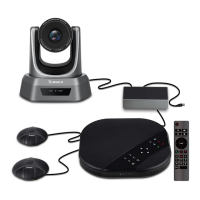

 To Next Page