The TERDENS model 2123 is a weather station designed for home use, offering a range of functions to monitor indoor and outdoor conditions, as well as providing weather forecasts. It features a radio-controlled clock and calendar, ensuring accurate timekeeping through the DCF-77 signal (RCC - Radio Controlled Clock).
Function Description
The device's core functions include:
- Radio-controlled clock and calendar (DCF-77): Automatically synchronizes time and date.
- Weekday display: Can be set in 7 languages: English, German, Italian, French, Spanish, Dutch, and Danish.
- Alarm clock: Includes a 5-minute snooze function.
- Time format: Supports both 12-hour and 24-hour display.
- Indoor thermometer and hygrometer: Measures temperature and humidity inside.
- Outdoor thermometer: Wireless sensor for external temperature readings.
- Climate comfort index: Indicates indoor comfort levels.
- Min/max memory: Stores minimum and maximum temperature readings for the last 24 hours.
- Weather forecast: Predicts weather conditions based on internal measurements.
- LCD backlight: Activates for 5 seconds for easy viewing in low light.
Important Technical Specifications
- Temperature Measurement Range:
- Indoor: -25°C to +70°C (±1°C)
- Outdoor: -10°C to +50°C (±1°C)
- Humidity Measurement Range: 20% to 95% (±5%)
- Wireless Transmission Range: Approximately 60 meters.
- Frequency: 433 MHz.
- Power Supply: Uses specific battery types (non-rechargeable).
- Compliance: Complies with R&TTE Directive 1999/5/EC.
Usage Features
Before First Use / Restart:
- Insert batteries into the external transmitter first, then into the base station.
- Upon startup or restart, the display will show all possible variants for a maximum of 3 seconds, and the station will emit a beep.
- The external transmitter signal reception takes up to 3 minutes, followed by DCF signal reception for up to 7 minutes. Further settings are only possible after this period.
- During DCF signal search, other function keys are inactive.
DCF Reception (Radio Controlled Clock):
- The station attempts to automatically connect to the DCF signal for up to 7 minutes (blinking tower icon).
- Automatic DCF reception is scheduled for 2:00, 3:00, 4:00, and 5:00 AM.
- A pulsating tower icon indicates good signal quality, while a weak signal is shown by a steady tower icon. A solid tower with radiating waves indicates successful reception.
- If reception fails, the station will pause and retry at the same times. To force a signal search or stop, press and hold the "WAVE" button.
- The device automatically adjusts for time zone shifts after successful DCF reception.
- It is recommended to place the station and transmitter at a distance greater than 2.5 meters from noise sources (e.g., routers, computers, TVs, thick walls with reinforcement) to avoid signal interference.
Manual Mode:
- If DCF reception is not possible, the clock and calendar can be set manually.
- Press and hold "SET" for about 2 seconds to enter manual setting mode.
- Use the "▲" and "▼" buttons to adjust values and "SET" to confirm changes.
- Settings include: hours, minutes, calendar (month-day, day-month), year, month, day, day of the week (selectable language), and 12/24h time format.
Daily Alarm Settings:
- Press and hold "ALARM" for 3 seconds to set the alarm.
- Use "▲" and "▼" to adjust hours and minutes, and "SET" to confirm.
- Briefly pressing "ALARM" toggles the alarm on/off (alarm icon appears/disappears).
- The alarm sounds with a 4-tone ascending melody, turns off, and reactivates after 24 hours.
- Pressing "SNOOZE/LIGHT" during the alarm activates a 5-minute snooze.
Min/Max Memory:
- Displays minimum ("Lo") and maximum ("Hi") temperature readings for the external sensor.
- Memory is updated every 24 hours.
Temperature Unit Change:
- Press the "°C/°F" button in the battery compartment to switch between Celsius and Fahrenheit.
Backlight Activation:
- Press "SNOOZE/LIGHT" on top of the station to activate the backlight for 5 seconds.
Weather Forecast Icons:
- The station displays four weather icons: Sunny, Partially Cloudy, Cloudy, and Rainy.
Climate Comfort Index Icons:
- Icons indicate "conditions good for health" or "conditions not good for health" based on indoor climate.
Maintenance Features
General Precautions:
- Avoid exposing the device to excessive vibration, loads, or sudden, significant temperature changes.
- Use the device within specified temperature ranges.
- Do not expose to excessive solar radiation.
- The device is not waterproof; do not immerse it in water.
- Clean with a slightly damp cloth.
- Do not disassemble the device; this will void the warranty.
- Keep out of reach of children.
- Do not use rechargeable batteries; consult the battery manufacturer's instructions for proper use and recycling.
Manufacturer's Liability:
- The manufacturer and seller are not responsible for product use inconsistent with its purpose.
- This product is not intended for medical purposes; information is for public dissemination only.
- Weather forecasts are not 100% accurate and should not be considered fully precise measurements.
- Specifications are subject to change without notice.
- No part of this manual may be reproduced without the manufacturer's permission.

 Need help?
 General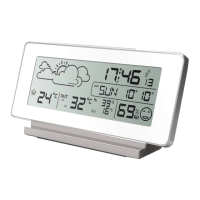

 To Next Page