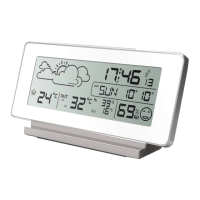
transmitter takes up to 3 minutes, and then for 7 minutes to the station receives a signal DCF.
Only after this time can be further settings. During the search, the DCF no other function keys.
DCF reception (Radio Controlled Clock):
When you start or restart the station after the station searching for a signal from an external
transmitter, the station will attempt to automatically connect to the DCF, for a maximum of 7
minutes ("" icon will blink). At 2:00 / 3:00 / 4:00 / 5:00 am DCF reception will be included
automatically. If you receive the clock signal is synchronized. If the reception is not successful,
the station break, continue trying to receive and try again at the same times. To force trying to
receive a signal or stop, press and hold the WAVE.
Information:
It flashes the tower means that the station reaches the DCF signal. During the reception
pulsating waves propagating icon indicates that the signal quality is good, the icon of the tower
"" means that the signal is weak. Display icons permanently tower radiating waves "" means
that the reception was successful, no icon indicates a connection failure. Setting the time shift:
time shift means a change in the time zone from the source to the DCF (Germany) local time, in
the area using the station. Change the time zone is done automatically when the correct
reception of the DCF. It is recommended that you place the stations and transmitters at a
distance greater than 2.5 m from noise sources such as a router, a computer monitor, television,
thick walls with reinforcement. DCF reception is weaker in rooms with concrete or metal walls.
If you need to use the device in such an environment, you must set them as close to the
windows, and other places that are less disruption to the DCF.
For more information on the DCF can be found on www.terdens.com.pl
Manual mode:
In conditions where the DCF reception is not possible or follow the long-term decay, set the
clock and calendar manually. To do this: press and hold for about 2 seconds the SET button.
Flashing second, which can be deleted with the ▲ or ▼. Changes confirm with SET. Then
using the ▲ and ▼ to change the value and the SET button to approve the changes, set the
various functions in the following order: hours, minutes, system calendar (month - day of
month, day of month - month), year, month, day of month, day of the week (selectable
language: English - EN, German - GE French - French, Spanish - ES, Italian - Italian, Dutch -
NE, Danish - DA), 12/24h clock mode. Pressing the SET button to exit to normal operation.
Daily alarm settings:
The station has a daily alarm. To set / change, press and hold the ALARM button for 3 seconds.
Use the ▲ and ▼ to change the value and press SET to approve amendments set each in the
order of an hour, and minute alarm. Pressing the SET button to confirm the changes.
Enable / disable an alarm by briefly pressing the ALARM button. When the mode is activated
the alarm icon appears , the lack of this icon indicates an alarm condition. Audible alarm is
issued ascending 4-tone, then turns off and activates again after 24 hours. Pressing within the
minute snooze button / LIGHT at the top of the station activates the snooze alarm which moves
about five minutes, and so each time. The display will show the symbol snooze "ZZ".


 To Next Page
 Loading...