10
Connecting the Transmitter to
Audio Components
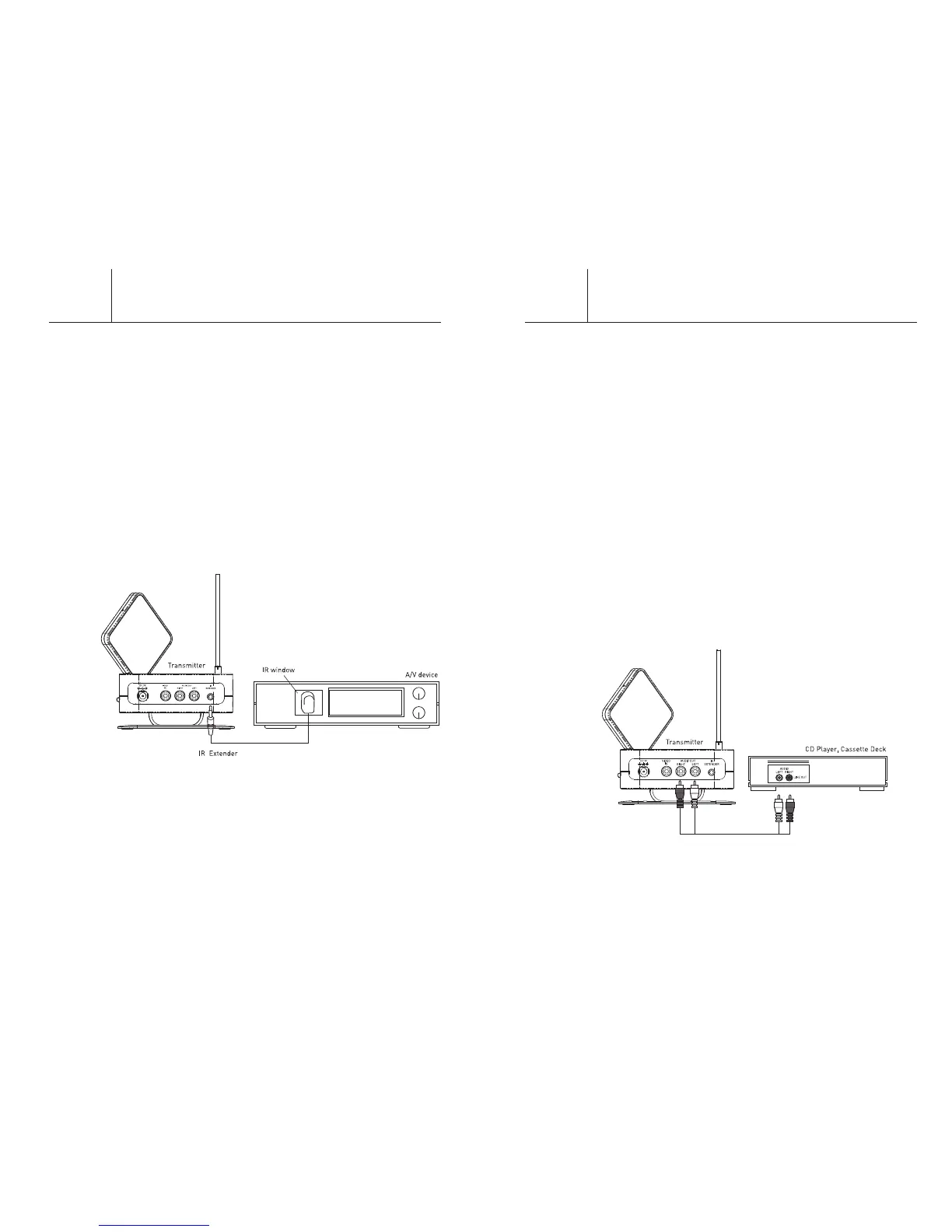
To enjoy sound from your CD player, cassette deck or other audio
component in another room, you can connect the transmitter
directly to that component. To use this feature, you must connect
either powered speakers, another stereo receiver, or an amplifier
to the receiver at the remote site.
1. Make sure the transmitter’s On/Off switch is “Off.”
2. Connect one set of A/V cables from the red and white AUDIO IN
jacks on the back of the transmitter to the LINE OUT audio
jacks on the back of your audio component. Be sure the red and
white plugs on the A/V cables match the red and white jacks on
both the transmitter and audio component. (The yellow video
plugs will not be used.)
3. Plug the small end of the power adapter into the back of the
transmitter and the other end into a standard A/C wall outlet.
Turn the On/Off switch to the “On” position.
4. Make sure the receiver and transmitter units are set to the
same channel.
5. Locate and orient the transmitter unit according to the
“Orienting the Transmitter and Receiver Units” (page 14)
section of this manual.
LF-30S
9
Connecting and Using
the IR Extender
The IR extender allows you to remotely control the A/V device
that is connected to the transmitter from the room you have the
receiver located in.
Connecting the IR Extender:
1. Extend the thin antenna upwards.
2. Plug in the IR extender into the connector on the back of
the transmitter.
3. Extend the IR extender cable to the front of the A/V device that
is connected to the transmitter.
4. Locate the IR window (dark, nearly opaque plastic) on the A/V
device connected to the transmitter. Look into the window and
try to locate the IR receiver behind the plastic.
5. Remove the adhesive pad on the IR extender and adhere it to
the window in front of the IR receiver on the A/V device
connected to the transmitter.
Controlling the A/V device remotely with your remote control:
Operate the A/V source’s remote control (the A/V device that is
connected to the transmitter) as you normally do while pointing
it at the receiver. The receiver wirelessly sends the infrared
command to the transmitter which then transmits it via the IR
extender to the A/V source device.
If you are having difficulty controlling the A/V device make sure
that you verify that your IR extender is positioned correctly in front
of the IR emitter on the device.
LF-30S


 To Next Page