Need help?
Do you have a question about the TERK Technologies LF-30S and is the answer not in the manual?
Highlights the product's wireless convenience and 2.4GHz technology.
Details compatibility with various TVs and expansion options.
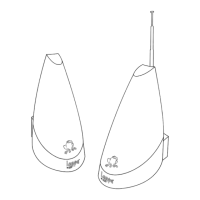
Details the LF-30S transmitter and receiver units included.
Lists A/V cables, power adapters, coaxial cable, IR extender, brackets, and strips.
Describes the directional antenna for signal transmission and reception.
Explains channel selection and power switches for unit operation.
Identifies power ports and A/V jacks for component connections.
Details the receiver's RF connector and video selector switch.
Details the transmitter's IR extender jack and antenna input.
Ensures transmitter is off and details initial A/V cable connections.
Connects power adapter and confirms matching channels.
Guides transmitter placement based on manual section.
Details the steps for connecting the IR extender to the transmitter.
Explains how to use the IR extender for remote control of A/V devices.
Ensures transmitter is off and details initial A/V cable connections.
Connects power, confirms channels, and guides placement.
Outlines two methods for connecting the receiver to a remote TV.
Details direct TV connection and connection via VCR.
Mentions PIP capability and provides connection notes for various TV setups.
Connects receiver power, confirms channels, and guides placement.
Notes the need for self-powered speakers and details the connection.
Connects receiver power, confirms channels, and guides placement.
Explains antenna function and advises orienting towards each other.
Recommends high placement and minimizing obstacles for best range.
Warns about limited antenna rotation and stresses stable placement.
Details surface mounting (horizontal/vertical) and wall mounting.
Explains mounting using adhesive strips for under-cabinet or wall use.
Addresses issues with no audio or video signal.
Addresses interference causing noisy picture or sound.
Lists regulatory approvals and operating frequencies of the system.
States the channel bandwidth of the system.
Details FCC compliance for Class B digital devices and interference mitigation.
States compliance with Industry Canada's RSS-210 standard.
Warns about modifications and provides FCC radiation exposure guidelines.
 General
| Brand | TERK Technologies |
|---|---|
| Model | LF-30S |
| Category | Extender |
| Language | English |

 To Next Page