EasyManua.ls Logo

TERK Technologies MTVGLS - User Manual

TERK Technologies MTVGLS
2 pages
Print Icon
To Next Page IconTo Next Page
Loading...
DO NOT RETURN this product to the store!
Please call our toll-free help line at 1-800-768-1969
or visit TERK.com
IMPORTANT: Don’t plug the
amplifier insert’s power cord
into a power outlet yet.
Quick
Start Guide
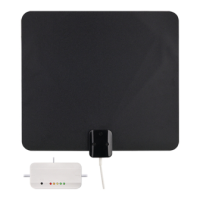
Digital Flat Amplified Indoor Antenna
Find the best location for your
antenna.
1
STOP!
Versión
en español
al dorso
TV antennas perform best
when facing the direction
of the broadcaster’s tower.
For help finding your local
broadcast towers, go to
www.TERK.com
Connect the antenna to the
provided amplifier insert.
3
Plug in the amplifier’s power cord
to a power outlet.
5
Antenna Placement Tips
Avoid metal surfaces (like a metal stand).
Move the antenna close to or in a window.
Position the antenna as high as possible.
Connect the amplifier insert to
your TV or digital converter box.
4
TV or
converter
box (back)
Amplifier Insert
ANTENNA
TV/STB
ANTENNA
IN
Most TVs have a channel scan option in their menu
system, many times in a SETUP or CHANNEL menu
under ANTENNA. For detailed instructions on
performing a channel scan, see the owner’s manual
that came with your TV.
Scan for channels on your TV.
6
Check out setup videos at
www.TERK.com/Setup
Antenna
Built-In
Coaxial Cable
Amplifier
Insert
ANTENNA
TV/STB
You can use this antenna with or without
its amplifier. Try with the amplifier first—it
provides the best performance in most
situations.
IMPORTANT: Make sure your TV is turned off.
Attach the antenna stand to the
antenna (2 options).
2
MTVGLS QSG 00
–OR–
Back
Bottom
Flat/wallmount Upright
Question and Answer IconNeed help?

Do you have a question about the TERK Technologies MTVGLS and is the answer not in the manual?

Summary

Find the best location for your antenna

Antenna Placement Tips

Tips for optimal antenna placement, including avoiding metal surfaces and positioning high.

Finding Local Broadcast Towers

Guidance on locating local broadcast towers via www.TERK.com for better signal reception.

Attach the antenna stand to the antenna

Flat;Wallmount Stand Option

Instructions for attaching the antenna stand using the flat or wallmount configuration.

Upright Stand Option

Instructions for attaching the antenna stand in an upright position.

Connect the antenna to the amplifier insert

Initial Amplifier Connection

Connect the antenna's coaxial cable to the amplifier insert, do not plug into power yet.

Amplifier Usage Recommendation

Recommendation to try the antenna with its amplifier for best performance.

Connect the amplifier insert to your TV or digital converter box

TV;Converter Box Connection

Connect the amplifier insert to the TV or converter box's ANTENNA IN port.

Power Off Safety Precaution

Important safety step: ensure your TV is turned off before making connections.

Plug in the amplifiers power cord to a power outlet

Scan for channels on your TV

Channel Scanning Procedure

Guide on performing a channel scan via the TV's menu for new channels.

TERK Technologies MTVGLS Specifications

General IconGeneral
BrandTERK Technologies
ModelMTVGLS
CategoryTV Antenna
LanguageEnglish

Related product manuals