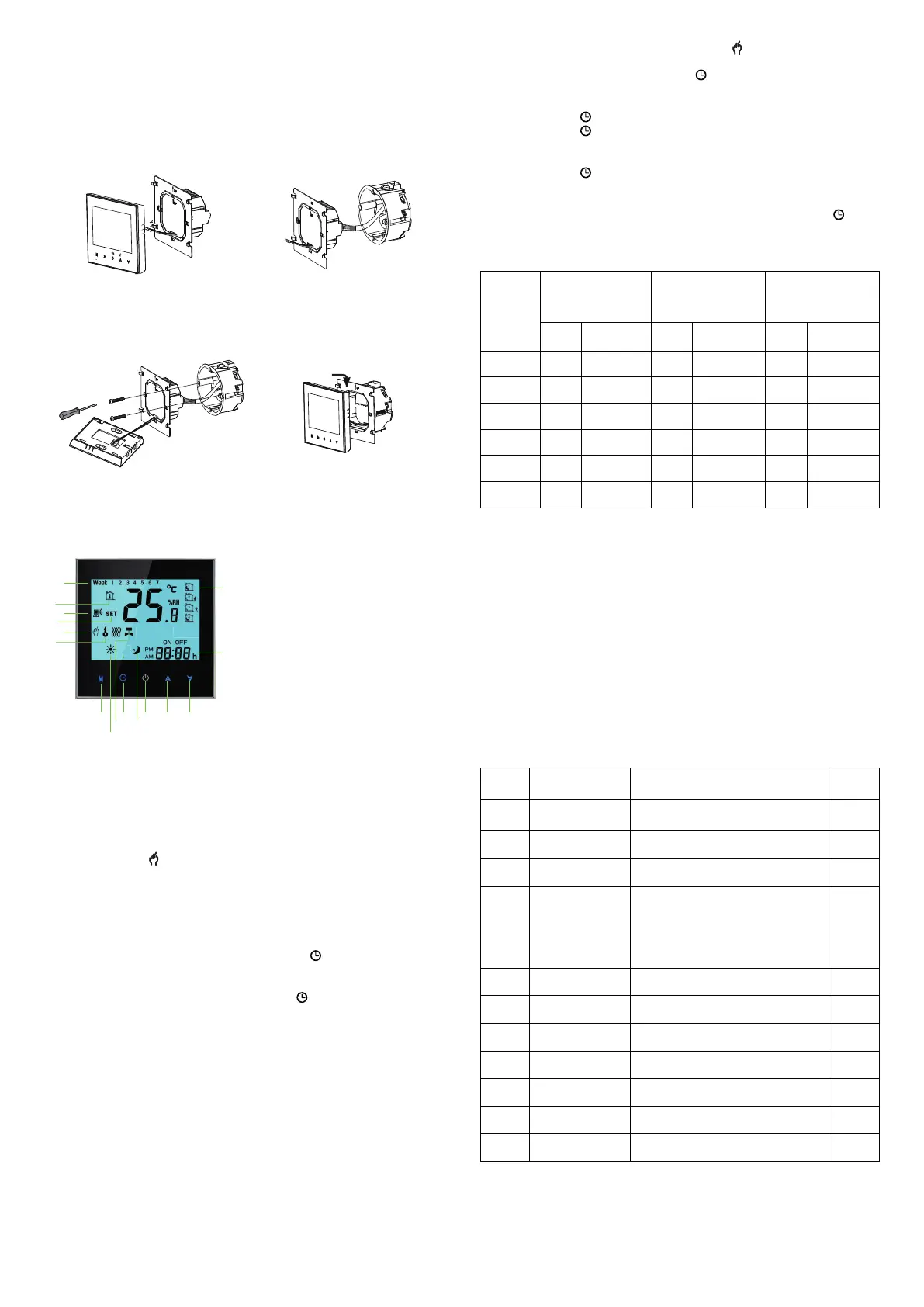
INSTALLATION
Fig. 1
Fig. 2
Fig. 3 Fig. 4
1
6
7
8
9
10
11
12 2
3
13
14
15
16
1. Power
2. Temperature Up
3. Temperature Down
4. Time
5. Periods
6. Week
7. Room Temperature
8. Wi-Fi
9. Set Temperature
10. Manual
11. Lock
12. Mode
13. Heating On
14. Valve On
15. Clock
16. Sleep
HOME SCREEN QUICK REFERENCE
Touch M to change between manual mode and programme mode. In
manual mode, will show in the bottom left of the screen.
In programme mode, touch the icon 4 times until the weekday
schedule settings appear (1 2 3 4 5 will show along the top of the
screen). Use the and arrows to adjust the on time.
Press the icon and and arrows to set the time (1st period).
Press the icon and use the and arrows to set the off time (2nd
period).
Repeat this process for periods 3 and 4.
Press the icon Saturday Schedule settings once more to enter the
weekend schedule settings (6 & 7 will show along the top of the
screen).
Repeat the above process to set the weekend schedule. Press once
more to conrm and exit.
DEFAULT SETTINGS FOR PROGRAM SCHEDULE
A separate schedule may be set for weekdays (Mon - Fri) and for
weekends (Sat or Sun).
7. Checking the Temperature of Floor Sensor
Press and hold the arrow for 5 seconds to display the temp. of oor
sensor.
8. Return To Factory Default
Press the Restore Manufacturer Defaults, you can reset thermostat.
Steps:Open your app -go into your room - click menu on the top right
corner - move to the end - Press Restore Manufacturer Defaults.
During Power Off
Setting the Functions and Options
When power is off, press and hold M 5 sec. in order to reach system
function. Then press M to scroll through the available functions, and
use the and arrows to change the available options. All settings
are conrmed automatically.
OPERATION
During Power On
1. Power On/off: Press to turn the thermostat on/off.
2. Manual & Programmable. Touch M (mode) to change between
manual mode and programm mode. In manual mode, will show in
the bottom left of the screen In programmable mode, the period icon
will show in the right side.
3. Setting Temperature In the mode of programmable, set temperature,
time and timing on/off could not be adjusted. If the user want to
change, please go to manual mode or programmable mode.
In the mode of manual, press to set the desired temperature.
4. Adjusting/Setting the Clock. Touch the icon to set minute, hour
and weekday (1 = Monday, 2 = Tuesday etc.) by using the arrows.
Press once more to conrm and exit.
5. Locking your Thermostat. Press and hold the for 5 seconds to
lock/unlock your thermostat In item 3 of high senior options, you can
select fuli lock or half lock.
6. Adjusting/setting the Program Schedules. When Wi-Fi connection is
madę, your thermostat will automatically accept the program
schedule made via the APP on your device (see below for detailed
instructions) To set the program schedules through your thermostat
(NOT via your smartphone/tablet) simply follow the instructions as
below:
Please note: Setting the programme schedule through your
thermostat can only be carried out if there is no Wi-Fi connection
between your thermostat and smartphone/tablet.
Time display
WEEKDAY (MONDAY-
FRIDAY) (123 45 shows
on screen)
WEEKEND (SATURDAY) (6
shows on screen)
WEEKEND(SUNDAY) (7
shows on screen)
TIME TEMPERATURE TIME TEMPERATURE TIME TEMPERATURE
Period 1 06:00 20°C 06:00 20°C 06:00 20°C
Period 2 08:00 15°C 08:00 20°C 08:00 20°C
Period 3 11:30 15°C 11:30 20°C 11:30 20°C
Period 4 13:30 15°C 13:30 20°C 13:30 20°C
Period 5(1+2) 17:00 22°C 17:00 20°C 17:00 20°C
Period 6(3+4) 22:00 15°C 22:00 15°C 22:00 15°C
CODE FUNCTION
SETTING AND OPTIONS
DEFAULT
1
Temperature
compensation
-7 to + 7 C (for internal sensor) -1
2
Deadzone
Temperature
1 ~ 5 C 1
3 Button locking
00: All buttons are locked except power button.
01:All buttonsare locked.
01
4 Sensor Types
In: InternalSensor (to controlor limit the
temp.)
Ex: External Sensor (to control or limit the
temp.)
Ou: Only external sensor
AL Internal/ External Sensor (Internal
sensorto controlthe temp.,external sensorto
limit the temp.)
AL
5 Min. Set Temp 5-15 C 05
6 Max. Set Temp 15-45 C 35
7 Display Mode
00: Display both set temp.and room temp. 01:
Display set temp. only
00
8
Low temperature
protection setting
0-10 C 00
9
High temperature
protection setting
25-70 C 45
A Economy Mode
00: Non-energy saving Mode 01: Energy saving
mode
0
B Economy Temperature 0-30 C 20


 To Next Page
 Loading...