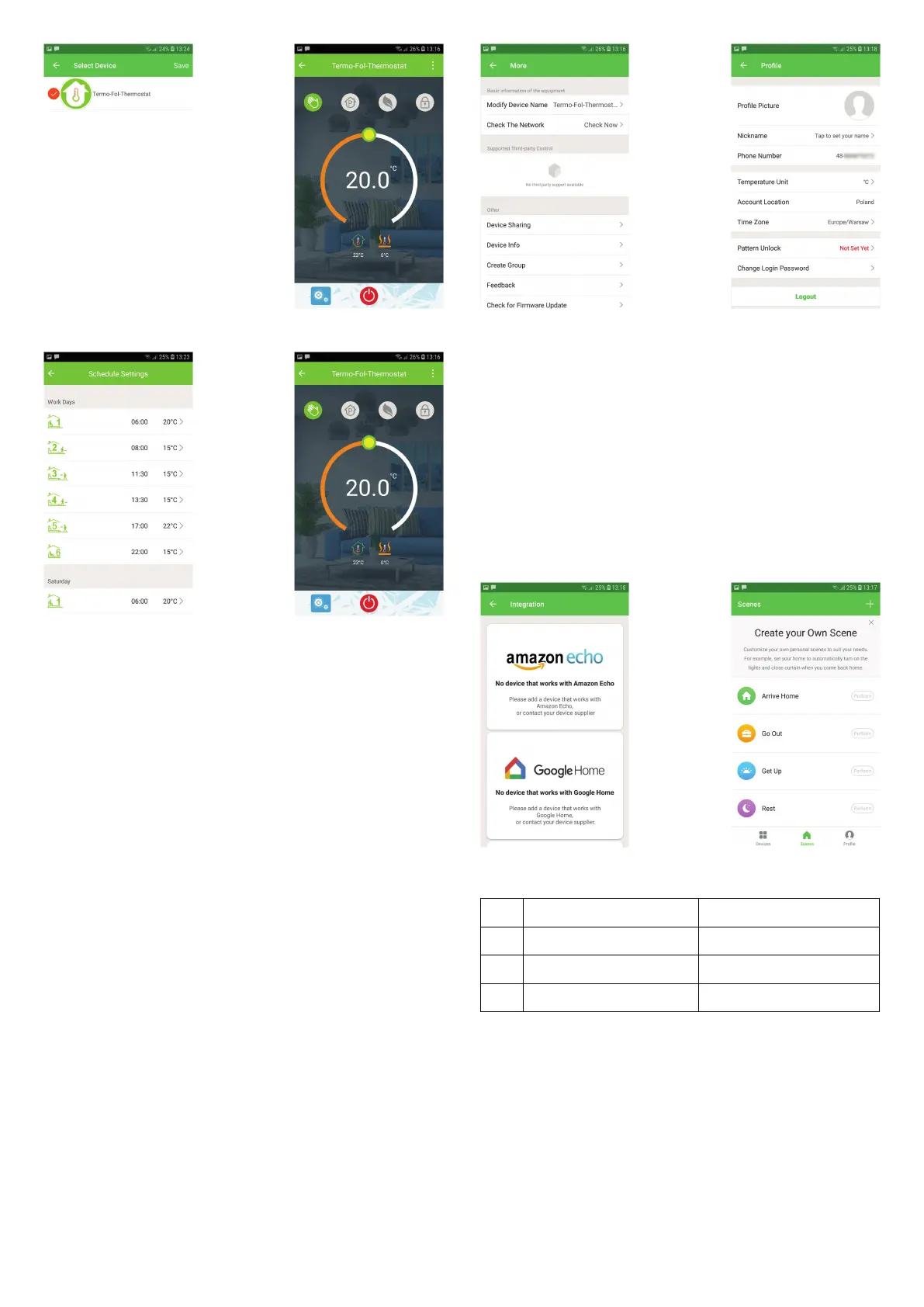
The one who create this group can control all the rooms at the same time
Except create the group, in this menu page, you can also modify your
device name, share your device, get the information of your device.
Way 1: Mentioned in the above.
Way 2: Click your Prole at the right botton of your main page (Fig 6—Z).
Select Device Sharing then add the account you want to share. You con
see the shoring account you have sent and the device you have shared In
this shoring poge. You don’t need to do anything if you are the one shored.
You can odd as many as rooms you wont. in your prole, click Integration
into the using page. Press Use Now > (Fig 7—1) for your Amazon Echo or
Google Home orTmall Genie or IFTIT then you can see the operation
steps.
Customize your own personal scenes to suit your needs.For example, set
your home to automatically turn on thermostat on when you back home
(Fig 7—2).Press button into the setting
Step 1: You can set a condition for Task like Temperature below 20
degree,then click Save.(Condition:Temp.,Humidity,Wether,PM2.5, Air
Quality,Sunrise/Sunset,Device)
Step 2: Add a task. Press to Select Device (Power,Set Temp,Lock i\/lode) to
act, then Save.if you want to delete the scene,you can press Press the
menu button in the red circle (Fig 5,2) then click Create Group Delete in
the end.
Your thermostat carries an 18 months warranty from date of purchase.
Senlice outwith the warranty period may incur a charge. More detail
please contact with us directly.
When your room is established successfully, it will display on the home
screen (Fig 5-1). The round button is to turn on/off your room. Click the line
into begining programming your thermostat. @ Power on/o button,press
it,turn on the device,press it again, turn off the device Lock/Unlock
button.if button is green,the screen is "Locked",lf button is grey,the screen
is "Unlocked". Econony button,in this mode,the temperature will be keep
20 degreehis temperature cannot be changed or adjusted. Manual
buttonzin this mode,your heating can be set manually (ie.Not using the pre-
programmed settings) Program button. When this button shows, your
thermostat is in program mode and will follow any pre-set heating
schedule. When in Manual mode, press the button to select mode and
vice—versa. (See Fig 5—2)
No Phenomenons Handling
1 Power is on but without display.
Check if the terminals between LCD panel
and Power Unit Box is loosen.
2 Withoutoutput but display works.
Use a new LCD panel or new Power Unit
Box to replace the old one.
3 RoomTemp. Is a little different from
Do temperature calibration in item senior
options


 To Previous Page
 Loading...