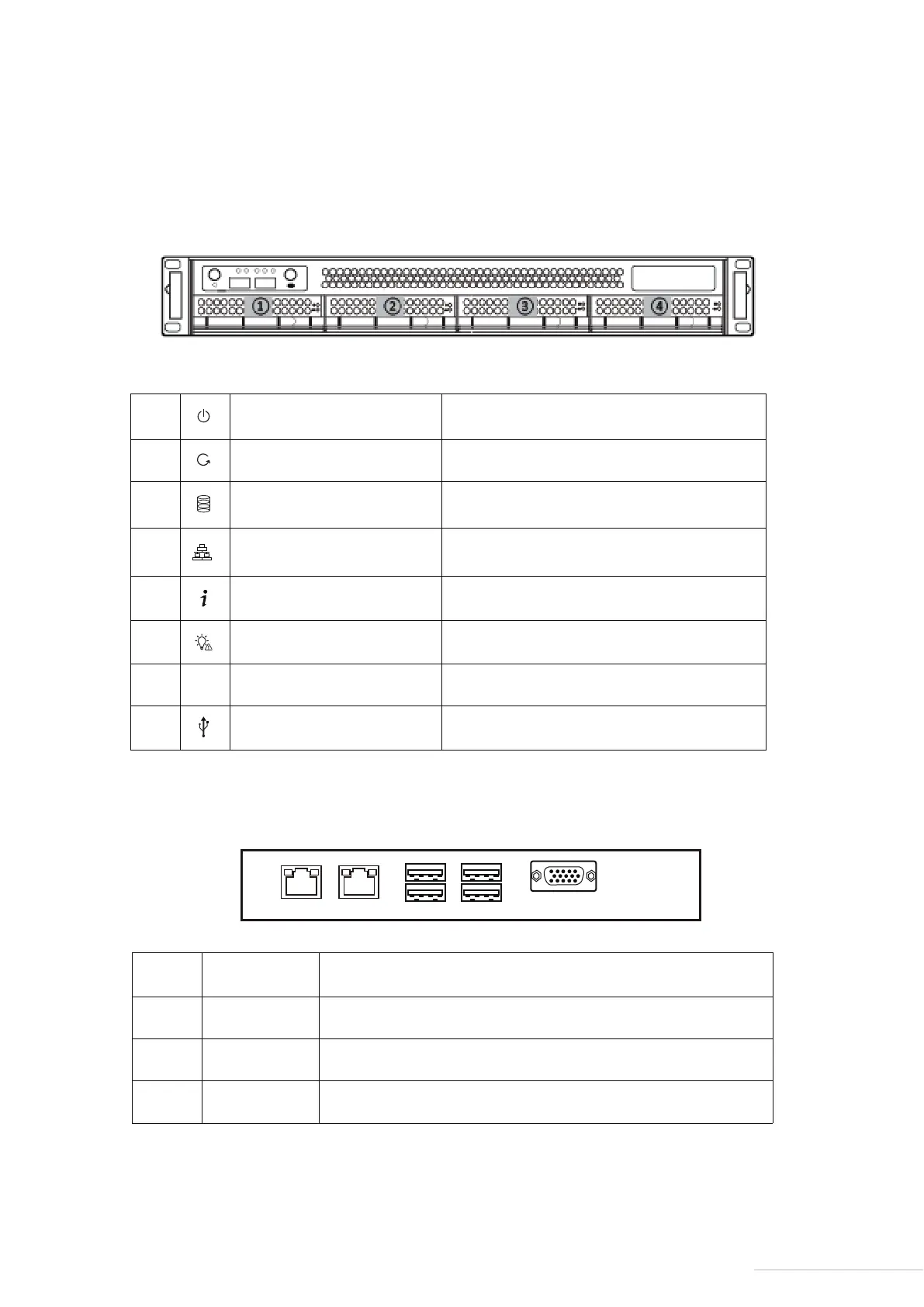
2.2 Appearance
3
Model:U4-211
①
Power Button/Power Indicator
Panel Illustration
Rear Cover Illustration
Reset
Hard Drive Indicator
Network Indicator 1/2
UID Information Indicator
Standby Indicator
UID button and indicator
USB Port
UID
Short press to power on. Press again to power off.
Indicator on when powered on
Short pressto restart
Flickering: Hard drive mounted normally
Off: Hard drive undetected
On: Network is connected
Flickering: Data transmission in progress
No function for now
No function for now
No function for now
Connect USB storage device or USB wireless card
②
③
④
⑤
⑥
⑦
⑧
2
①
RJ45 port
USB2.0 port
USB3.0 port
COM port
1000M/100M/10Mbps network port
Connect USB storage device or USB wireless card
Connect USB storage device or USB wireless card
COM (serial)communication interface
②
③
④


 To Next Page