EasyManua.ls Logo

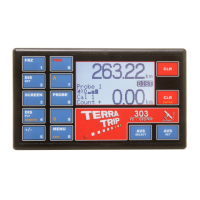
Terratrip GeoTrip 303 - User Manual

Default Icon
20 pages
Print Icon
To Next Page IconTo Next Page
Loading...
User Manual
EN FR DE
for Terratrip GeoTrip IT ES PT
Version V1.1, 06/02/13
User Manuals available at www.terratrip.com/manuals.htm
Page 1 of 20
Index. Page :
Features .......................................................................................................................... 3
1.0 Probe Selection: ....................................................................................................... 3
1.1 GPS receiver: ....................................................................................................... 3
1.2 Wheel Probe, Part Number T005: ........................................................................ 3
1.3 Wheel Probe, Part Number T005A: ..................................................................... 3
1.4 Speedo Cable Probe, Probe No. T006: ................................................................ 3
1.5 Gear Box Probe, Probe No. T007: ....................................................................... 4
1.6 Electronic speedometer probe (DSI), Part No. T014: .......................................... 4
2.0 Optional Extras: ....................................................................................................... 4
2.1 Remote display. Part No. T016G: ........................................................................ 4
2.2 Remote Zeroing unit. Part No. T008 (foot RZU), T011G (Hand operated): ....... 4
2.3 Bracket. Part No. T009G: .................................................................................... 4
3.0 Fitting GeoTrip® to vehicle. .................................................................................... 4
3.1 Mounting GeoTrip®: ........................................................................................... 4
3.2 Power lead: ........................................................................................................... 4
4.0 Probe & RZU Installation: ....................................................................................... 5
4.1 Wheel/ Drive Shaft Probe T005 & T005A: ......................................................... 5
4.2 Cable Drive Probe – T006: .................................................................................. 5
4.3 Japanese Gearbox Probe – T007: ......................................................................... 5
4.4 Electronic Probe (DSI) - T014: ............................................................................ 6
4.5 Remote zeroing unit – T008 & T011G: ............................................................... 6
5.0 Menu Layout on GeoTrip®: .................................................................................... 6
6.0 Calibration: .............................................................................................................. 6
6.1 Select Cal: ............................................................................................................ 7
6.2 Auto Cal: .............................................................................................................. 7
6.3 Manual Cal: .......................................................................................................... 7
6.4 GPS Cal: ............................................................................................................... 8
7.0 Display Menu: .......................................................................................................... 8
7.1 Screen Brightness: ............................................................................................... 8
7.2 Remote Brightness: .............................................................................................. 9
7.3 Contrast: ............................................................................................................... 9
8.0 Settings menu: .......................................................................................................... 9
8.1 Set Units: .............................................................................................................. 9
8.2 Digit Font: ............................................................................................................ 9
8.3 FRZ clears INT: ................................................................................................... 9
8.4 Set AVS Times: ................................................................................................. 10
9.0 GPS Options: ......................................................................................................... 10
9.1 Start Threshold: .................................................................................................. 10
9.2 Standby Probe: ................................................................................................... 11

Question and Answer IconNeed help?

Do you have a question about the Terratrip GeoTrip 303 and is the answer not in the manual?

Summary

Terratrip GeoTrip Probe Selection Guide

GPS Receiver Unit Installation

Details the GPS receiver unit and its fitting to the GeoTrip.

T005 Wheel Probe Installation

Describes the 1.5mm gap sensor wheel probe compatible with all cars.

T005 A Wheel Probe Installation

Describes the 3.5mm gap sensor wheel probe compatible with all cars.

T014 Electronic Speedometer Probe (DSI)

Covers the electronic probe for cars with an electronic speed signal.

Probe and RZU Installation Procedures

T005 & T005 A Wheel;Drive Shaft Probe Installation

Details mounting and positioning the wheel/drive shaft probes for optimal signal.

T006 Cable Drive Probe Installation

Instructions for fitting the speedo cable probe to mechanical speedo cables.

T007 Japanese Gearbox Probe Connection

Explains connecting the gearbox probe via the car's speedometer cable.

T014 Electronic Probe (DSI) Wiring

Guide for connecting the electronic probe and its specific wiring.

T008 & T011 G RZU Cable Connections

Instructions for fitting the terminal pins to the RZU cable and wiring.

GeoTrip Calibration Methods

Selecting Calibration Mode (CAL 1;CAL 2)

How to choose between CAL 1 and CAL 2 for calibration settings.

Automatic Calibration Procedure

Step-by-step guide for automatic calibration using a measured distance.

Manual Calibration Entry

Procedure for manually entering the calibration figure (impulses per km/mile).

GPS Data Calibration

How to calibrate the unit using GPS data for distance accuracy.

System Settings Configuration

Setting Display Units (km;mi)

Changing distance units between kilometers and miles for display and calculation.

GPS Module Options

Time and Date Configuration

Performance Measurement Features

Electrical Connections and Diagrams

Fig 1: T005 & T005 A Probe Wiring

Wiring diagram for Probe 1 and Probe 2 connections to the 12-way connector.

Fig 4: T014 Electronic Probe (DSI) Wiring

Wiring diagram for the electronic DSI probe connections.

Fig 5: RZU Units Wiring

Wiring diagram for the hand-held and foot-operated RZU units.

Overview

The Terratrip GeoTrip is a sophisticated trip meter designed for rally and road survey applications, offering a range of features for precise distance measurement, speed tracking, and performance timing. It is available in different models, including the 202 GeoTrip Classic and the 303 GeoTrip, with the latter offering more advanced functionalities like GPS integration and performance timers.

Function Description:

The primary function of the GeoTrip is to measure and display distance, both total and interval, with high accuracy. It can be connected to various types of probes, including wheel probes, gearbox probes, speedo cable probes, and electronic speedometer probes (DSI), to gather distance data. The device also integrates with a GPS receiver, which can be fitted after purchase, to provide GPS-based distance and speed readings, as well as time and date synchronization.

Key functionalities include:

  • Distance Measurement: Displays total distance and interval distance, with 5-digit calibration for precision.
  • Speed Tracking: Shows current speed, average speed, and maximum speed.
  • Time Functions: Includes time of day and a stopwatch.
  • Performance Timers: The 303 GeoTrip model offers three performance timers with data logging capabilities for acceleration and deceleration timing (e.g., 0-60, 0-100, and custom speeds).
  • Calibration: Supports automatic, manual, and GPS-based calibration methods to ensure accuracy regardless of the chosen probe.
  • Remote Display (Optional): An optional graphical LCD remote display (Part No. T016G) shows speed, average speed, and distance, along with 7 LEDs for regularity rallies, indicating deviation from target speed in seconds.
  • Remote Zeroing Unit (Optional): Foot-operated (T008) or hand-operated (T011G) remote units allow for zeroing the interval distance or changing screens and clearing readouts.
  • Units: Can display distances in miles or kilometers.
  • Language Support: Available in English, French, German, Italian, Spanish, and Portuguese.
  • AVS (Average Speed Indicator): For regularity rallies, the 303 GeoTrip with a remote display can indicate target speed deviation using LEDs.

Important Technical Specifications:

  • Probe Inputs: The GeoTrip supports 2 probe inputs.
  • Calibration Digits: 5-digit calibration for precise adjustments.
  • GPS Module: Optional, can be fitted after purchase.
  • Power: Connects to the vehicle's 12-volt power supply using a supplied 2 Ampere fuse.
  • Probe Types:
    • T005/T005A Wheel Probe: Compatible with all cars, 1.5mm (T005) or 3.5mm (T005A) gap sensors for wheel assembly or prop shaft.
    • T006 Speedo Cable Probe: Fits most mechanical speedo cables, designed for 3.2mm (1/8 inch) inner cables.
    • T007 Gear Box Probe: Fits M22 Gearbox speedometer cable drive, common in Japanese and some American cars.
    • T014 Electronic Speedometer Probe (DSI): Compatible with cars having an electronic speed signal (not CANBUS).
  • Remote Display (T016G): Graphical LCD with LED backlight.
  • Remote Zeroing Units (T008/T011G): Foot-operated or hand-operated.
  • Bracket (T009G): Optional, for dashboard or window fixing with suction cups, includes a removable sun visor.

Usage Features:

  • Probe Selection: Users can cycle between probes off, probe 1, probe 2, or GPS probe using the "PROBE" button. Holding the "PROBE" button for 2 seconds selects the GPS probe if a module is fitted.
  • Calibration Methods:
    • Auto Cal: Calibrates the unit over a measured distance (e.g., a mile or kilometer). The unit prompts the user to drive a set distance and then enter the actual distance driven.
    • Manual Cal: Allows direct input of a known calibration figure (impulses per kilometer or mile).
    • GPS Cal: Calibrates the unit via GPS, requiring a valid satellite fix and correct unit selection (km or miles).
  • Display Adjustments:
    • Screen Brightness: Adjustable using up/down keys.
    • Remote Brightness: Also adjustable, affecting the intensity of AVS indicator LEDs.
    • Contrast: Adjustable to optimize screen clarity based on mounting angle.
    • Digit Font: Users can choose between a rounded bold font (default) and a 7-segment digital display.
  • FRZ (Freeze) Function: Holds displays (total distance, interval distance, stopwatch, average speed) while counting continues in the background. The "FRZ clears INT" setting determines if the interval distance counter clears when frozen.
  • DIS SET (Distance Set): Allows users to enter or adjust the total distance display using number keys.
  • SCREEN Button: Cycles through different display screens (DIST, SPEED, TIME, TSD screens depending on the model). In TSD mode, up/down buttons navigate through 4 TSD screens (Stopwatch and Interval Distance, Time of Day and Interval Distance, Total Distance and Current Speed, Average Speed and Interval Distance).
  • DIS FLY (Distance Fly Adjustment): Allows "on the fly" adjustment of distance in 1/10ths or 1/100ths. Can be disabled by holding "DIS FLY" while turning the unit on.
  • +/- Button: Changes the count direction of the trip meter (count up, count down, or "REVERSE" if an external reverse signal is connected).
  • PWR Button: Briefly press to turn on; press and hold for 5 seconds to power down.
  • Nudge Buttons (/\ and V): Used to "nudge" hundredths up or down in distance mode and to navigate or select menu items.
  • MENU / EXIT: Enters the main menu; pressing it a second time exits the menu.
  • CLR (Clear) Button (Upper Right): Clears the total distance counter (hold for 2 seconds). Also used to exit setting or menu items requiring numeric input. In 303 models, it has different functions across various screens (e.g., operating stopwatch, freezing/resuming time of day).
  • CLR/ENTER Button (Bottom Right): Clears the interval counter (primary function). Also acts as the "ENTER" key to select or set functions/menu options. In 303 models, it has different functions across various screens.
  • AVS SELECT: Opens the Average Speed Indicator select/setting menu (303 models with remote display). Allows pre-programming up to 10 target speeds or setting a target speed "on the fly."
  • AVS SET: Activates the average speed indicator with the current target speed. Subsequent presses increment the target speed memory.
  • Time/Date Settings (303 only): Allows adjustment of time, date, time zone, and time format (Standard or Decimal). Can also set time from GPS (UTC).
  • GPS Options (with GPS module):
    • Start Threshold: Sets the speed at which the GPS probe starts recording distance, adjustable to prevent false readings in poor signal environments.
    • Standby Probe: Allows the unit to revert to a fixed mechanical probe in case of GPS signal loss (e.g., in tunnels), automatically switching back to GPS mode when the signal returns.
  • Performance Menu (303 only): Provides timing for acceleration and deceleration. Records 8 results for 0-60, 0-100, and custom speeds. Users can view saved records (time and date) and enter a live performance measuring mode.
  • Road Survey / High Precision Mode: Activated by holding "DIS SET" and "ENTER" for 2 seconds, changes the decimal place to 3 numbers for commercial road surveying.

Maintenance Features:

  • Factory Reset: Holding the upper "CLR" button while turning the unit on will reset it to factory settings after a long beep.
  • Language Selection: To select the operating language, turn the unit on while holding the "MENU" key until the language setting screen appears.
  • Wiring Diagrams: The manual provides detailed wiring diagrams for connecting various probes (T005/T005A, T006/T007, T014) and remote zeroing units (T011G/T008) to the 12-way connector at the back of the GeoTrip.
  • Probe Installation Guidelines: Detailed instructions are provided for mounting wheel probes (T005/T005A) to wheel hubs or prop shafts, fitting speedo cable probes (T006) into mechanical speedo cables, and installing gearbox probes (T007) into M22 gearbox speedometer cable drives.
  • Fuse Protection: The power lead requires a 2 Ampere fuse for protection.

Terratrip GeoTrip 303 Specifications

General IconGeneral
Power Supply12V DC
External probe inputYes
DisplayLCD
GPSYes
InputsGPS
MemoryYes

Related product manuals