EasyManua.ls Logo

Terumo BCT TSCD II - User Manual

Terumo BCT TSCD II
14 pages
Print Icon
To Next Page IconTo Next Page
Loading...
©2012 Terumo BCT, Inc. Page 1 of 14PN 306620452
TSCD
®
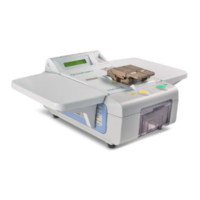
II Sterile Tubing Welder
Example Standard Operating Procedure
Overview
This document is an example of a standard operating procedure (SOP) for the
TSCD II Sterile Tubing Welder. You may reference this document when writing an
SOP that meets your facility’s requirements. For complete information about
using the TSCD II Sterile Tubing Welder, including Warnings and Cautions,
refer to the TSCD
®
II Sterile Tubing Welder Operating Instructions included
with purchase.
Table of
Contents
Page
1
2
2
3
4
4
5
5
6
7
8
9
10
10
11
11
12
12
13
14
Principle of Operation
Applications for Use
Materials
Operating Procedure Flow Chart
Operating Procedures
Setting Up the Device
Replacing the Wafer Cassette (Cartridge)
Placing the Tubing
Performing a Weld
Inspecting the Integrity of the Weld
Removing and Attaching the Cover
Assembling and Attaching the Bag Support Shelves
Maintenance Procedures
Cleaning Surfaces
Cleaning the Clamps
Cleaning the Wafer Cassette (Cartridge) Compartment
Replacing the Air Filter
Replacing the Fuses
Emptying and Cleaning the Wafer Disposal Box
Setting Parameters
Principle of
Operation
The collection and processing of blood products often requires manipulation and
transfer of the blood products among various containers. The TSCD II device offers
technology for connecting sterile blood product containers while maintaining a sterile
fluid pathway and a closed system.
In this system, two lengths of tubing are secured parallel to each other in the clamps
of the TSCD II device. A TSCD wafer that has been heated to approximately 300 °C
(572 °F) cuts through the two lengths of tubing. The section of tubing held in the left
front clamp is moved along the wafer until it is aligned directly across from the
section of tubing held by the right rear clamp. At this point the wafer is retracted, the
clamps push the tubing together, and the two sections of tubing are welded together
by the fusion of polyvinyl chloride (PVC) material.
Question and Answer IconNeed help?

Do you have a question about the Terumo BCT TSCD II and is the answer not in the manual?

Summary

Overview

Principle of Operation

Applications for Use

Materials

Operating Procedure Flow Chart

Operating Procedures

Setting Up the Device

Details on preparing the TSCD II device for operation, including power connection and initial checks.

Replacing the Wafer Cassette (Cartridge)

Step-by-step guide for removing the old and inserting a new wafer cassette for welding.

Placing the Tubing

Instructions on correctly positioning the tubing within the device's clamps for a successful weld.

Performing a Weld

Procedure for initiating and completing the sterile tubing welding cycle, including important notes.

Inspecting the Integrity of the Weld

Guidelines for carefully examining the welded tubing for alignment, leaks, and proper closure.

Removing and Attaching the Cover

Instructions on how to safely remove and reattach the device's protective cover.

Assembling and Attaching the Bag Support Shelves

Steps for assembling and attaching the bag support shelves to the TSCD II device.

Maintenance Procedures

Cleaning Surfaces

Procedure for cleaning the exterior surfaces of the TSCD II device using approved cleaning solutions.

Cleaning the Clamps

Detailed instructions for cleaning the device's clamp covers and tubing holder slots.

Cleaning the Wafer Cassette (Cartridge) Compartment

Steps for cleaning the compartment where the wafer cassette is housed to ensure proper function.

Replacing the Air Filter

Guide on when and how to replace the air filter for optimal device operation.

Replacing the Fuses

Instructions for safely replacing the device's fuses, including fuse type and procedure.

Emptying and Cleaning the Wafer Disposal Box

Procedure for emptying and cleaning the disposal box for used wafers to maintain device functionality.

Setting Parameters

Guidance on adjusting device settings for optimal performance based on specific needs.

Overview

The TSCD II Sterile Tubing Welder is a medical device designed for the sterile connection of blood product containers, maintaining a sterile fluid pathway and a closed system. This device is crucial in blood banking and hospital settings where manipulation and transfer of blood products among various containers are frequently required. It allows for sterile connections without compromising the sterility of the blood products, which is a significant advantage over traditional "spiking" procedures.

Function Description:

The primary function of the TSCD II device is to create sterile connections between two lengths of tubing, typically made of polyvinyl chloride (PVC), used with blood product containers. The process involves securing two lengths of tubing parallel to each other in the device's clamps. A TSCD wafer, heated to approximately 300 °C (572 °F), cuts through both tubing lengths. One section of tubing is then moved along the wafer to align directly across from the other section. Once aligned, the wafer retracts, and the clamps push the tubing sections together, fusing them through the melting and re-solidification of the PVC material. This fusion creates a strong, sterile weld, ensuring the integrity of the fluid pathway.

Important Technical Specifications:

While specific numerical technical specifications like dimensions, weight, or power consumption are not explicitly detailed in the provided document, several operational and material specifications are highlighted:

  • Welding Temperature: The TSCD wafer is heated to approximately 300 °C (572 °F) for cutting and welding.
  • Wafer Holder Warm-up: The wafer holder is heated to 70 °C to shorten weld time, taking approximately 3 minutes from room temperature.
  • Tubing Compatibility: Tubing used with the device must conform to specifications listed in section 3, "Specifications," of the operating instructions (not provided in this excerpt).
  • Fuse Specification: The device uses 4A (250V) slow-blow fuses.
  • Power Source: The device connects to a grounded AC outlet using an AC power cable.
  • Safety Features: The device includes photo sensors for the wafer disposal box to detect when it needs to be emptied, preventing wafer jams or incorrect fill detection if the box is inserted properly. It also has a self-check function upon power-on.

Usage Features:

The TSCD II device offers several features that enhance its usability and applicability in various scenarios:

  • Sterile Connection: Enables sterile connections between blood product containers, maintaining a closed system and preventing contamination.
  • Versatile Applications: Recommended for a wide range of blood bank practices, including:
    • Adding leukocyte reduction filters.
    • Removing samples from blood product containers for testing.
    • Adding new needles to blood collection or apheresis processing sets.
    • Preparing components (e.g., adding bags for component separation, making triple sets from double sets).
    • Pooling blood products.
    • Preparing aliquots for pediatric use or divided units (e.g., attaching syringe sets or bags for aliquots of whole blood, red blood cells, or plasma).
    • Connecting additional saline or anticoagulant lines to apheresis processing sets.
    • Connecting processing or additive solution bags, or reconnecting mistakenly removed ones.
  • User Interface: Features an LCD display that shows operational messages such as "HOLDER WARM UP," "Heating wafer," "WELDING," "COOLING," and "WELD COMPLETE/OPEN CLAMP." It also beeps to indicate readiness or completion of cycles.
  • Clamp Mechanism: Equipped with clamps to secure tubing, and clamp covers that lock into place during the welding cycle.
  • Wafer Cassette System: Utilizes disposable wafer cassettes (cartridges) that are easily inserted and ejected. An unused wafer is automatically advanced to the welding area when needed.
  • Bag Support Shelves: Includes two bag support shelves to hold blood product containers gently during the welding process, preventing strain on the tubing. These shelves are assembled and attached to the device.
  • Device Cover: A removable cover protects the device and can be in an open position or removed during operation.
  • Reset Button: A RESET button realigns clamps and advances the next wafer.
  • Start Button: A START button initiates the welding cycle.
  • Tubing Placement Guidelines: Tubing lengths must extend a minimum of one inch beyond the outer edge of both clamps. For optimal weld strength when connecting non-fluid-filled to fluid-filled tubing, it is recommended to place the non-fluid-filled tubing in the rear slot and the fluid-filled tubing in the front slot.
  • Weld Inspection: After welding, users are instructed to rotate the tubing 360° for visual inspection of alignment and to pinch or roll the weld site to open the fluid pathway and check for leaks.

Maintenance Features:

The document outlines several maintenance procedures to ensure equipment longevity and optimal performance:

  • Power Disconnection: All maintenance procedures require turning off the device and disconnecting it from the power source.
  • Surface Cleaning: Recommended on an as-needed basis using a cloth dampened with mild detergent, isopropyl alcohol, or a broad-spectrum disinfectant. Abrasive cleaning solutions are prohibited. Caution is advised to prevent spills inside the device.
  • Clamp Cleaning: Recommended as needed, using a foam applicator or cotton swab dampened with isopropyl alcohol or an alcohol pad to wipe down clamp covers, tubing holder slots, and teeth.
  • Wafer Cassette Compartment Cleaning: Recommended as needed, involving removal of the wafer cassette and wiping the compartment with a foam applicator or cotton swab dampened with isopropyl alcohol or an alcohol pad, ensuring all foreign matter is removed.
  • Air Filter Replacement: Recommended on a regular basis or if damaged or if excessive smoke is noticed during welding. Replacement filters can be obtained from customer support. The process involves removing the filter case, replacing the filter, cleaning the case, and carefully reinserting it.
  • Fuse Replacement: Involves locating fuse holders at the back of the device, using a flat-head screwdriver to open the holder, replacing the 4A (250V) slow-blow fuse, and reinserting the holder.
  • Wafer Disposal Box Emptying and Cleaning: The disposal box should be emptied routinely or when the LCD displays "DISPOSAL BOX FULL." Used wafers, especially those from tubing containing blood products, must be discarded as biohazardous waste. The box can be cleaned with a cloth dampened with mild detergent, isopropyl alcohol, or a broad-spectrum disinfectant. Proper insertion of the disposal box is crucial for the photo sensors to function correctly.

Terumo BCT TSCD II Specifications

General IconGeneral
BrandTerumo BCT
ModelTSCD II
CategoryWelding System
LanguageEnglish