

EasyManua.ls Logo

Tesco DMS1702 - User Manual

Tesco DMS1702
16 pages
Print Icon
To Next Page IconTo Next Page
Loading...
DMS1702
DAB Music system
User guide
Question and Answer IconNeed help?

Do you have a question about the Tesco DMS1702 and is the answer not in the manual?

Summary

Important Safety Information

General Safety Precautions

Essential safety guidelines for operation, cleaning, and maintenance of the unit.

Electrical and Compliance Information

Details on mains supply, RF energy, and EU compliance declaration.

Introduction and Preliminaries

Unpacking and Contents

Instructions for unpacking the system and checking carton contents.

Unit Placement

Guidance on positioning the audio system for optimal performance and safety.

Connecting the Speakers

Step-by-step guide on how to connect the left and right speakers to the unit.

Controls and Connections Overview

Front Panel Controls

Identification and function of controls and indicators on the front of the unit.

Back Panel Connections

Details of connection ports and the power cord on the rear of the unit.

Remote Control Operation

Initial Setup and Battery Replacement

Instructions for preparing the remote control and replacing its battery.

Remote Control Buttons

Explanation of all buttons on the remote control and their functions.

Getting Started and Basic Controls

Initial Setup: Aerial and Power

Guidance on positioning the aerial and connecting the unit to the mains power.

System Power and Standby

How to turn the system on/off, use standby mode, and understand auto standby.

Volume and Equalisation

Instructions for adjusting volume using the unit or remote, and setting sound equalisation.

Radio Operation and Presets

Mode Selection and DAB Radio

Switching between audio modes and tuning into DAB radio stations.

FM Radio Tuning

Methods for tuning FM stations, including auto-tune and manual tuning.

Station Presets

Storing and recalling favourite DAB and FM radio stations.

Radio Display Modes

DAB Display Information

Details on the information displayed for DAB radio, including DLS and signal strength.

FM Display Information

Details on the information displayed for FM radio, including RDS Radiotext and Stereo/Mono status.

Radio Settings and Scanning

DAB and FM Settings Menus

Accessing and configuring settings for DAB and FM radio reception.

DAB Scanning Procedures

How to perform a scan to find available DAB stations.

CD Playback

Disc Handling and Basic Playback

Instructions for loading, unloading, and playing CDs, including track selection.

Advanced CD Features

Using repeat, random, and intro playback modes for CDs.

Program Playback

Storing and Playing Programs

Creating and playing custom track sequences from a CD.

Clearing Programmed Tracks

How to remove a programmed track sequence from memory.

Bluetooth and AUX Audio

Bluetooth Audio Setup

Pairing and playing audio from a mobile device via Bluetooth.

AUX Input Playback

Connecting and playing audio from external devices using the AUX input.

Timers

On;Off Timer Setup

Configuring the system to switch on or off at preset times.

Sleep Timer Function

Setting the system to turn off automatically after a specified period.

System Information and Maintenance

Headphones and System Reset

Using the headphone socket and performing a factory system reset.

Care, Cleaning, and Specifications

Guidelines for maintaining the unit and technical specifications.

Troubleshooting Common Issues

Solutions for poor radio reception and no sound from AUX source.

Warranty Information

Details of the product warranty and disposal advice.

Overview

The Tesco DMS1702 is a compact audio system designed for versatile music playback, featuring a built-in CD player, DAB/FM radio, AUX connection, and Bluetooth connectivity for mobile devices. The system is controlled via a supplied remote control, offering convenient operation from a distance, with some essential controls duplicated on the front panel for easy access.
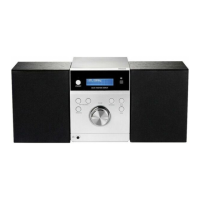
Functions:

  • CD Player: Plays audio CDs, supporting standard playback, pause, track selection, fast search, repeat modes (single track or all tracks), random play, and an intro play function (first 10 seconds of each track). It also features a program play function, allowing users to store and play up to 20 tracks in a preferred order.
  • DAB/FM Radio: Receives both Digital Audio Broadcasting (DAB) and FM radio signals. It includes features for automatic and manual station scanning, station presets (up to 30 for both DAB and FM bands), and various display modes to show information like DLS (scrolling text), signal strength, programme type, multiplex name/frequency, signal error rate, audio bit rate/encoding, time, and date for DAB. For FM, display modes include RDS Radiotext, programme type, and stereo/mono.
  • Bluetooth Connectivity: Allows wireless streaming of audio from mobile phones, tablets, or laptop computers. It supports pairing with Bluetooth devices, automatic re-connection, and playback control from the music system for compatible mobile devices.
  • AUX In: Provides a 3.5mm jack input on the front panel for connecting external audio players or computers, enabling playback through the system's speakers.
  • Headphone Jack: A 3.5mm headphone output socket on the front panel allows for private listening, automatically muting the speakers when headphones are connected.
  • Timer Functions:
    • ON/OFF Timer: Allows setting specific times for the system to switch on and off, with selectable source (DAB, FM, or DISC) and volume level.
    • Sleep Timer: Enables setting a period (90-10 minutes) after which the system will automatically switch to Standby, ideal for listening to music before sleep.
  • Equalisation (EQ): Offers various sound equalisation presets (OFF, ROCK, CLASSIC, POP, JAZZ) to tailor the audio output to personal taste.
  • Mute Function: Temporarily mutes the sound output.
  • System Reset: A factory reset option is available, which clears all preset station memories and timer settings, returning the unit to its default factory settings and initiating a DAB station scan.

Important Technical Specifications:

  • Supply Voltage: 100-240 V ~, 50/60 Hz
  • Tuning Range:
    • FM: 87.5-108 MHz
    • DAB: 174-239.2 MHz
  • Net Weight: 2.6 kg
  • Frequency Range (Bluetooth): 2.402GHz - 2.480GHz
  • Max. Transmitted Power (Bluetooth): 4dBm EIRP
  • Construction: Class II construction, double insulated, meaning it must not be connected to earth.
  • Laser Product: Class 1 laser product, indicating safe operation under normal use but caution against staring into the laser beam when the CD compartment is open and safety interlocks are defeated.

Usage Features:

  • Remote Control: A comprehensive remote control is included, powered by a CR2025 3V battery, which needs to be activated by removing a safety strip before first use. Battery replacement instructions are provided.
  • Speaker Connection: The system requires external speakers, which are connected via block terminals on the back of the unit using red and black wires. Clear instructions are given for proper wiring to ensure correct stereo imaging and prevent damage.
  • Aerial: An extendable aerial wire is provided for DAB and FM reception, which should be fully unwrapped and extended for optimal signal strength.
  • Auto Standby: The unit automatically enters Standby mode after 15 minutes of idle operation (or 4 hours in AUX mode) as an energy-saving feature.
  • Volume Control: Adjustable via the remote control (VOLUME+/- buttons) or a control knob on the front panel.
  • DAB & FM Settings Menus: Accessible via the MENU button, these menus allow for advanced configuration, including Full Scan, Manual Tune, DRC (Dynamic Range Compression), Prune (to remove unavailable stations), Scan Setting (for FM sensitivity), Audio Setting (Forced Mono/Stereo Allowed), and Software Version display.
  • Bluetooth Pairing: A straightforward process involving selecting Bluetooth mode, activating Bluetooth on the mobile device, searching for 'DMS1702', and pairing. A password (0000) may be required for older Bluetooth versions.
  • CD Loading: Discs are loaded into a top-loading compartment, ensuring the label is uppermost and the disc clicks into place on the turntable.

Maintenance Features:

  • Care and Cleaning: The unit should be unplugged from the mains power before any cleaning. The cabinet can be wiped with a lint-free duster, avoiding liquids or solvents. Loudspeaker grilles can be cleaned with a soft brush.
  • Battery Replacement: Instructions are provided for replacing the remote control battery, emphasizing the use of the specified CR2025 type and proper disposal of used batteries according to recycling regulations.
  • Troubleshooting: Basic troubleshooting advice is given for common issues such as poor radio reception (suggesting aerial repositioning and checking signal strength display) and no sound/low volume from an AUX source (checking volume levels).
  • Safety Information: Comprehensive safety warnings are provided, including precautions against electric shock, fire, exposure to rain or moisture, and proper placement and ventilation. It also highlights the importance of referring servicing to qualified personnel.
  • Electrical Information: Specifies mains operating voltage and identifies the mains plug as the means of disconnecting the appliance from the mains supply.
  • Compliance Statement: Declares compliance with Directive 2014/53/EU and provides a link to the full EU declaration of conformity.
  • Environmental Disposal: Information on the proper disposal of waste electrical products and batteries in the UK and ROI is included, encouraging recycling.
  • Warranty: The appliance is covered by a 12-month warranty from the date of purchase, with contact details for Tesco electrical helpline and a reminder to retain the purchase receipt.

Tesco DMS1702 Specifications

General IconGeneral
BrandTesco
ModelDMS1702
CategoryReceiver
LanguageEnglish