12
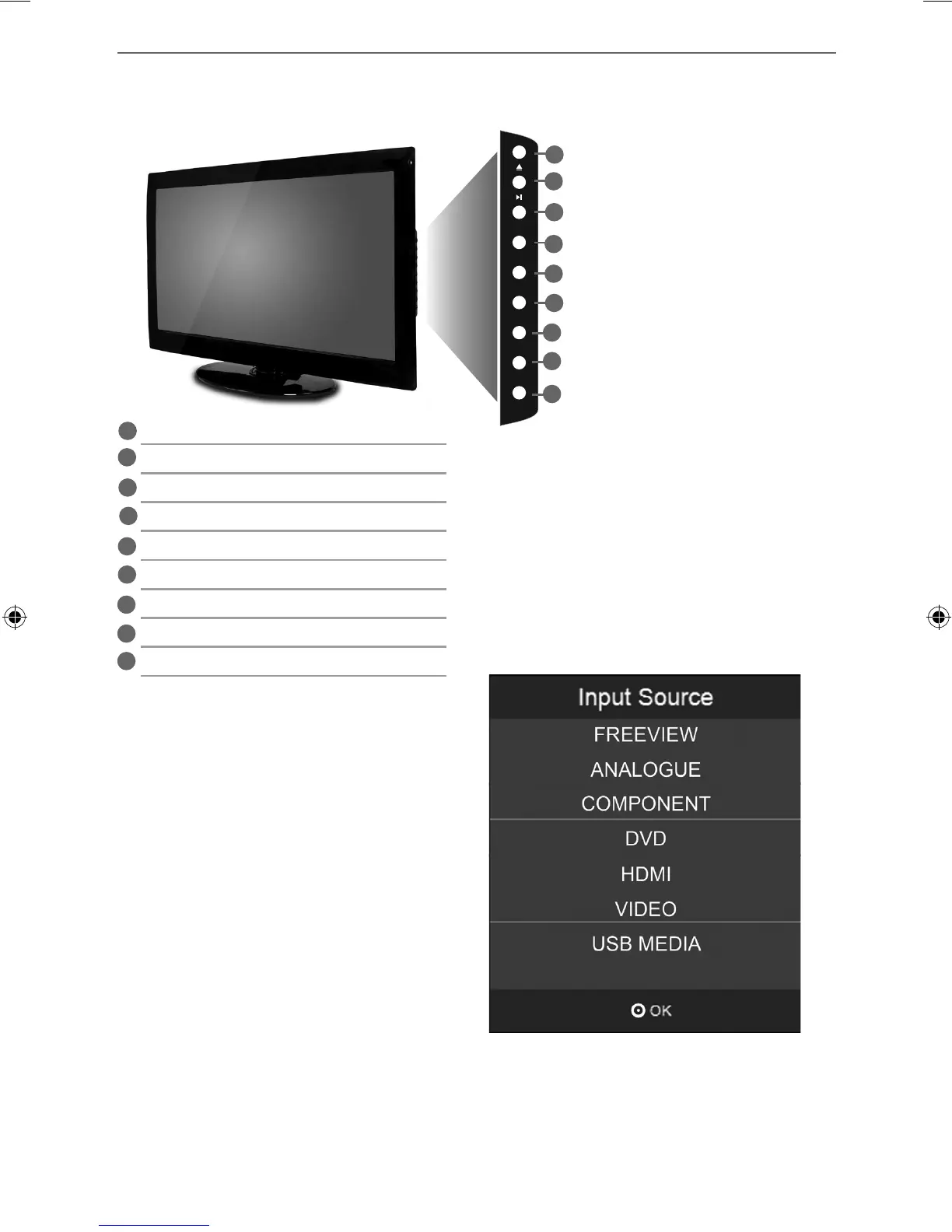
TV BUTTONS & SOURCE MENU
TV Buttons and Source Menu
VOL +
VOL -
CH+
MEN U
SOU RCE
STANDBY
CH-
Choosing Mode Input/Source
To switch between the different input/
connections.
A) Using the buttons on the remote control:
1) Press [SOURCE/ AV] - The source menu will
appear
2) Press [\/] or [/\] to select the input you
require.
3) Press [OK]
B) Using the buttons on the Television:
1) Press [SOURCE]
2) Scroll up / down using CH+/ CH- buttons to
the input/source you require
3) Press Vol+ to change input/source to the
one selected.
1
2
3
4
5
6
7
8
9
Eject Disc
Play/Pause Disc
Volume up and menu right
Volume down and menu left
Programme/Channel up and menu up
Programme/Channel down and menu down
Displays Menu/OSD
Displays the input source menu
Standby Power On/Off
1
2
3
4
5
6
7
8
9
User Guide - Technika - 19-229, 22-229.indd Sec1:12User Guide - Technika - 19-229, 22-229.indd Sec1:12 30-Jan-12 3:31:28 PM30-Jan-12 3:31:28 PM



 To Next Page